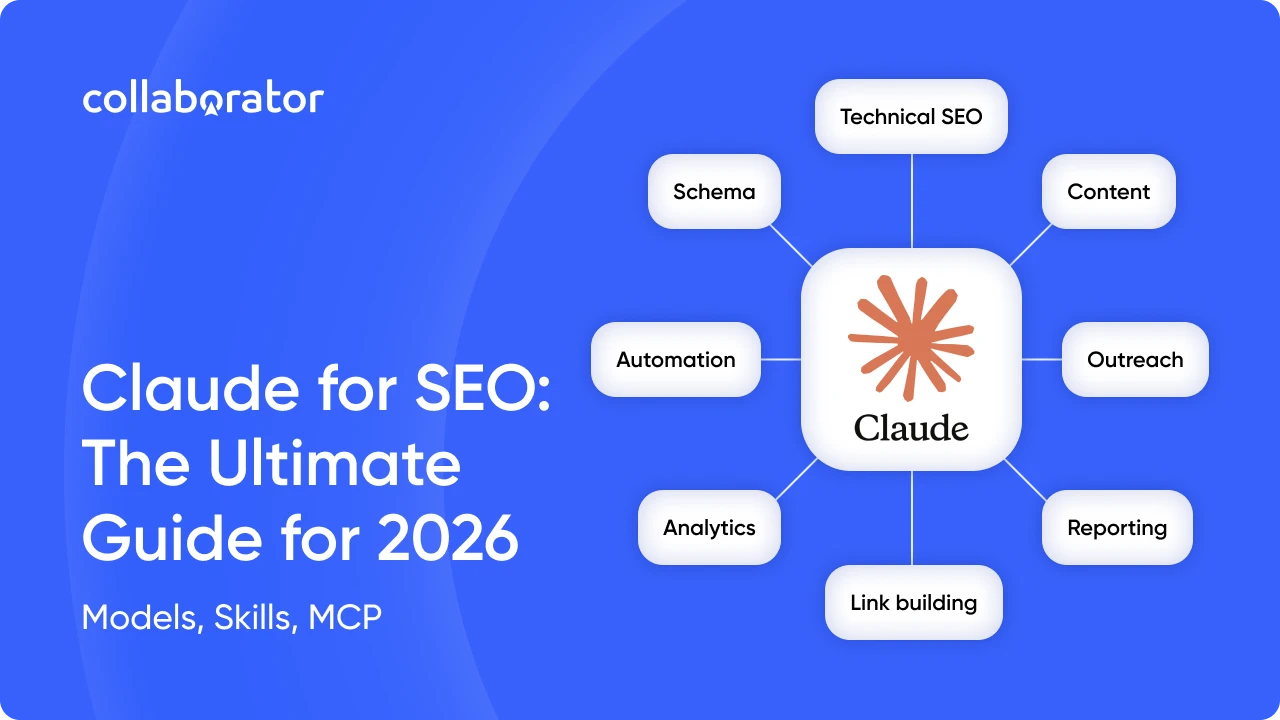
Claude AI for SEO is no longer just about writing meta tags. Weekly reports, content briefs, data analysis, technical audits, and link building planning — most of these tasks are still done manually, taking hours to complete. Over and over again.
Claude AI can automate much of this routine, evolving from a chatbot into an AI agent that works directly with Ahrefs, Google Search Console, GA4, and other services.
In this article, we'll discuss:
- what Claude is;
- how to use Claude for SEO;
- what MCP and Skills are in Claude;
- how to automate SEO with Claude;
- what mistakes to avoid.
In addition to answering these questions, we'll walk through practical examples of how SEO experts use Claude to automate their workflows.
Highlights
- Claude automates most repetitive SEO tasks and improves SEO productivity
- Claude Skills let you save SOPs and run them with a single prompt
- Claude MCP connects Claude to Ahrefs, Google Search Console (GSC), GA4, and other tools
- The best use cases include SEO reporting, link building, content briefs, and SEO audits
- Claude handles the routine, while the SEO specialist stays in control of the final review and decisions
What Is Claude AI and How to Use It for SEO
Claude AI is a large language model (LLM) developed by Anthropic that can perform a wide range of tasks, from content analysis and text generation to creating reports, generating images, writing code, and more.
You can get started for free and see whether Claude fits your SEO workflow even on the Free plan.
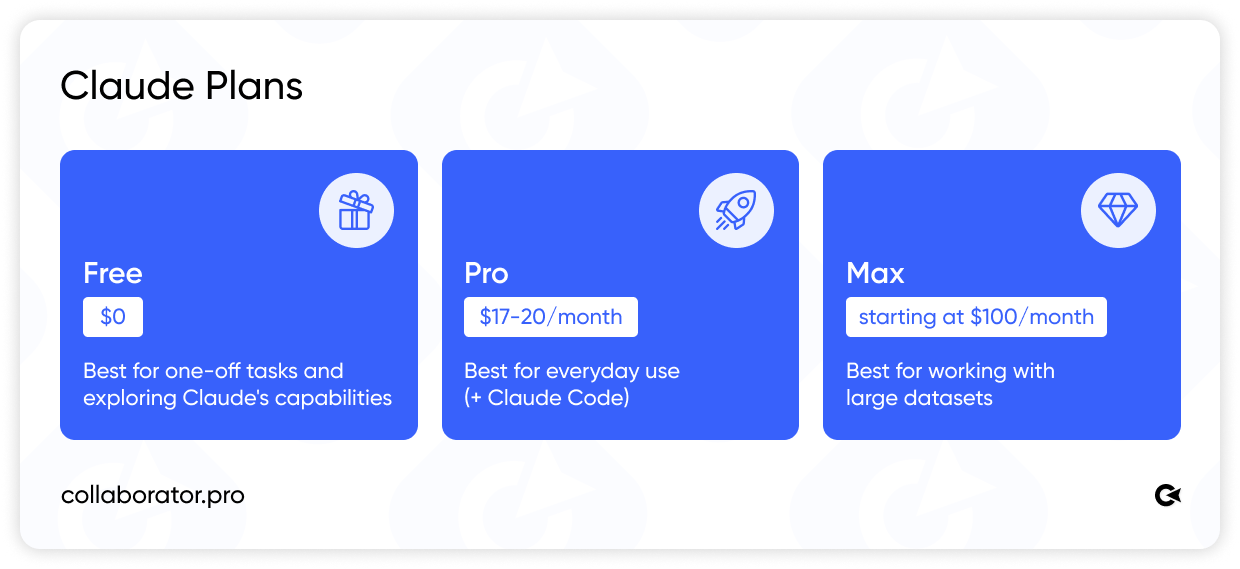
For most SEO experts, the Pro plan is the best place to start. It offers enough usage for everyday work and full access to Claude Code.
Benefits of Claude for SEO:
- Work with large datasets and documents;
- Analyze SEO reports, audits, and research findings;
- Write, review, and explain code;
- Generate structured insights based on the data you provide;
- Maintain context and reasoning throughout long, multi-step conversations.
That's why more and more professionals are choosing Claude for SEO automation instead of relying on multiple standalone tools. It supports the entire workflow, starting with analysis and ending with reporting.
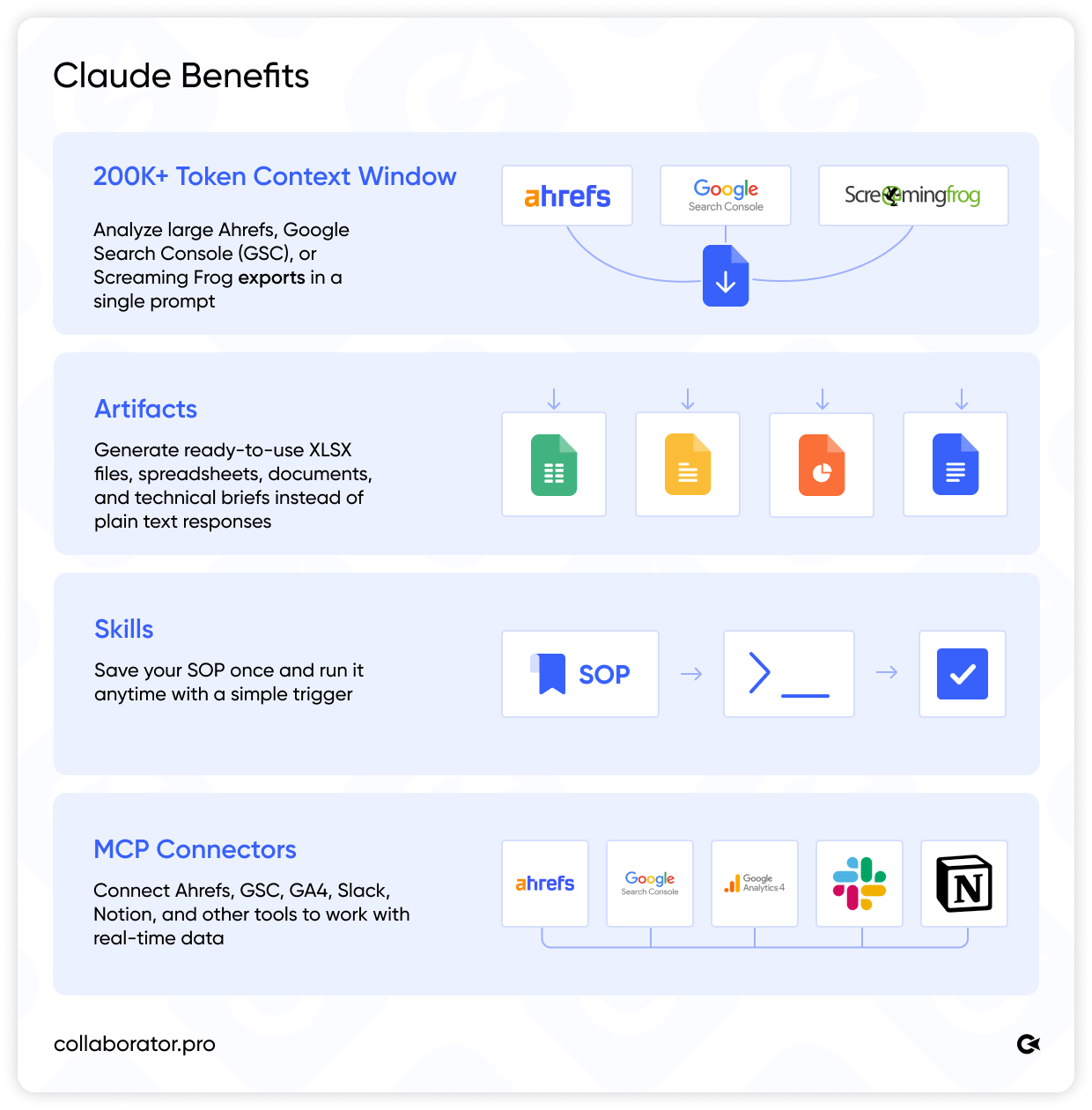
Even the basic version demonstrates how AI for SEO works in practice.
- 200K+ token context window. You can upload an entire Screaming Frog crawl, a year's worth of Ahrefs exports, or your complete Google Search Console dataset, and Claude will process it all in a single prompt.
- Artifacts. Claude can instantly generate ready-to-use XLSX, HTML, and other file formats. For SEO professionals, this means a link building plan or technical specification is produced in a format that's ready to use or share with your team.
- Claude Skills. Your SOP is saved once as an instruction, and Claude executes it whenever you invoke it with a trigger phrase. This makes it possible to automate routine tasks without having to configure the workflow again.
- MCP Connectors. With Model Context Protocol (MCP), Claude connects directly to Ahrefs, Google Search Console, GA4, Slack, and Notion to retrieve live data in real time. This is what sets Claude apart as an AI agent for SEO from a standard AI chatbot, where you have to manually upload exports.
Claude Architecture: Claude.ai, Claude Code, and Cowork
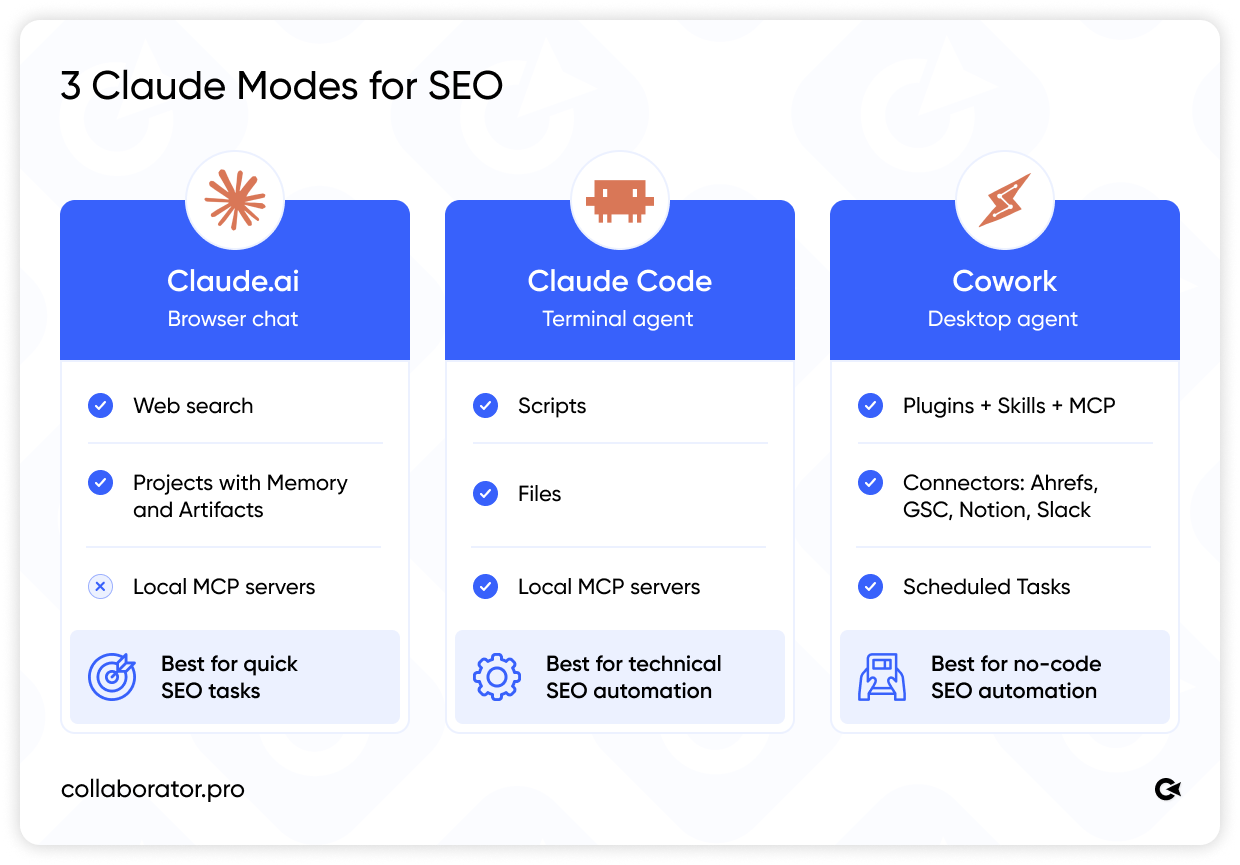
Claude is available in three interfaces, each with its own capabilities:
- Claude.ai is the standard browser-based chat. It includes built-in web search and can generate Artifacts. However, it can't access Ahrefs or Google Search Console (GSC) on its own—you'll need to copy and paste the data manually. In this version, MCP connectors work only if they're deployed as web services rather than running locally.
Best for: quick, one-off tasks like writing meta tags, reviewing content, or analyzing uploaded files. - Claude Code is an AI agent that runs in your terminal. It has direct access to your files, can execute scripts, and connect to local MCP servers. Despite the name, you don't need to be a developer. The terminal is simply a text-based interface. At the same time, it offers significantly more capabilities than the chat interface.
Best for: technical tasks such as log parsing, bulk URL operations, and SEO audit automation. - Cowork is Anthropic's desktop app. It supports Claude Skills, plugins, and MCP connectors for Ahrefs, Google Search Console, Notion, and Slack. Everything is controlled with natural language, so there's no need to use the command line.
Best for: no-code SEO automation, including Scheduled Tasks, daily digests, and link building plans. Most workflows take just 30–60 minutes to set up.
Tip: If you're setting up SEO automation for the first time, start with Cowork. You can create your first Claude Skill right from the chat. Just ask Claude: "Turn this process into a Skill."
Claude Skills for SEO: What They Are and How They Work
A Claude Skill is a saved Standard Operating Procedure (SOP) that contains the rules, templates, and logic needed to complete a specific task. Claude Skills work in Claude Code (terminal and desktop app) and are triggered with a simple prompt.
Unlike a regular prompt, which describes a single task and disappears once it's completed, a Skill is permanently saved within your project and runs the same way every time.
|
Regular Prompt |
Claude Skill |
|---|---|
| Describes a single task | Contains a complete SOP with rules and priorities |
| Exists only within a single chat | Saved permanently within your project |
| Requires you to explain the context every time | Runs with a trigger phrase |
| Can't access external data sources | Automatically pulls data from MCP-connected services |
When you use a trigger phrase, Claude loads the saved SOP, connects to the required MCP data sources, and completes the entire workflow, from start to finish, without asking you to explain the context, rules, or priorities again.
These are just some of the SEO workflows you can automate with Claude Skills today:
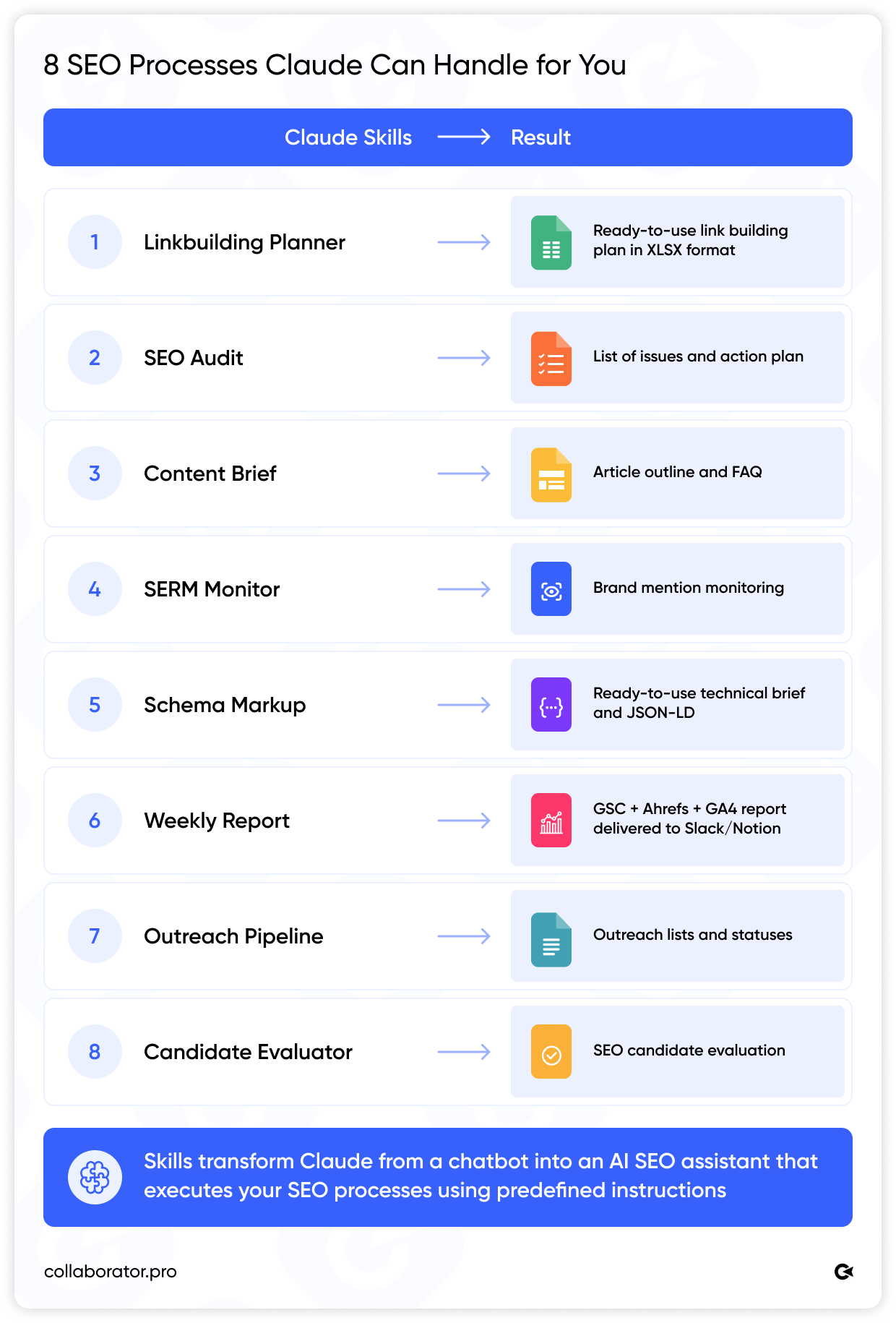
Tip: Avoid installing third-party Skills without reviewing their code, as they may introduce prompt injection risks. In most cases, you can build a custom Claude Skill for your own workflow in about 30 minutes using Claude itself.
What Is MCP and How to Connect It to Claude
Model Context Protocol (MCP) is an open standard developed by Anthropic that allows Claude to connect directly to external services through ready-made MCP servers, access live data in real time, and work with it without manually exporting CSV files.
Claude MCP is what transforms Claude into a true AI agent for SEO, rather than just another AI chatbot.
Many popular services already offer ready-to-use MCP servers. Official Claude Connectors are available for Ahrefs, Slack, Notion, and Linear.
To integrate Collaborator into your SEO workflow, learn more about the Collaborator API. You can connect it to your CRM, financial systems, or custom scripts.
How to Connect an MCP Server in Claude Cowork
- Open Cowork → Settings → Connectors.
- For official connectors, click Connect and complete the OAuth authorization process.
- To connect your own or a third-party MCP server, enter the local server path or the URL if it's deployed as a web service.
- Check the connection. If the MCP server is configured correctly, Claude will return a response without errors.
For detailed instructions on connecting Ahrefs to Claude, see the setup guides for Claude Desktop, Claude Mobile, and Claude Code.
If you're building your own MCP server, start by asking Claude Code to create it. It will generate the required files and explain how to run them.
Tip: There's currently no official MCP connector for Google Search Console, but it's easy to build one yourself. Simply ask Claude Code to create an MCP server using the Google Search Console API (GSC API). The setup takes a few hours, and once it's complete, you'll have a fully functional connector.
AI for SEO: 7 SEO Automation Use Cases with Claude AI
AI for SEO is best demonstrated through practical use cases.
Claude for SEO is particularly effective for tasks such as:
- writing long-form content;
- performing technical SEO audits using large HTML files;
- identifying content gaps compared to competitors;
- auditing internal links across an entire website;
- generating Schema markup in JSON-LD format;
- clustering keywords and mapping search intent;
- evaluating EEAT and AI Visibility / GEO (Generative Engine Optimization).
The illustration below shows what a typical workweek looks like once these workflows are fully automated.
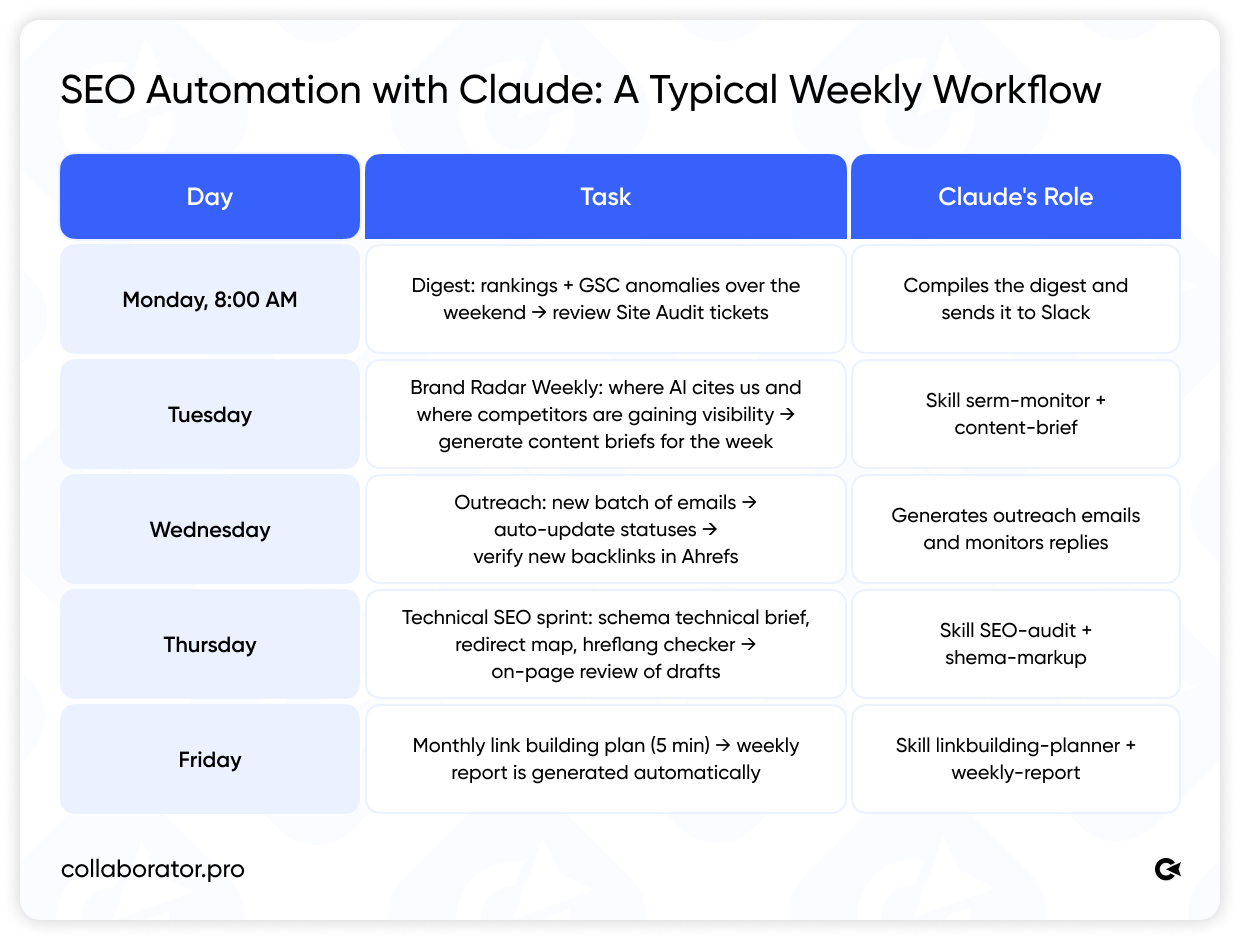
Next, let's look at seven SEO automation use cases with Claude.
Planning a Link Building Campaign
A typical monthly link building plan takes an SEO specialist 4–6 hours to prepare. The process involves exporting data from Google Search Console (GSC), identifying priority pages, categorizing them by link type, defining anchor text, and putting everything into a spreadsheet for the team.
The linkbuilding-planner Skill cuts that process down to just five minutes. That's AI-powered link building automation in action.
How It Works
The Skill stores the same rules you normally use when creating a link building plan, including branded anchors, priority pages, and forum outreach lists.
When you run it, Claude:
- analyzes Google Search Console (GSC) data through MCP to identify pages ranking in positions 4–15 with the greatest link building potential;
- pulls the current Domain Rating (DR) of websites in your outreach list from Ahrefs and compares it with competitors in the same keyword cluster;
- categorizes pages into three link building types: guest posts, crowd marketing, and SERM;
- selects anchor text based on your predefined rules and existing backlink profile;
- generates a ready-to-use XLSX spreadsheet for your team.
Results
Instead of spending several hours on manual work, the SEO specialist gets a ready-to-use document that only needs a quick manual review. In most cases, the output requires only minor adjustments.
To avoid searching for donor websites manually, use Collaborator Link Assistant, our free Chrome extension. It lets you instantly see whether a website is available in Collaborator’s catalog along with their placement prices directly in Google Search and Ahrefs.
SERP-Based Content Briefs
A content brief created on instinct is a gamble. A content brief based on the actual Google Top 10 gives you a competitive advantage. If you're looking to automate content planning, the content-brief Skill is exactly what you need.
How It Works
When you run it, Claude:
- retrieves the Google Top 10 results for your target keyword using web search;
- analyzes each page's structure, including H1, H2, H3, content length, and content format;
- identifies the search intent as informational, commercial, or navigational;
- highlights the content sections shared by competing pages;
- collects FAQs from the People Also Ask section and includes answers used by competitors;
- builds a list of entities—terms and concepts that should be covered to fully address the topic;
- recommends the most appropriate Schema markup based on the search intent, such as Article, FAQPage, or HowTo;
- generates an on-page SEO checklist covering the title tag, meta tags, alt text, and internal linking.
Results
The copywriter receives a detailed content brief with a ready-to-use article structure, recommended content sections, and key questions to answer.
Tip: A separate on-page-review Skill checks your draft before publication and generates a report such as "3 critical · 2 minor", along with specific before/after recommendations for each issue.
Traffic Drop Analysis
Traffic analysis is usually a complex process. An SEO specialist has to open Google Search Console (GSC), filter pages, compare the data with Ahrefs, review the SERP manually, and come up with a hypothesis. For websites with 50+ affected pages, that can take 3–5 hours, and the outcome often depends on the specialist's experience and attention to detail. With Claude, you can automate and significantly simplify the process.
How It Works
When you run it, Claude pulls data from three sources simultaneously:
- Google Search Console (GSC) via MCP tracks clicks and impressions by page and query, week over week and year over year. Claude identifies exactly where the traffic started to decline and how significant the drop is.
- Ahrefs via MCP analyzes ranking trends across keyword clusters to determine whether the issue is caused by ranking losses or by a lower CTR while rankings remain unchanged.
- SERP overview identifies what replaced your pages in the search results, whether it's a direct competitor, an AI Overview, or a new SERP feature such as a featured snippet, People Also Ask, or a video carousel.
Once the data is collected, Claude looks for patterns across all three sources, identifies the most likely causes, and suggests possible solutions.
Results
Instead of manually comparing dozens of spreadsheets, you get a structured report with ready-to-review findings.
Tip: You can also set up a Scheduled Task. Claude can compare the previous week's performance with the four-week average and send Slack alerts only when it detects anomalies. For example, pages with a 20%+ drop in clicks, keywords that have fallen out of the top 10, new competitors appearing in the SERP, or unusual CTR changes for specific rankings.
Technical SEO and Audits
Technical SEO automation is one of the easiest ways to eliminate repetitive work. Claude handles structured technical tasks consistently, delivers predictable results, and frees up valuable time for SEO specialists.
How It Works
Claude can automate the following tasks:
- Schema markup generation. It analyzes page templates, prepares technical requirements for developers, and generates ready-to-use JSON-LD for each schema type, including Article, FAQPage, Product, and BreadcrumbList.
- Redirect maps for site migrations. Upload your old and new sitemaps, and Claude matches URLs, identifies differences in slugs and site structure, recommends the best URL mapping, and generates a ready-to-use redirect configuration. For migrations involving 500+ URLs, this can save an entire working day.
- Site Audit. Claude pulls issues from Ahrefs Site Audit through MCP, groups them by severity and pattern, filters out false positives, and creates developer tickets with all the necessary context.
Results
Routine technical SEO tasks that normally take hours can be completed in minutes, allowing SEO specialists to focus on reviewing the results and making strategic decisions.
Task Management
Client and team meetings rarely end with a clear list of action items. Some people take notes, others don't. And by the next day, half of the decisions have already been forgotten. Claude solves this in three simple steps.
How It Works
- An AI meeting assistant records the meeting. Connect an AI meeting assistant such as Fireflies, Otter, Grain, or any similar tool to your meeting. It records and transcribes the conversation automatically. You only need to set it up once.
- An MCP-powered AI meeting assistant creates the tasks. A Claude Skill knows how to extract action items from the transcript: where to retrieve the input (the MCP-connected meeting assistant), which task format your team uses, and where each task should be sent next.
- An MCP-connected task tracker creates tasks on your board. Claude compares the action items extracted from the meeting with the tasks that already exist on your board. Only after that does it create new ones, preventing duplicates.
Results
After every meeting, new tasks automatically appear in your task tracker with the correct descriptions, assignees, and priorities.
Automated Reporting
Weekly SEO reporting is one of the most time-consuming and least valuable parts of an SEO specialist's routine. You collect data from multiple sources, format spreadsheets, and write summaries. The weekly-report Skill does all of that for you.
For many SEO teams, the weekly-report Skill is one of the most practical examples of AI-powered SEO automation.
How It Works
Claude collects data from connected MCP sources:
- Google Search Console (GSC) — clicks, impressions, CTR, and rankings, week over week and year over year;
- Ahrefs — new and lost backlinks, referring domains, and visibility across keyword clusters;
- Google Analytics 4 (GA4) — organic sessions, conversions, and top landing pages;
- Brand Radar — brand mentions in AI-generated answers and Share of Voice compared to competitors.
Results
The output is a ready-to-use report in Notion and a short summary in Slack with the key metrics, trend overview, three insights, and three priorities. A final review takes about five minutes.
Building Your Own SEO Tools
This is probably the most overlooked way to use Claude. Many SEO teams spend years without tools tailored to their specific workflows simply because those tools don't exist or they're too expensive. Claude Code lets you build them yourself.
How It Works
Describe what you need in plain English, and Claude writes the code, explains each step, and fixes issues through the conversation.
Claude can build:
- Chrome extensions;
- internal SEO tools;
- web scrapers;
- report generators;
- small web applications.
Results
Even without programming experience, you can quickly build specialized tools tailored to your own SEO workflows.
Tip: AI can automate your SEO workflows, but the final review should always be done by an SEO specialist. Strategy, priorities, and final decisions should always remain yours.
How to Automate SEO with Claude: A Step-by-Step Guide
If you're wondering how to use Claude for SEO, you can get started in five simple steps.
- Connect Your MCP Servers
Open Cowork → Settings → Connectors and connect Ahrefs, Slack, and Google Sheets. For Google Search Console (GSC), either ask Claude Code to build an MCP server using the GSC API or use a community-built MCP server. - Create Your First Claude Skill
Start with your most repetitive task, such as a weekly SEO report or a content brief. Describe the workflow in the chat as if you were writing instructions for a junior SEO specialist, then ask Claude: "Turn this into a Skill." Claude will ask a few follow-up questions and generate the Skill structure for you. - Set Up Your CLAUDE.md
Think of CLAUDE.md as your project's knowledge base. Add your keyword clusters, branded anchors, KPIs, competitor names, and website structure. Claude will automatically use this information across your conversations and SEO workflows. - Set Up a Scheduled Task
A daily digest is one of the quickest ways to experience the practical value of an AI assistant. Open Cowork → Scheduled Tasks → New Task, choose when you'd like it to run, and add a detailed instruction such as: "Pull yesterday's data from Google Search Console and Ahrefs, identify any anomalies, and send a summary to Slack." The next morning, you'll find a report waiting in Slack with your rankings, GSC anomalies, and new backlinks. Claude prepares it automatically while you're having your morning coffee. - Don't Automate Everything at Once
Perfect one workflow before moving on to the next. It's easy to fall into the trap of overengineering and try to automate everything from day one. But complex AI agents running on a server are more expensive, harder to maintain, and often unnecessary.
Common Claude Mistakes and Limitations
Claude is a powerful tool, but it's important to understand its limitations before you build your SEO automation workflows.
- Don't rely on numbers or factual claims unless you can verify the source. Ask Claude to double-check its information, and always have a human review of the content before publishing.
- Don't paste passwords or API keys into the chat. Use MCP authentication and .env files instead. If you're new to SEO automation, this should be one of the first things you learn.
- NDA-protected data. Anthropic states that it doesn't use API data to train its models. However, before uploading a client's SEO strategy or other confidential documents, make sure to review the Data Processing Agreement (DPA).
- The context window isn't unlimited. A 200K-token context window is impressive, but long workflows can still lose track of the beginning of a conversation. For complex SEO workflows, split your automation into separate Claude Skills and Projects instead of relying on a single chat.
- Usage limits. Claude has five-hour and weekly usage limits. Don't use Opus for tasks that Sonnet can handle just as well — you'll burn through your limits much faster.
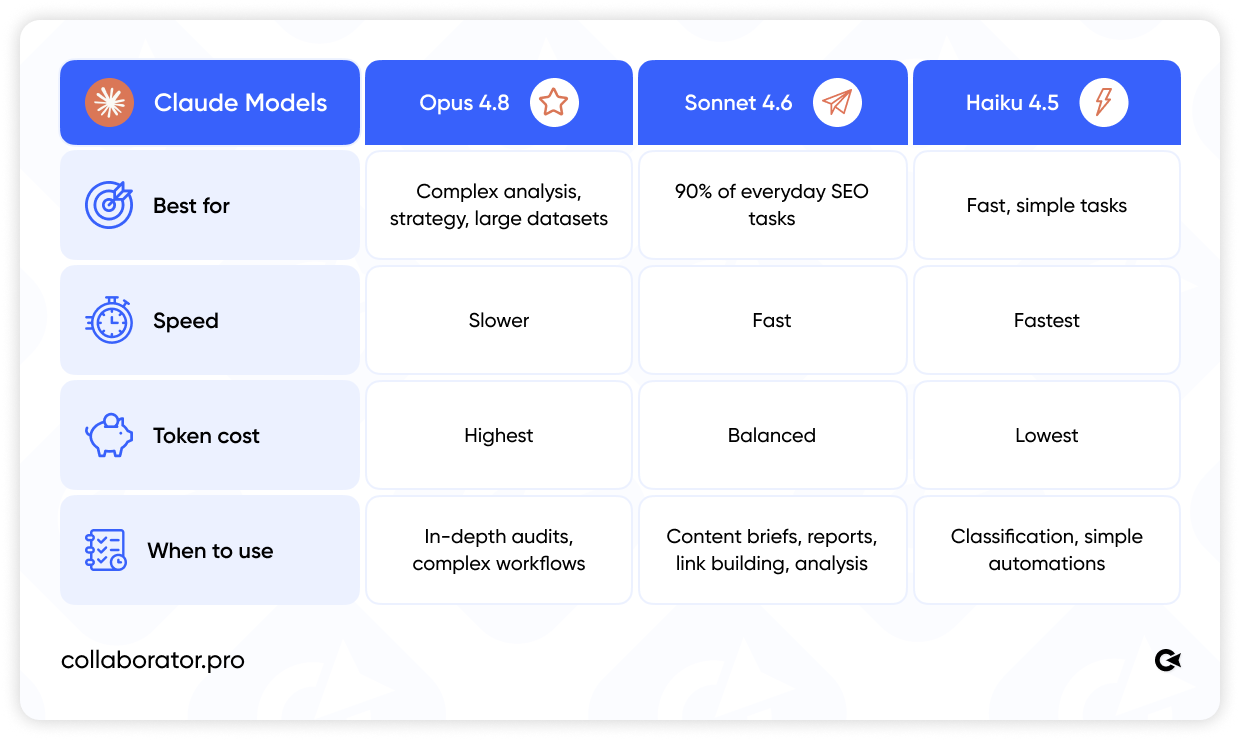
Claude is a powerful tool for SEO automation and content workflows, but its effectiveness depends on how you structure your workflows.
The biggest risks don't come from Claude itself but from unrealistic expectations. Whether it's fact-checking, data security, context management, or choosing the right model, getting the best results depends on using Claude the right way.
Claude AI for SEO in 2026: What's Already Working
Claude AI for SEO is not just an AI assistant for simple tasks, but a full-fledged AI agent for SEO.
The fastest way to get started is simple: connect your MCP servers, create one Claude Skill for your most time-consuming workflow, and set up a daily digest.
If you're still building your SEO processes, start with the fundamentals: develop a link building strategy, set up Google Search Console, and perform a technical SEO audit.
Claude will enhance every one of these workflows by helping you analyze data faster, identify patterns, and automate repetitive SEO tasks.
FAQ
Can You Use Claude AI for SEO for Free?
Claude offers a free plan with basic functionality. However, if you want to take full advantage of SEO automation with Claude Skills and MCP connectors, you'll need a paid Pro or Team subscription, which starts at $20–100 per user per month, depending on usage limits.
For SEO teams, the Team plan is usually the best choice. If it saves your team 10–20 hours per week, it can pay for itself within the first week.
What Is MCP in Claude and Why Do SEO Professionals Need It?
Model Context Protocol (MCP) is the standard that allows Claude to connect to external tools such as Ahrefs, Google Search Console, Google Analytics 4 (GA4), Slack, and Notion.
Without MCP, you have to copy data manually. With MCP, Claude retrieves live data on its own and uses it to build reports, plans, and SEO audits.
What Are Claude Skills and How Do You Use Them for SEO?
Claude Skills are saved Standard Operating Procedures (SOPs) that run when triggered by a prompt.
For example, the weekly-report Skill automatically collects data from Google Search Console, Ahrefs, and GA4, then generates a ready-to-use report in Notion.
Set it up once, and it runs every week without any additional configuration.
How Do You Connect Google Search Console to Claude?
Google doesn't currently offer an official MCP connector for Google Search Console.
The easiest option is to ask Claude Code to build an MCP server using the Google Search Console API (GSC API).
The setup takes a few hours, after which Claude and Google Search Console work together as a single system.
Claude vs. ChatGPT for SEO: Which One Is Better?
For SEO automation based on live data, Claude has several advantages: a larger 200K-token context window, support for Claude Skills and MCP connectors, and more reliable performance when working with large files such as Screaming Frog crawls, Ahrefs reports, and Google Search Console exports.
ChatGPT is better suited to quick, one-off tasks.
Is It Safe to Upload Client Data to Claude?
Anthropic states that it doesn't use API data to train its models. However, before uploading NDA-protected materials, be sure to review the Data Processing Agreement (DPA).
Always use MCP authentication and .env files to manage API keys and passwords and never paste them directly into the chat.
Will AI Replace SEO Specialists?
No. AI for SEO is excellent at automating repetitive tasks, including data collection, SEO reporting, technical audits, and content briefs. But strategy, prioritization, anomaly analysis, and final decision-making still depend on the SEO specialist.
Claude doesn't replace your SEO team but helps your team work more efficiently.
This article is based on the webinar "Claude AI for SEO: From Reports to Custom Tools," presented by Anton Krokhmal, SEO Team Lead at Liven (June 2026).
Related reading
- • +1469% Traffic in 2 Years: E-Commerce SEO Case Study by WEDEX
- • JavaScript SEO – How to Optimize SPA Sites for Search Engines and AI
- • Ecommerce Link Building: 7 Proven Tactics, Strategy and Costs in 2026
- • What Is Grounding in AI and How to Use It for SEO
- • Which Website Authority Metric Can You Trust: DR, DA, TF, CF, AS, or SDR. A Unique Study of 40,000 Websites