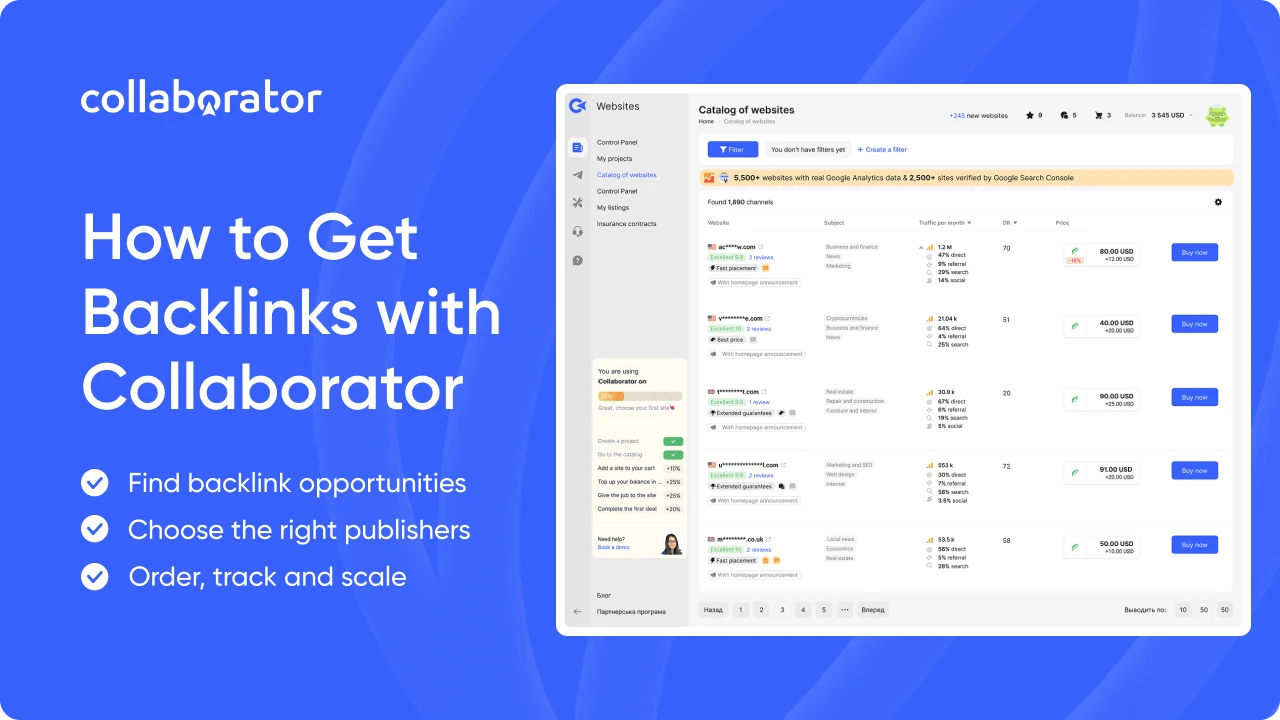
Collaborator gives link builders and SEOs everything they need to find and manage backlink placements in one place.
In this guide, we’ll take you through the complete process, from choosing the content behind your links to tracking live placements. By the end, you’ll know how to:
- Find backlink opportunities with the Free Backlink Checker and automatic competitor analysis, then see which referring domains are available for placement in Collaborator
- Evaluate publishers based on topical relevance and 40+ SEO and audience metrics, including GA4, GSC, and Ahrefs data
- Order a guest post and manage the placement through your Collaborator account
- Verify the live backlink with Link Assistant and follow your campaign through project reports
Let’s start with the content for your link building strategy.
Plan the Content Behind Your Links
Before you look for publishers, create a simple content marketing strategy for your link-building campaign.
Choose the Content Types You'll Distribute
We recommend building your placements around five formats:
|
Content Type |
What It Covers |
What It Does for Your Brand |
Best For |
| Company overview + reviews | Who you are, what you offer, and what customers say about you | Builds trust and supports branded searches | New brands, local businesses, companies entering a new market |
| Case studies | One client's problem, your approach, and measurable results | Gives proof with numbers | B2B, SaaS, agencies |
| Listicles | Your brand featured in “best X” or “top X for Y” roundups | Puts your brand where buyers compare options | Competitive categories with many alternatives |
| Interviews with owners | The founder's story, expertise, and views on the industry | Builds personal and brand authority | Expert-led brands, fintech, health, professional services |
| Product reviews | A hands-on walkthrough of features, pricing, pros, and cons | Supports the purchase decision | Ecommerce, SaaS, apps |
Pro tip: Rotate formats during a campaign. Interviews and company overviews suit branded anchors, and listicles and reviews leave room for commercial ones. Mixing formats keeps your link profile varied and gives each publisher a piece that fits its audience.
Make Every Article Original
AI tools can help with outlines and first drafts. However, an untouched AI draft often repeats ideas already covered elsewhere. It also lacks the first-hand details that make an article useful and credible.
So before you send a text to a publisher, add something only your company can provide:
- Product screenshots or short screen recordings
- Photos of your team, office, products, or events
- Custom graphics, charts, or infographics
- Quotes from founders, clients, or in-house experts
- Your own numbers, such as clients served, campaign results, or survey data
Even one or two of these gives the article something no generic draft has.
1. Find Backlink Opportunities
With your content plan ready, it’s time to find publishers. The right starting point depends on how much research you have already done.
|
If You Want To… |
Start With… |
| Check one competitor quickly | Free Backlink Checker |
| Research several competitors over time | Automatic competitor analysis |
| Work with prospects collected elsewhere | My Lists import |
Quick note: For ongoing campaigns, we recommend setting up a project in Collaborator. You can sign up for free and add your website, target pages, and anchors to keep your research and future placements connected.
Use the Free Backlink Checker
The Free Backlink Checker is the quickest way to explore a competitor’s link profile. Enter a domain or individual URL, and the tool will find up to 50 of its strongest backlinks and 50 of its newest ones. For each backlink, you’ll see:
- The referring page
- The anchor text
- The dofollow or nofollow attribute
- When the link was first found
- When it was last checked
- Domain and page authority metrics
Collaborator also highlights referring domains available in its marketplace, so you can immediately see which publishers accept placements.
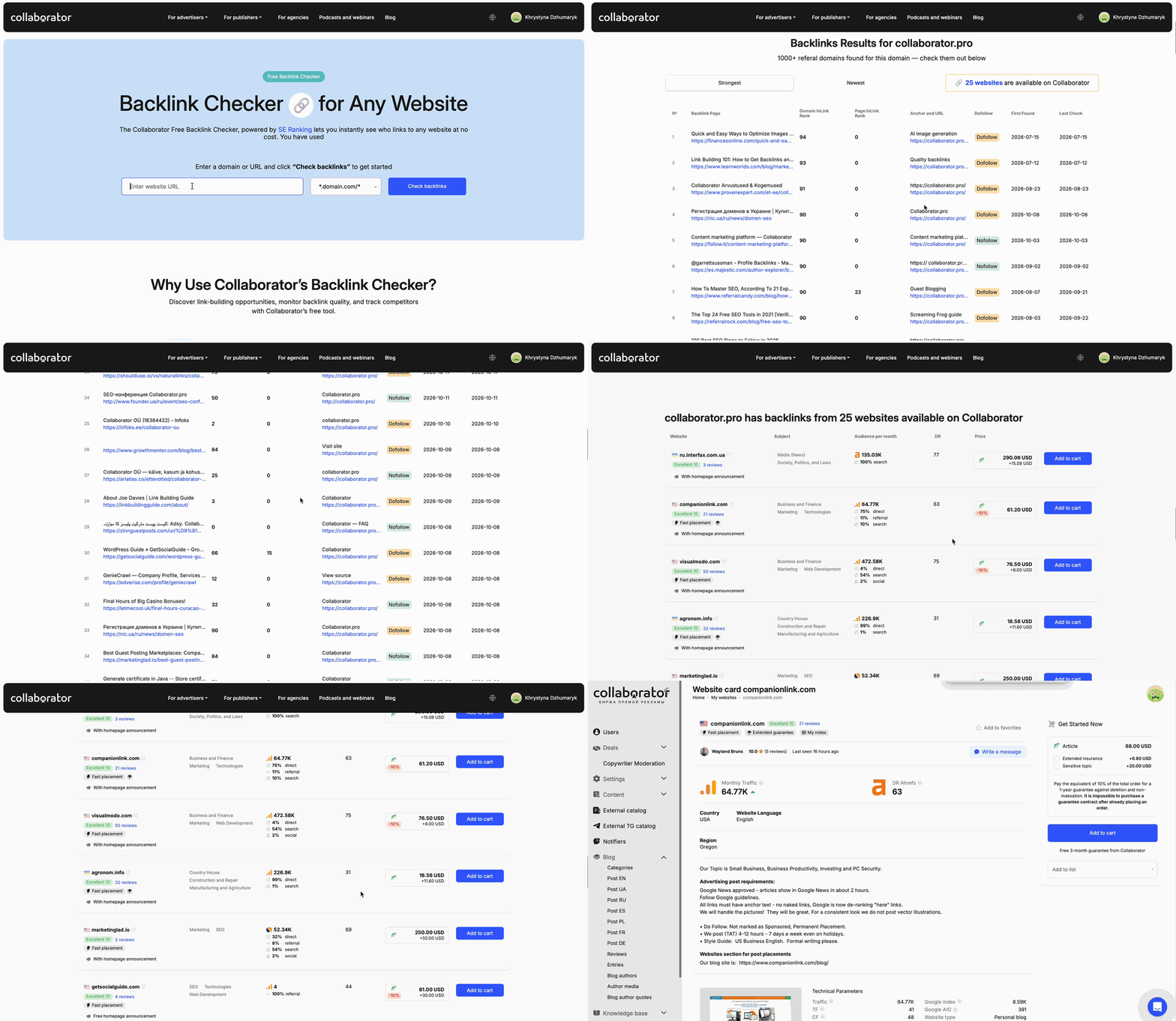
Example: A dental clinic in Austin could check a competing clinic’s domain and discover local news sites, health blogs, or business publications linking to it. If any of those publishers are in the Collaborator catalog, the clinic can immediately evaluate them for its own campaign.
Pro tip: Check the full domain when researching a competitor’s overall strategy. For a specific service, enter the corresponding page instead. A competitor’s dental implants page, for example, should reveal more focused opportunities than its homepage.
Analyze Your Competitors
A quick backlink check works well for initial research. However, an ongoing campaign usually needs a broader view.
Collaborator’s automatic competitor analysis handles that research inside your project.
Open the Competitors tab and enter a competitor’s domain. Collaborator uses public Majestic data to collect up to 2,000 referring domains for each competitor. You can begin with five competitors and expand the list to ten during the following 30 days.
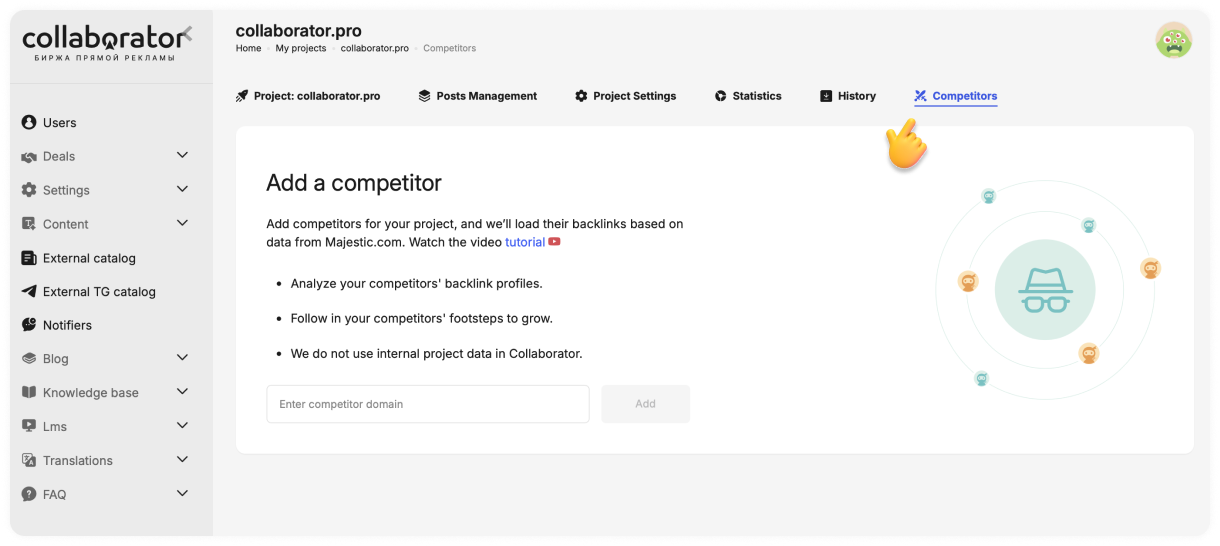
The platform then checks those referring domains against its marketplace and creates a filtered list of publishers where your competitors have already earned backlinks.
In the example below, two competitors produced 213 websites available in Collaborator.
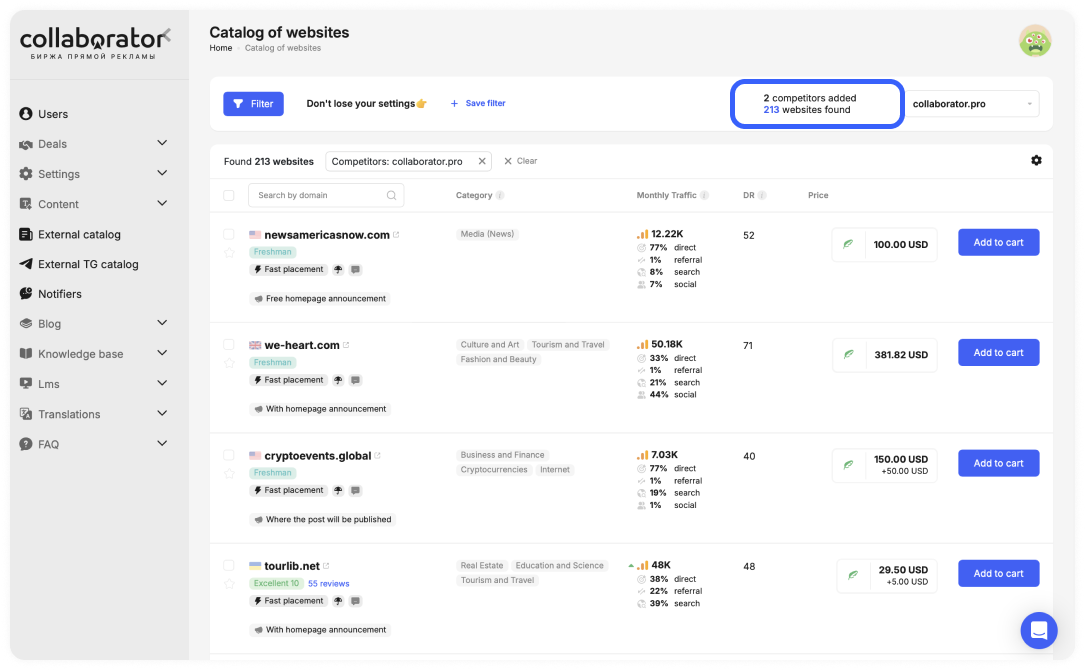
The results already include the information needed for an initial comparison:
- Website category
- Monthly traffic
- Traffic sources
- Domain Rating
- Placement price
- Publication conditions
From here, you can refine the selection with the catalog filters, open individual publisher pages, or add suitable placements to your cart. This moves competitor research directly into publisher selection.
Pro tip: If you are unsure which competitors to analyze, start with the Organic competitors report in Ahrefs or a similar SEO tool. Look beyond direct business rivals and include websites competing for the same search topics.
The walkthrough below shows the complete process. It covers finding competitors in Ahrefs, adding their domains to Collaborator, reviewing marketplace matches, importing a CSV, and receiving monthly updates about newly discovered opportunities.
Import Your Existing List
Perhaps you have already collected prospects in Ahrefs, Semrush, Majestic, Google, or an outreach spreadsheet. In that case, upload them to My Lists and check which domains are available in Collaborator.
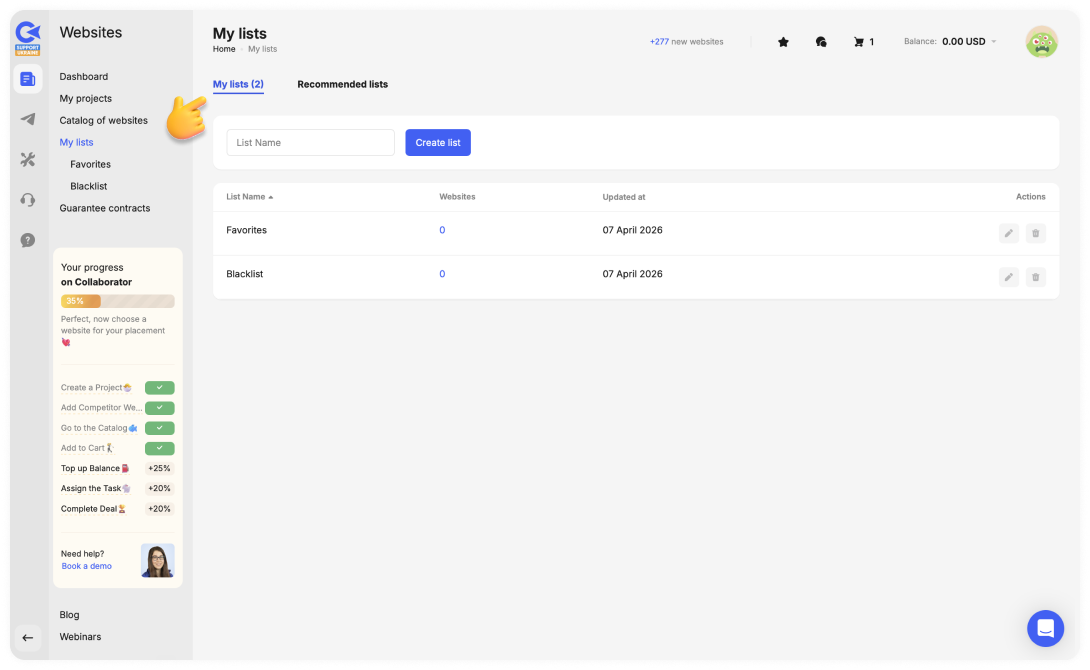
The platform accepts CSV and TXT files containing up to 1,000 domains. After the import, the list separates them into two useful groups:
|
Result |
What You Can Do Next |
| Available in Collaborator | Open the publisher page and review its placement conditions |
| Not currently available | Keep the domain in your list and wait for a catalog match |
Collaborator tracks the second group as well. If a saved website later appears in the catalog, you can receive a notification instead of checking it manually.
This is especially helpful for agencies and in-house SEO teams with existing prospect databases. Their previous research remains useful, while Collaborator handles the marketplace matching.
2. Evaluate the Right Publishers
At this point, you should have a list of potential publishers. Now compare them based on relevance, performance, and practical fit.
- Relevance: Does this website regularly cover my topic?
- Performance: Does it have a real and stable audience?
- Practical fit: Do the placement terms, reviews, and price make sense?
Compare Traffic and Authority Data
After checking topical relevance, review the audience and SEO metrics for each website. In Collaborator, you can see a detailed website card with its available traffic, search, and authority data in one view.
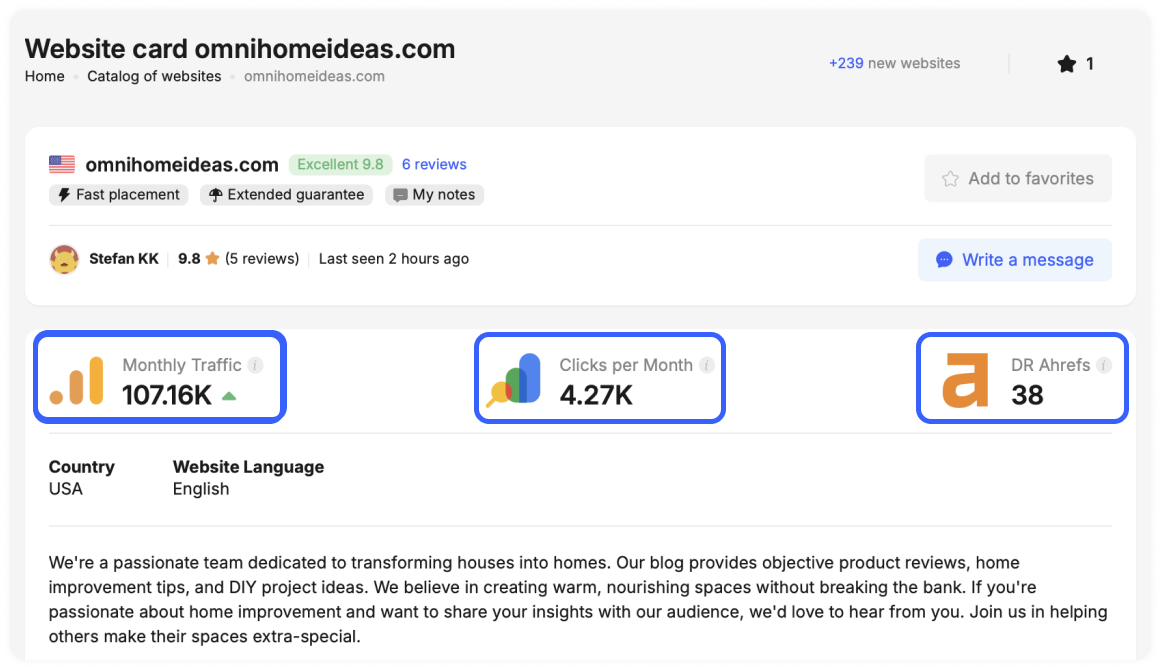
Together, these signals help you estimate what a placement could offer: exposure to real readers, a backlink from a website with stable search visibility, and enough value to justify the price.
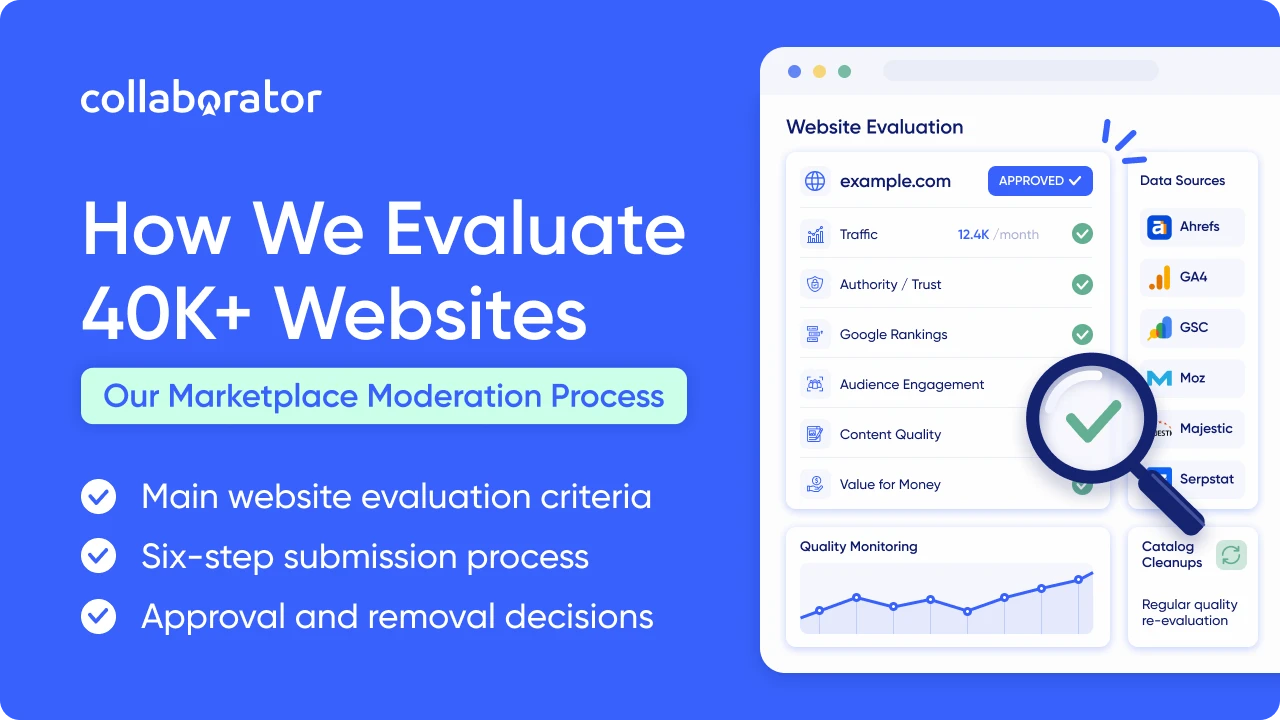
Collaborator draws this information from several sources:
|
Data Source |
What It Helps You Understand |
| GA4 | Actual traffic, traffic sources, audience geography, and recent performance |
| Google Search Console | Search clicks and impressions reported by the website |
| Ahrefs | Domain Rating, estimated organic traffic, and ranking keywords |
| Majestic, Moz, and Serpstat | Additional authority and link-profile signals |
GA4 and GSC data are particularly valuable because they come directly from the publisher’s connected accounts. Ahrefs and similar tools provide independent estimates that help you view the website from another angle.
The figures will not always match. In fact, our analysis of more than 7,500 websites found meaningful differences between GA4, GSC, and Ahrefs data. That is why a pattern across several sources tells you more than a single impressive number.
A useful evaluation order: relevance first, followed by verified audience data, traffic stability, authority, placement conditions, and price.
Build Your Shortlist
After comparing publishers, save the strongest options to Favorites so you can return to them when you are ready to order. If you manage several campaigns or clients, use My Lists to keep suitable websites organized.
You can also leave a private note on each website card. Use it to record why the publisher fits your campaign, which page you want to promote, or what you need to confirm before ordering.
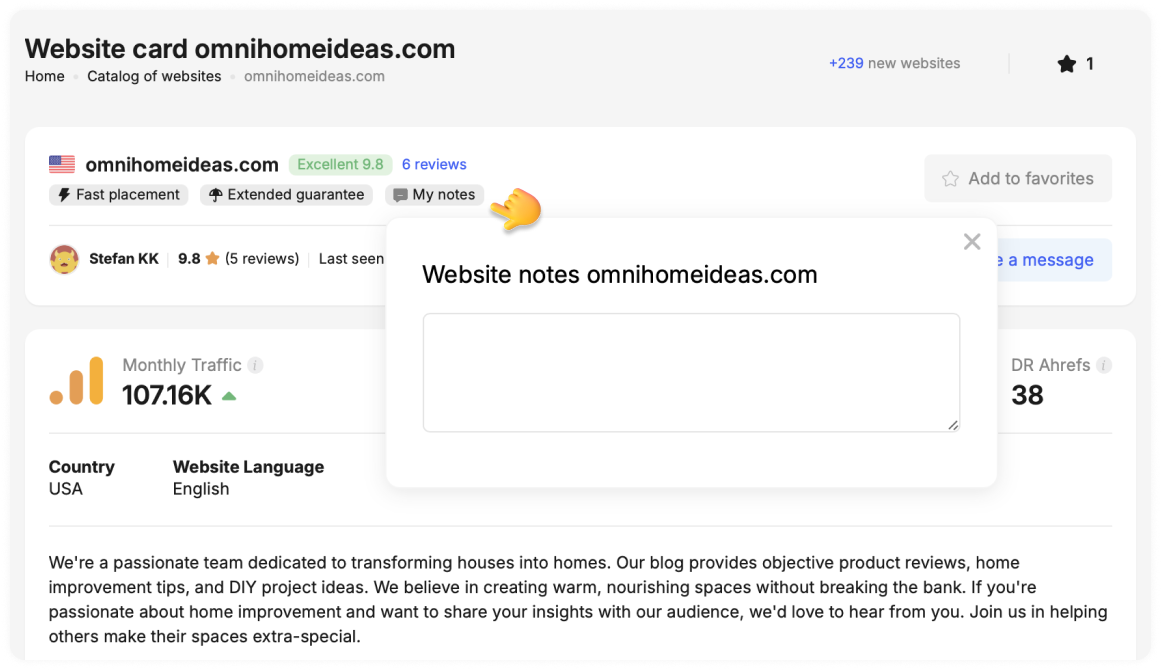
With your shortlist ready, you can continue with the next step.
3. Order and Publish Your Guest Post
When you are happy with your choice, add the website to your cart and select the project you are building links for.
If your article is ready, upload it and check that it follows the publisher’s requirements. If you need content, you can send the publisher a brief and ask them to write the article for you.
Whichever option you choose, make sure the order includes:
- The correct target URL
- The anchor text you want the publisher to use
- Any important instructions about the article or placement
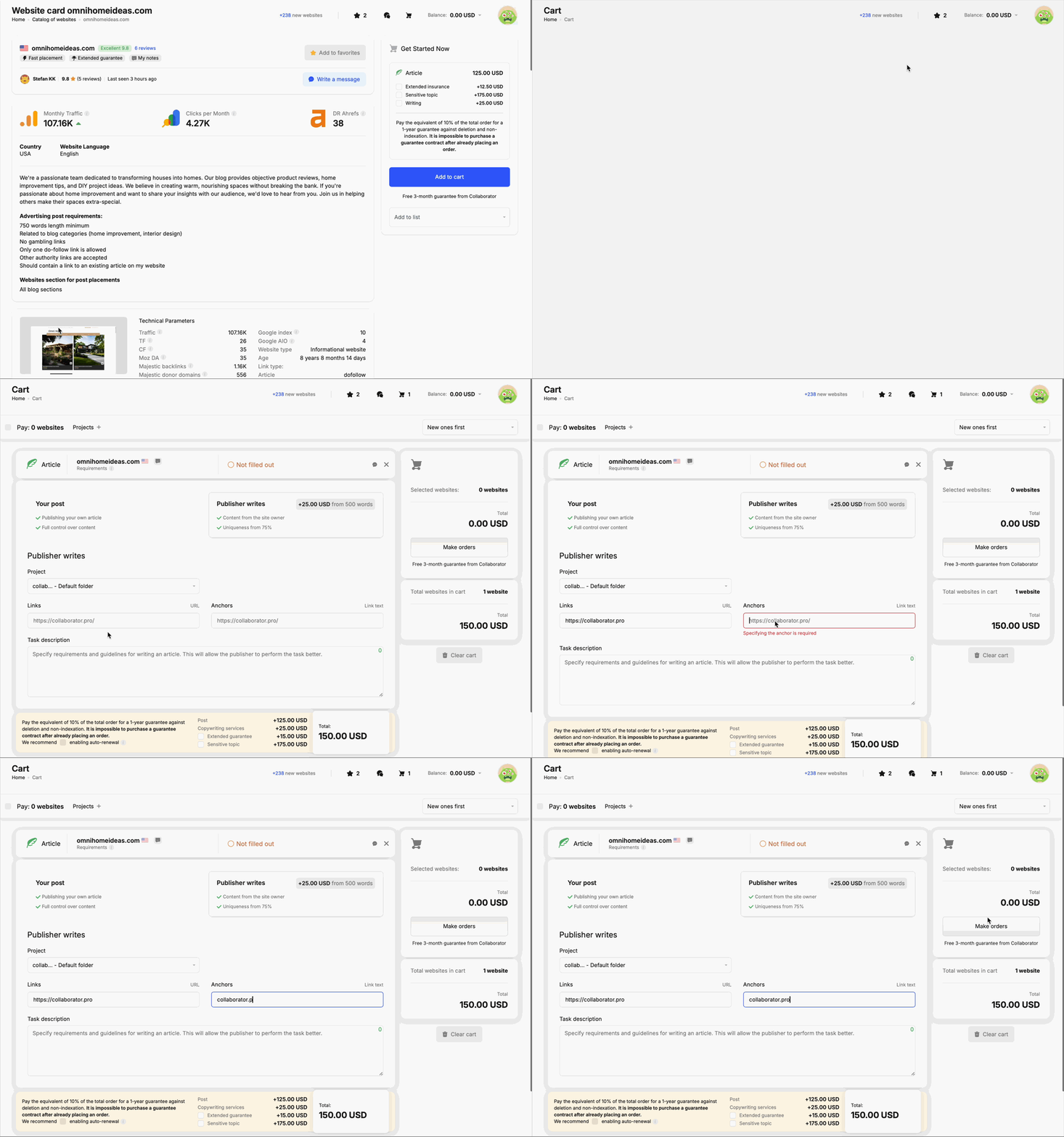
Add your content and backlink details before sending the task to the publisher.
The publisher can contact you through Collaborator if anything needs clarification. You can also discuss revisions there, so the requirements and conversation stay attached to the order.
When the article goes live, the publisher will send you the published URL to review.
4. Verify and Monitor Your Backlink
A live URL is good news, but the work is not quite finished. Open the published page and confirm that the placement matches your order.
Check the Published Placement
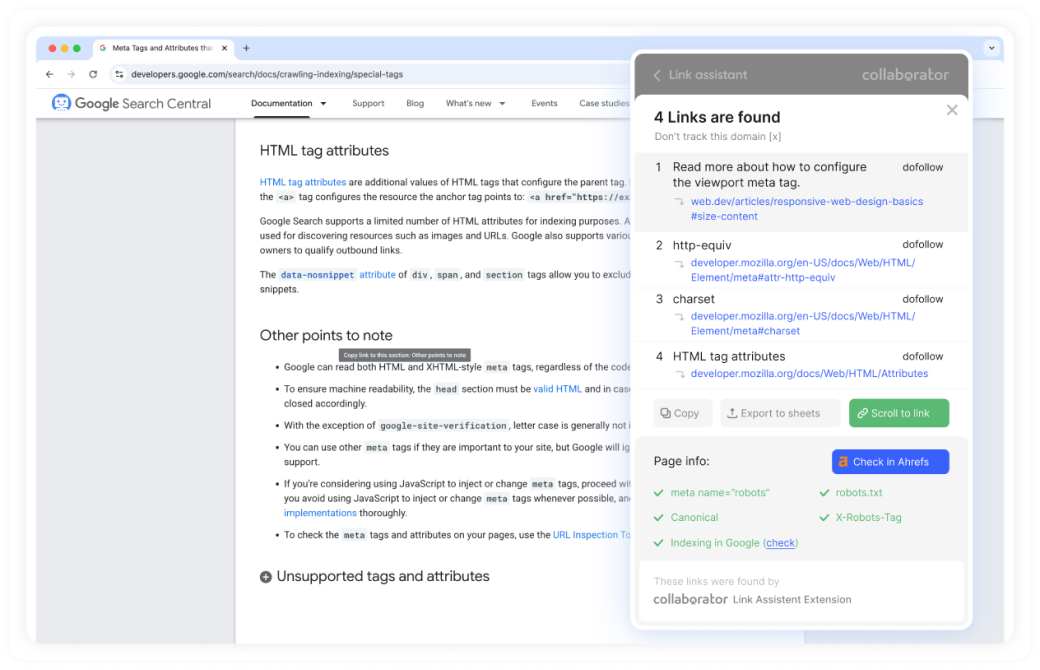
Start with the details that directly affect the value of the backlink:
- Does the link point to the correct URL?
- Is the anchor text accurate?
- Does the link have the expected attribute?
- Is the article accessible and open to indexing?
- Does the canonical tag point to the published page?
You can check these details with the free Collaborator Link Assistant. Add your domain to the extension and open the published article. Link Tracker will detect your backlink automatically and show its attributes, indexation status, canonical tag, and other technical signals in one place.
If the article contains an error, open the order in My Orders and select Request Edit. You can explain what needs to change and send the request directly to the publisher.
Placement protection: Every order includes a free three-month guarantee against article deletion and non-indexation. You can also add an extended guarantee when placing the order.
Track Your Campaign
As you publish more backlinks, checking individual orders is no longer enough. You also need a clear view of what has gone live across the campaign.
The Statistics tab gives you a campaign-level view of your spending and completed placements. Select a date range or project folder to see:
- How much of your budget you have used
- How many guest posts and links you have acquired
- How the campaign has progressed over time
- How placements are distributed by deals, posts, anchors, target pages, and SEO metrics
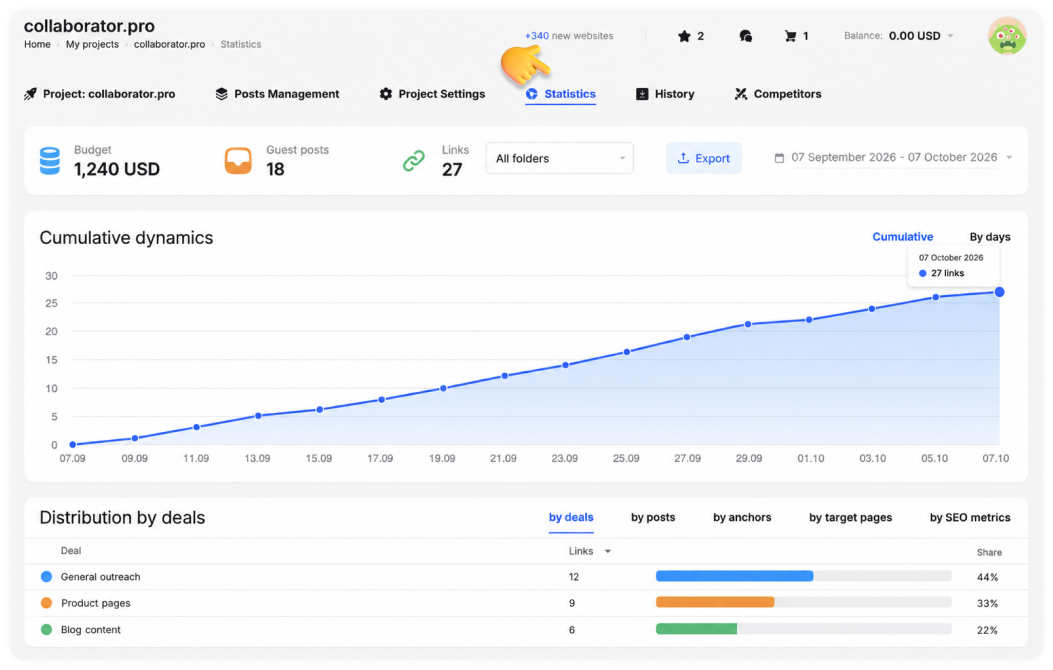
You can also switch from cumulative results to daily activity or export the report for further analysis.
At this point, you have taken a campaign from competitor research to a published and verified backlink. Next, let’s look at how to repeat the workflow at a larger scale.
5. Scale Your Link-Building Workflow
If you build links for several clients or manage a larger SEO team, there is more to keep track of. You have separate projects and budgets. You also need to know who is handling each placement.
Collaborator has two features that make this easier.
Manage Campaigns With a Team Account
A Team Account keeps your clients, specialists, and link-building projects in one workspace.
You can:
- Give each specialist access to the right projects
- Manage campaign budgets across different accounts
- Follow placement deals from one place
- Let clients keep their own accounts and balances
- See who created or updated each deal
This way, your team can work on the same campaigns without sharing passwords or mixing client budgets.
Connect Your Link-Building Data With the API
When your team manages many campaigns, manually transferring placement data between tools becomes time-consuming. The Collaborator API gives you direct access to deal data, link-building budgets, and marketplace opportunities.
You can use that data to:
- Send completed deals and placement costs to your CRM
- Build automatically updated reports in Google Sheets or a BI platform
- Find publishers based on your preferred metrics and prices
- Set up notifications for deal changes or new placement opportunities
The API can connect with tools such as Zapier, Make, n8n, and Slack. Your team still needs to configure those workflows, but it no longer has to copy the same data between systems manually.
Related reading
- • How We Evaluate the 40K+ Websites in Our Marketplace
- • 175+ Free Guest Posting Sites List 2026. Top Websites To Submit Guest Posts
- • Link Insertions: How They Work and How to Evaluate Them
- • Traffic Analysis of 7,500+ Websites: Ahrefs vs Google Analytics vs Google Search Console. Unexpected Results