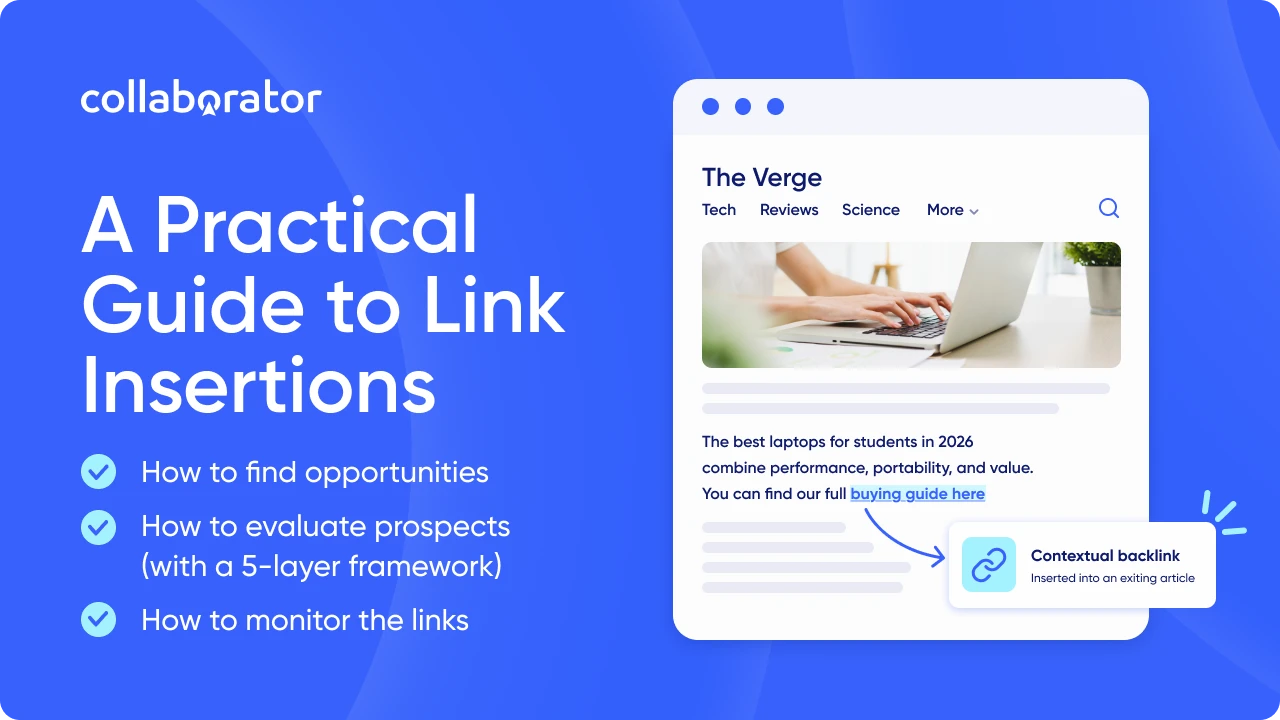
A link insertion is when you add your link directly into an article that's already published, instead of writing new content from scratch.
That makes it one of the fastest ways for companies to build backlinks. There's no new page to write and no wait for indexing, just a link placed into content that's already ranking.
Of course, to get the most SEO value from a link insertion, you need to know where to place it. And that's what this article is about. I'll explain everything you need to know about this tactic and show you how to find opportunities worth pursuing, with a five-layer framework.
Key Takeaways
- Link insertions are best suited to established websites that already have useful content to promote. New sites with little original content may find guest posting easier.
- Original research is one of the easiest assets to pitch for link insertion because it can support a claim. Tools and detailed guides also work when they help the reader complete a task or understand a point the host article only introduces.
- The exact host page deserves as much attention as the domain: relevance, rankings, traffic trend, freshness, and outbound links all shape the opportunity.
- Niche edits are a common form of link insertion; broken-link replacement and unlinked-mention reclamation can also result in an insertion.
- Paid arrangements need transparent terms and the appropriate link qualification under Google’s guidance.
What Are Link Insertions in SEO?
A link insertion is an SEO tactic where a publisher adds a link to your website from a page that’s already live. They may add it to an existing sentence or edit the surrounding copy so it fits naturally.
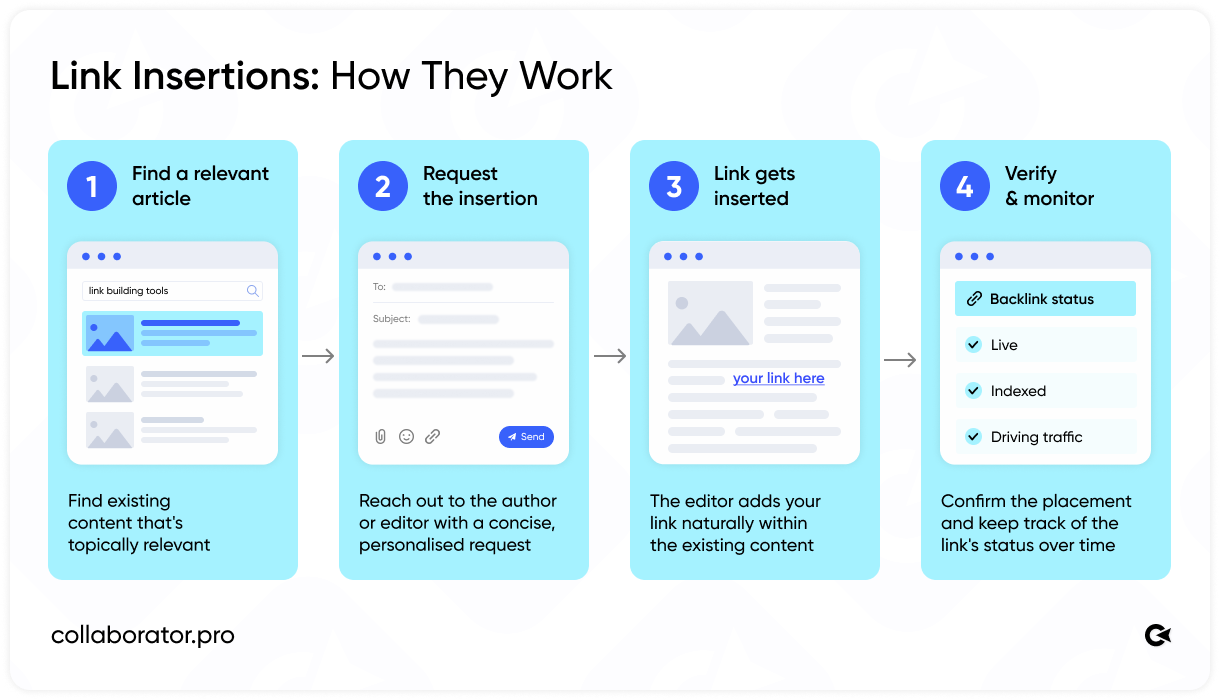
The main advantage of this tactic is that you’re working with an established page. It may already rank, attract visitors, and have backlinks pointing to it. So, a good insertion can:
- send referral traffic from the article
- pass link equity from a relevant page
- introduce your brand to the right audience
- give AI answer engines another source that connects your brand with the topic
Now, a quick note on terminology. You’ll often hear people call a link insertion a niche edit. In SEO, the two terms are commonly used to mean the same thing, particularly when someone arranges the placement directly with a publisher.
But niche edits are not the only way your link can end up on an existing page. A few other methods get you there too, and the table below shows how they compare.
|
Method |
How it works |
| Niche edit | You arrange for a publisher to add your link to an article that already covers the topic. |
| Broken-link building | You find a broken reference and offer your page as a suitable replacement. |
| Unlinked-mention reclamation | A publisher already mentions your brand or resource, and you ask them to link to it. |
| Resource-page outreach | You suggest your guide, tool, or research for an existing list of useful resources. |
| Content update | A publisher cites your page while refreshing an older article with new information. |
As you can see, a link insertion can come from several tactics, although each one gives the publisher a different reason to update the page.
Link Insertion vs. Guest Posting
Another link-building tactic often compared with link insertions is guest posting. However, they work differently.
With a link insertion, the editor updates a small part of an existing page. This means you can check whether the article ranks, attracts traffic, or already has backlinks before pursuing the placement.
A guest post requires a new article. That takes more work, although it also gives you more control over the topic and the way your link fits into the content. Here’s a table on how they differ:
|
|
Link insertion |
Guest post |
| Content required | A short addition to an existing page | A complete new article |
| Publishing time | Usually faster | More time for writing and editorial review |
| Control over the content | Limited to the placement and surrounding copy | More control over the topic and structure |
| Page history | The page may already rank and have backlinks | The new page starts without that history |
| Best fit | Your source fills a clear gap in an existing article | The idea needs more room to explain properly |
If the article already makes the point and simply needs a useful source, a link insertion makes sense. When the idea deserves its own article, a guest post gives it the space it needs.
Related resource: If you decide to pitch a complete article, use our list of 175+ free guest posting sites to start building your prospect list.
How Much Does a Link Insertion Cost?
A paid link insertion costs $179 on average, according to an August 2026 BuzzStream study based on a database of 421,259 websites. Of those, 62,916 offered link insertions.
Prices generally increased with website traffic. The average ranged from $137 on sites receiving up to 100 estimated monthly visits to $510 on sites receiving more than 100,000.
BuzzStream also found a general relationship between DR and price, although it was not consistent across every range. Sites with a DR of 0–9 charged $113 on average, compared with $461 for DR 80+.
Publishers may also consider:
|
Factor |
How it can affect the price |
| Niche | Industries with more advertiser demand may charge higher fees. |
| Country and language | Publisher availability varies between markets. |
| Exact article | A page with traffic or backlinks of its own may cost more. |
| Required edit | Writing a new context takes more work than linking an existing phrase. |
| Placement terms | The link attribute and guarantee may affect the offer. |
These figures describe site-level averages. Before paying, evaluate the exact article and confirm what the quoted price includes.
Are Link Insertions Against Google’s Guidelines?
Google treats a link insertion like any other link. An editor can add one because your page gives their readers a useful source. If money or another benefit changes hands, however, Google expects the publisher to qualify the link. Here’s how that works:
|
How you secured the link |
Appropriate link attribute |
| The editor chose to cite your page without compensation. | A regular followed link is acceptable. |
| You paid for the placement. | Google recommends rel="sponsored". |
| The publisher cannot use sponsored. | Google also accepts rel="nofollow". |
| You paid for a followed link to influence rankings. | Google considers this link spam. |
This distinction matters when you evaluate the price. A sponsored insertion may bring relevant visitors or increase brand exposure, but you shouldn’t buy it on the promise that it will pass ranking credit.
How to Find Link Insertion Opportunities
Before you look for prospects, choose the page you want to promote. Its purpose will shape your search and help you decide which articles make sense for your outreach.
Here are a few common starting points:
|
Page you want to promote |
Where to look for opportunities |
| Research or statistics page | Articles using older figures or making claims without citing a source. |
| Free tool or calculator | Practical guides, resource pages, and best-tool lists. |
| Detailed guide | Articles that introduce the subject without explaining it fully. |
| Homepage | Provider roundups and unlinked brand mentions. |
| Product or service page | Best-of lists, alternatives pages, and relevant comparisons. |
Now that you have a target page, here’s how to find suitable articles for your link.
Research Your Competitors
One way to find prospects is to see who already links to pages like the ones you want to promote.
Say you run a roofing company that recently published a guide to roof replacement costs. You want to find articles citing similar information that could use your data, so you pick a page competing for the same topic, like This Old House's New Roof Cost Guide.
Any backlink analysis tool works here, but for a free option, paste the exact URL into Collaborator's free backlink checker and select URL:
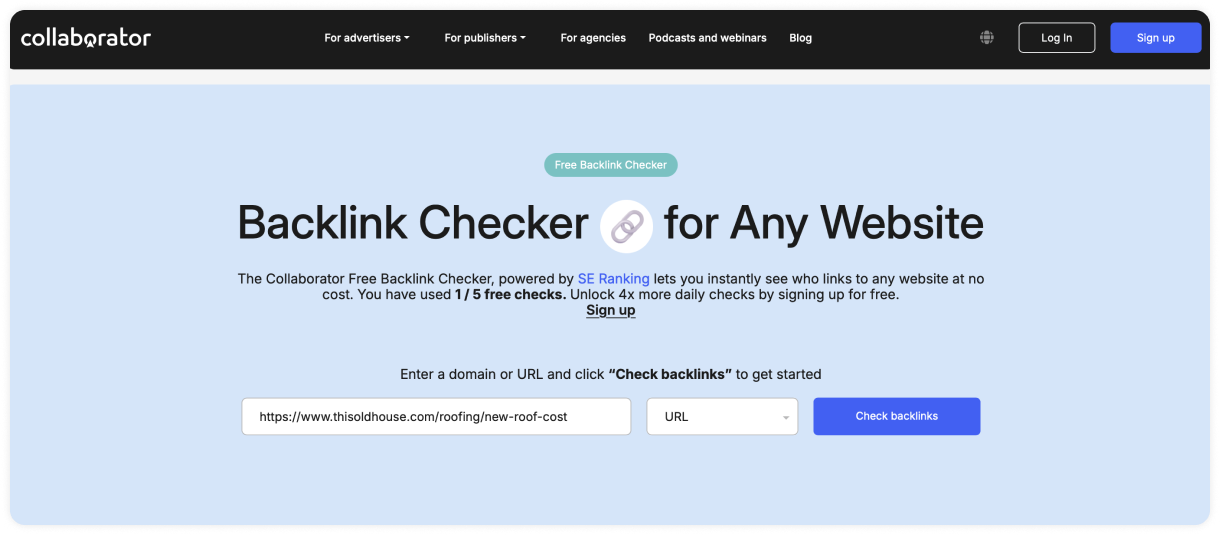
Once you press Check Backlinks, you'll see every page linking to that guide, along with the anchor text and link attribute:
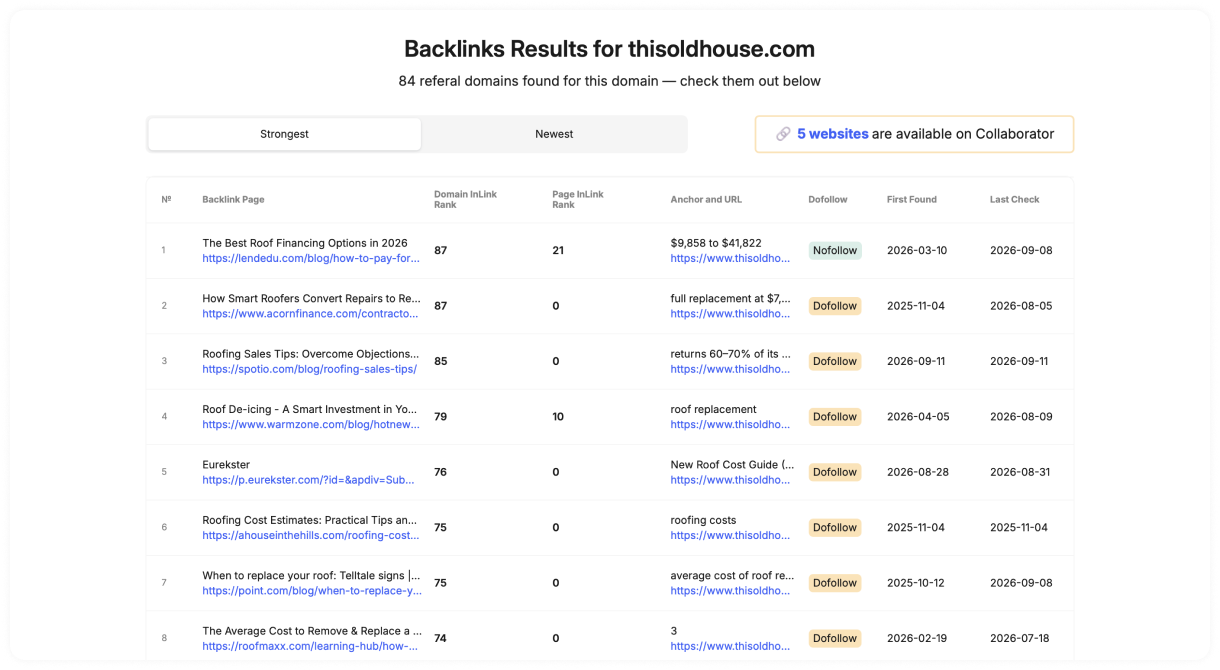
Now comes the useful part. Review the referring pages and open the ones most relevant to your topic. Then find the anchor shown in the report and read the surrounding paragraph. This will tell you why the author cited that source.
Search for Gaps in Existing Articles
Beyond the links your competitors have already earned, look for articles your page could improve.
What you search for will depend on the resource you want to promote:
→ Recent research can replace an outdated statistic or support an uncited claim.
→ A free tool can help readers put the article’s advice into practice.
Best-of lists and alternatives pages are also worth checking when you’re promoting a company, product, or tool. If the editor adds your offer to an existing list, that update counts as a link insertion.
Here are Google search operators you can use to narrow the results:
|
What you want to find |
Search to try |
| Articles on a specific website | site:example.com "your topic" |
| Older statistics | "your topic" "2023 statistics" |
| Claims that cite a source | "your topic" "according to" |
| Best-of lists | intitle: "best [type of product or tool]" |
| Alternatives pages | intitle:"[competitor] alternatives" |
For example, if you’re promoting a free keyword clustering tool, search for intitle: "best keyword clustering tools". You’ll find listicles that already feature similar products:
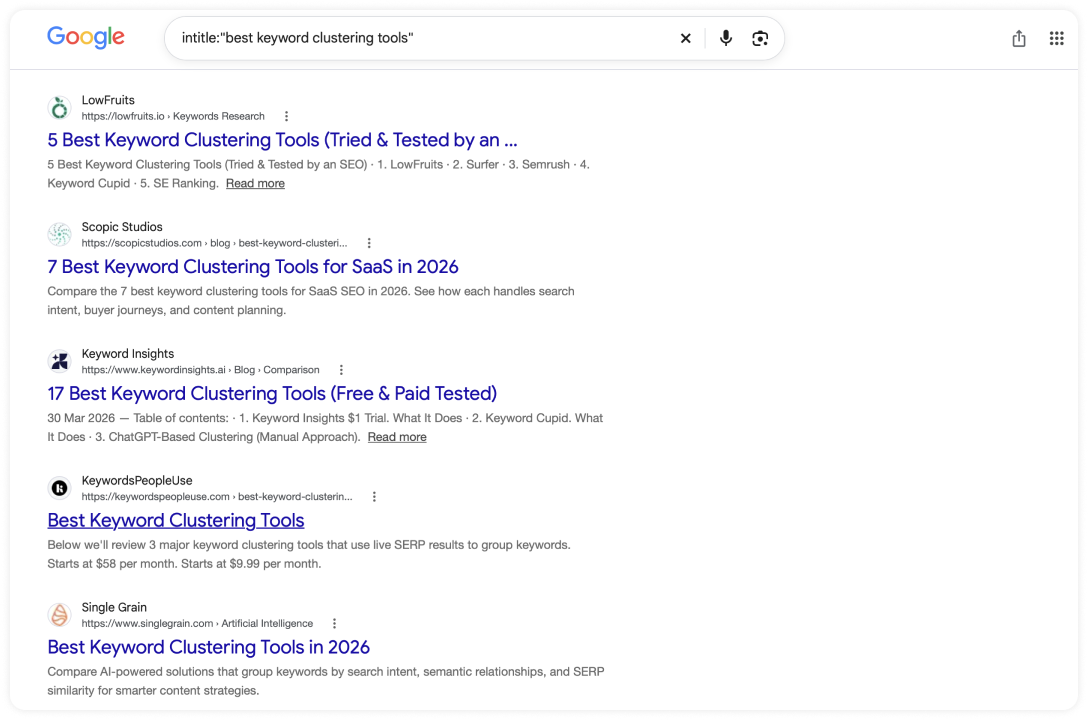
From there, open the results and see how each editor chooses which tools to include. If yours meets those criteria and offers something useful that the list currently lacks, you have a good reason to suggest it.
Find Unlinked Mentions
With an unlinked mention, the publisher already knows your brand or resource, so you’re starting one step closer to the link.
There are a few ways to find these mentions. You could start with a Google Search operator, like:
This surfaces pages mentioning your brand outside your own site, the ones worth checking for a missing link. Repeat the search for a named study, free tool, or company representative.
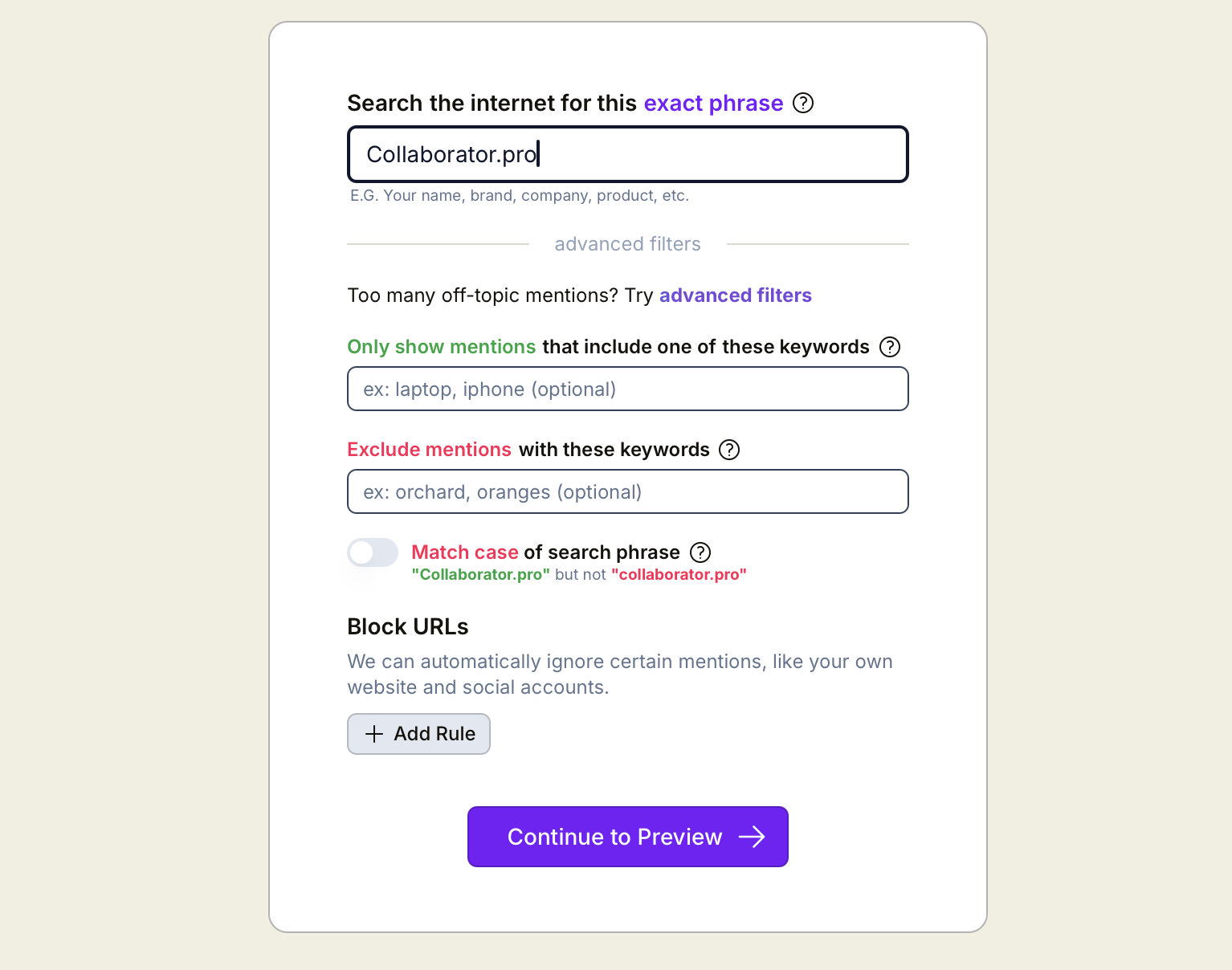
An alternative is to use a tool like Google Alerts (free) or Alertmouse (free plan available). Here's what the setup looks like in Alertmouse:
Once it's running, the tool shows you the mentions your brand already has, and you can set up alerts to get notified each time a new one appears (as you can see in the screenshot below).
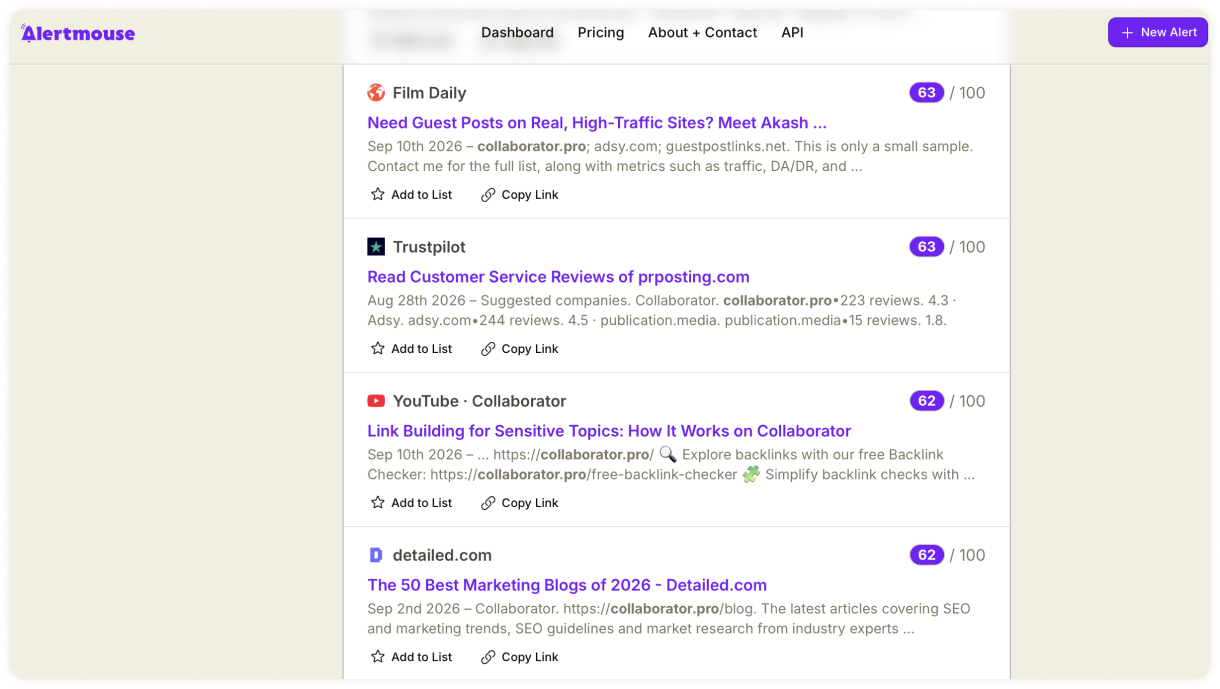
You can then look through these results and check why the writer mentioned you. If they discuss your product, suggest its product page. If they quote one of your findings, send them the original study.
Start with recent coverage, especially mentions connected to a current campaign, company announcement, or piece of research.
Your message can be brief. Thank the writer for including your business, share the most relevant URL, and explain how it would help their readers.
How to Evaluate a Link Insertion Opportunity
Whichever method turns up a prospect, you still need to evaluate the opportunity to see whether it’s worth pursuing. Here’s a five-layer framework to help you decide:
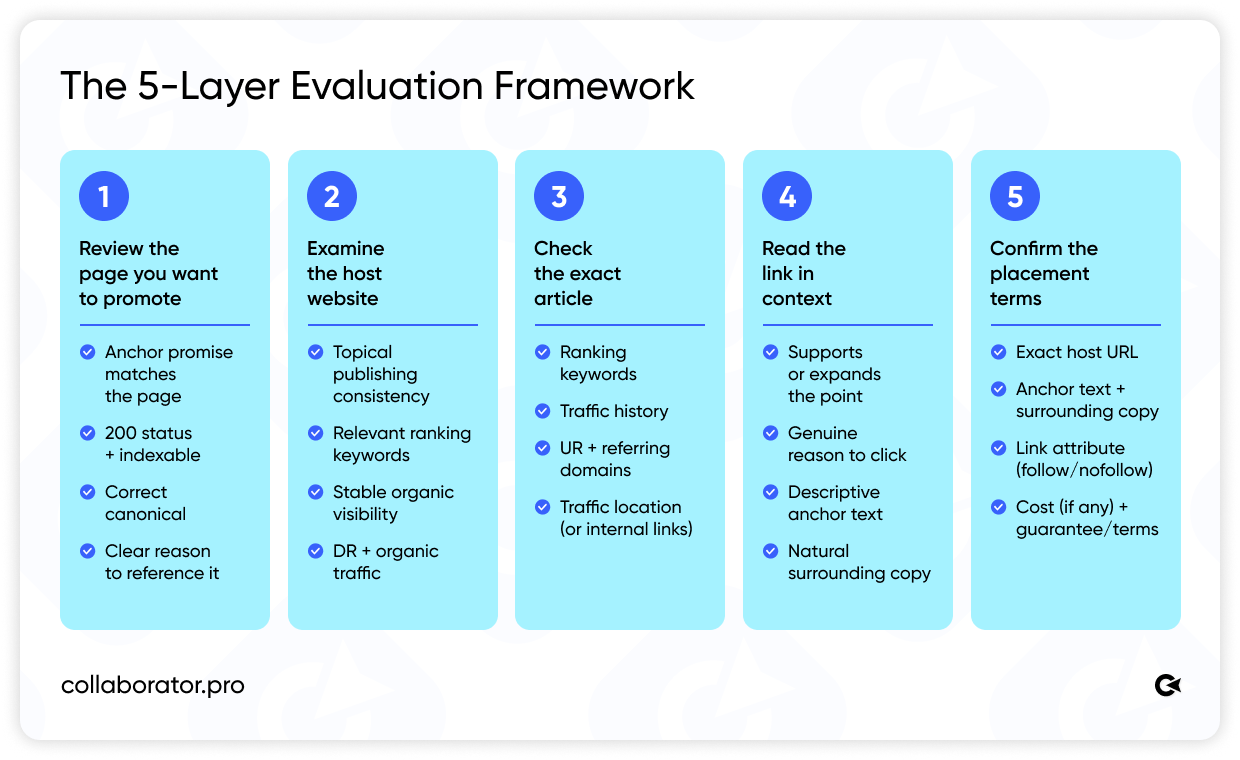
Let’s look at each of these layers in more detail.
Review the Page You Want to Promote
Your own page comes first because it gives the editor a reason to add the link.
Read the host article and identify the information your page would contribute, then review the page itself against these criteria:
- The content delivers what the proposed anchor text promises.
- The URL returns a 200 status code and allows indexing.
- The canonical tag points to the version you want Google to index.
- The page gives the publisher a clear reason to reference it.
Pro tip: Keep your campaign goal in mind here. If you want referral traffic, the destination should continue the discussion that brought the reader there. If you want to improve its rankings, the page should already satisfy the search intent behind its target query.
Examine the Host Website
With your destination page ready, take a quick look at the website behind the article. At this stage, you’re checking whether the publication serves a real audience and covers your subject as part of its usual editorial focus.
Pay attention to a few site-wide signals:
- Publishing consistency. The site regularly publishes content about your industry rather than jumping between unrelated topics.
- Ranking keywords. The queries it ranks for match the subjects the publication claims to cover.
- Search visibility. Its organic visibility has remained reasonably stable over the past year, without unexplained declines.
- DR (Domain Rating). This metric indicates the strength of the site’s backlink profile, but you should consider it alongside relevance and organic traffic.
- Editorial transparency. Recent articles name their authors or editors, and commercial links fit naturally into the surrounding discussion.
Our study of more than 40,000 websites found that authority metrics often assess the same domain differently. For sites with fewer than 1,000 monthly visitors, their correlation with traffic was virtually zero. Therefore, treat DR as one signal among several, alongside relevance, traffic, rankings, and editorial quality.
If the website passes the initial check, spend more time on the exact article. After all, that’s where your link will appear, and where most of its SEO value will come from.
Check the Exact Article
Now narrow your analysis to the page where the link will appear. Paste the article URL into Ahrefs and review these signals:
|
Signal |
What to look for |
| Ranking keywords | Queries that closely relate to your destination page and target audience. |
| Traffic history | Stable visibility or a clear explanation for any recent decline. |
| UR and referring domains | Evidence that the article has earned backlinks of its own. |
| Traffic location | Visitors from the country your campaign targets. |
| Internal and external links | Relevant internal links and a natural, editorial pattern of external linking. |
Why check UR? In an Ahrefs study of 44,589 SERPs, URL Rating had the highest correlation with rankings among the link metrics tested. This supports checking page-level authority separately: DR describes the domain, while UR reflects the backlink profile of the exact article.
Read the Proposed Link in Context
The metrics we’ve reviewed so far help you assess the website and the article. To judge the insertion itself, read the proposed edit in context. You’re looking for four things:
- The source helps the author support or expand a point.
- Readers have a genuine reason to follow the link.
- The anchor describes what they’ll find on the destination page.
- The edited paragraph sounds natural when you read it aloud.
Google’s link best practices recommend concise, descriptive anchor text. The guidance also explains that the words around a link help people and search engines understand the destination.
Confirm the Placement Terms
Finally, compare the publisher’s offer with the placement you evaluated.
|
Term |
What to confirm |
| Host page | The exact URL where the link will appear. |
| Anchor text | The final words the publisher will link. |
| Surrounding copy | Any sentence or paragraph added to accommodate the link. |
| Link attribute | follow, nofollow, or sponsored. |
| Price | (If it’s a paid link insertion) The complete fee, including any editing or platform costs. |
| Guarantee | The remedy if the publisher removes the link or article. |
After reviewing all five layers, you can compare the price with the SEO signals and editorial value of the actual placement.
How to Pitch a Link Insertion
By the time you find the right article, you should already know what your source would add. Your pitch simply needs to make that value clear to the editor.
Here are a few things you need to include:
- The article and section you reviewed.
- The information your source would add.
- A brief explanation of why your page is credible.
- Suggested wording that matches the existing paragraph.
- The anchor you propose using.
You can then structure your message like this:
Subject: [Their article title]: updated data for the [section] part
Hi [Name],
I'm [Your name], [role] at [Company]. In your article [link to their page], you write:
"[Exact quote of their sentence]"
[One line on the gap: "That figure is from 2021" / "The linked source is now a 404" / "This doesn't cover X yet."]
We recently published [resource name] [link], based on [method: e.g., analysis of 4,000 orders/survey of 300 SEOs]. The key finding: [one concrete number or fact].
If it helps, here's a sentence that could go right after the line above:
"[Suggested sentence with descriptive anchor.]"
Happy to adjust the wording to fit your style. Would you be open to adding it?
Thanks,
[Name]
It comes in under 120 words, and the editor can say yes without clicking anything except your resource link.
The wording matters more than the length. Avoid opening with your company history or explaining how valuable backlinks are for SEO. The editor needs to know why this source belongs in that particular article.
If the publisher charges for updates, discuss the price and link attributes openly before agreeing to the placement.
How to Measure the Results of a Link Insertion
Seeing your link in the article confirms that the edit went live. However, its SEO impact will take longer to judge.
On publication day, open the page and check:
- Does the link lead to the correct URL?
- Did the editor use the agreed anchor text and attribute?
- Does the surrounding paragraph still read naturally?
- Can Google index the article?
Save the publication date and a screenshot as well. You’ll have something to refer back to if the publisher edits the page later.
From there, turn your attention to the page you’re promoting:
- Compare its Search Console performance with the baseline you recorded at the beginning of the campaign.
- Pay particular attention to the queries you hoped to influence.
- Your analytics may also show people arriving directly from the host article.
Keep an eye on the placement itself, too. A link may stay live while the article loses its rankings or drops out of Google’s index. Collaborator Link Assistant can find the link as you browse, show its attributes, and check whether the page remains indexed.
Quick note: A single insertion rarely explains an entire ranking change. Your other SEO work continues, and the search results keep moving around you. Record the publication date, then look for patterns across several comparable placements.
Final Thoughts
Link insertions can be one of the fastest ways to secure a high-quality backlink and reach a new audience. With the five-layer framework from this guide, you can find worthwhile opportunities and assess the exact page before spending your budget.
If the opportunity passes those checks, confirm the anchor, link attribute, and commercial terms in writing. And if your topic deserves an article of its own, a guest post gives you much more room to develop it.
Related reading
- • 175+ Free Guest Posting Sites List 2026. Top Websites To Submit Guest Posts
- • How to Check Website Backlinks for Free in 2026
- • 12 Best Link Building Tools for SEO in 2026
- • 9 Best Free Backlink Checkers and Monitoring Tools in 2026
- • Which Website Authority Metric Can You Trust: DR, DA, TF, CF, AS, or SDR. A Unique Study of 40,000 Websites