Best SEO Extensions in 2026: 40+ Free & Freemium Browser Tools for Every SEO Task

|
From technical SEO audits and keyword research to link building, YouTube SEO, AI-assisted workflows, and Magento site audits, there's a free browser extension for almost every SEO task. |
Between limited budgets, repetitive tasks, and the need to switch between multiple tools, SEO experts feel like they're constantly putting out fires. Browser extensions offer a simple way to save time, reduce costs, and make everyday SEO work much easier.
To help you save time, cut unnecessary software costs, and simplify everyday SEO tasks, we've reviewed the best SEO browser extensions and organized them by browser and use case.
Whether you need tools for Chrome, Firefox, Safari, ChatGPT workflows, YouTube SEO, Magento site audits, or something else, you'll quickly find the right fit.
At a Glance
- 40+ SEO browser extensions reviewed across all categories
- 33 Chrome extensions for link building, technical SEO, keyword research, analytics, and local SEO
- 8 Firefox extensions for everyday SEO audits and competitor analysis
- 3 Safari-compatible extensions for on-page SEO, keyword research, and performance analysis
- 7 AI browser extensions for ChatGPT-powered and AI-assisted SEO workflows
- 7 YouTube SEO extensions for video optimization, keyword research, and channel growth
- 8 browser extensions for auditing Magento stores
- 7 SEO categories covered: technical SEO, on-page SEO, link building, keyword research, analytics, local SEO, and YouTube SEO
- All featured extensions are free or offer a free plan to get started
Best SEO Extensions for Chrome
Most extensions are released for Chrome first, and many remain exclusive to Google's browser, making it the preferred choice for SEO professionals.
We’ve gathered the extensions worth your attention and categorized them by use cases. The first section is for everyone involved in link building and outreach.
Link Building & Outreach Extensions
Link building comes with a lot of repetitive work, from finding outreach prospects and gathering contacts to checking placed backlinks. The right extensions can handle much of this for you. The comparison table below gives you a quick overview of the best Chrome extensions for link building and outreach before we take a closer look at each one.
Comparison Table: Best Link Building Chrome Extensions
| Extension | Best for | Pricing |
|---|---|---|
| Collaborator Link Assistant ⭐ 4.3 | Backlink monitoring, link prospecting, and finding guest posting opportunities | Free |
| Link Grabber ⭐ 4.6 | Extracting URLs from webpages | Free |
| BuzzMarker ⭐ 4.1 | Managing outreach and digital PR in BuzzStream | Requires a BuzzStream account |
| Hunter Email Finder ⭐ 4.7 | Finding email addresses for outreach | Freemium |
Starting with Collaborator Free Link Assistant, let's take a closer look at each extension.
Collaborator Free Link Assistant
⭐ 4.3 👨💻 2,000 users 💰 Free extension
Collaborator Link Assistant is a free Chrome extension built for link builders and SEO professionals. It simplifies backlink monitoring and link prospecting by displaying essential SEO data directly in your browser, helping you evaluate websites without switching between multiple tools.
Key features:
- Detects backlinks and checks dofollow, nofollow, and sponsored attributes
- Checks page indexability, canonical tags, and robots directives
- Displays article placement prices for websites available in the Collaborator marketplace directly in Google Search and Ahrefs
- Saves favorite domains and exports backlink data to Google Sheets
Best use cases:
- Monitoring backlinks after link-building campaigns
- Finding guest posting opportunities
- Evaluating competitor backlinks and outreach prospects
Pros:
- Combines backlink monitoring and prospecting
- Saves time with built-in price checking
Cons:
- Chrome only
Add to Chrome Collaborator Free Link Assistant →
Link Grabber
⭐ 4.6 👨💻 200,000 users 💰 Free extension
Link Grabber extracts all links from web pages and compiles them into a separate list, providing a clear view of link information. This URL data can be valuable for your link-building campaigns, especially when analyzing top-ranking competitors' websites.
Key features:
- Extracts links from an entire webpage
- Filters URLs by keywords or substrings
- Groups links by domain
- Hides duplicate and same-origin links
- Copies extracted URLs to the clipboard
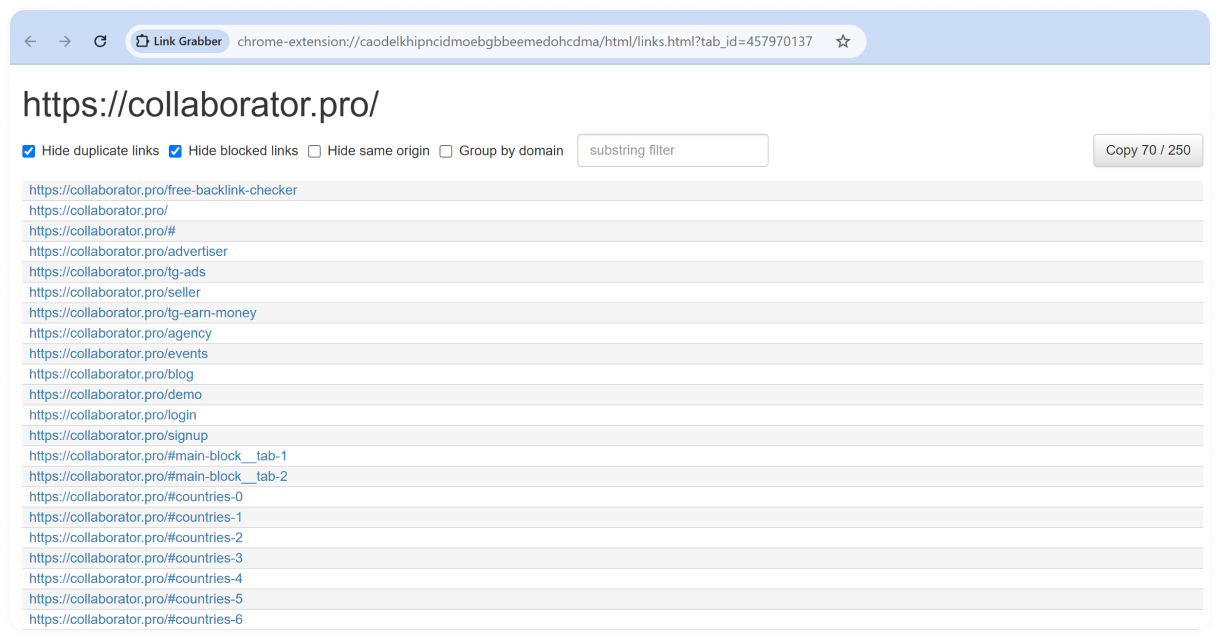
Link Grabber in action: displaying all links found on the Collaborator homepage
Best use cases:
- Collecting URLs for link-building campaigns
- Analyzing links on competitor and resource pages
- Preparing prospect lists for further analysis
Pros:
- Handles large numbers of links quickly
- Offers useful filtering and grouping options
Cons:
- Doesn't provide SEO metrics or backlink data
- Requires other SEO tools to evaluate extracted URLs
BuzzMarker
⭐ 4.1 👨💻 10,000 users 💰 Requires a BuzzStream account
The BuzzMarker Chrome extension is designed for digital PR professionals and link builders who use BuzzStream. You can research websites, review contact details and past interactions, and add promising prospects to your projects without leaving the page you're viewing.
Key features:
- Adds websites and contacts directly to BuzzStream projects
- Displays contact details and relationship history
- Shows previous interactions with prospects
- Lets you add notes and tags to contacts
- Supports personalized outreach using saved templates
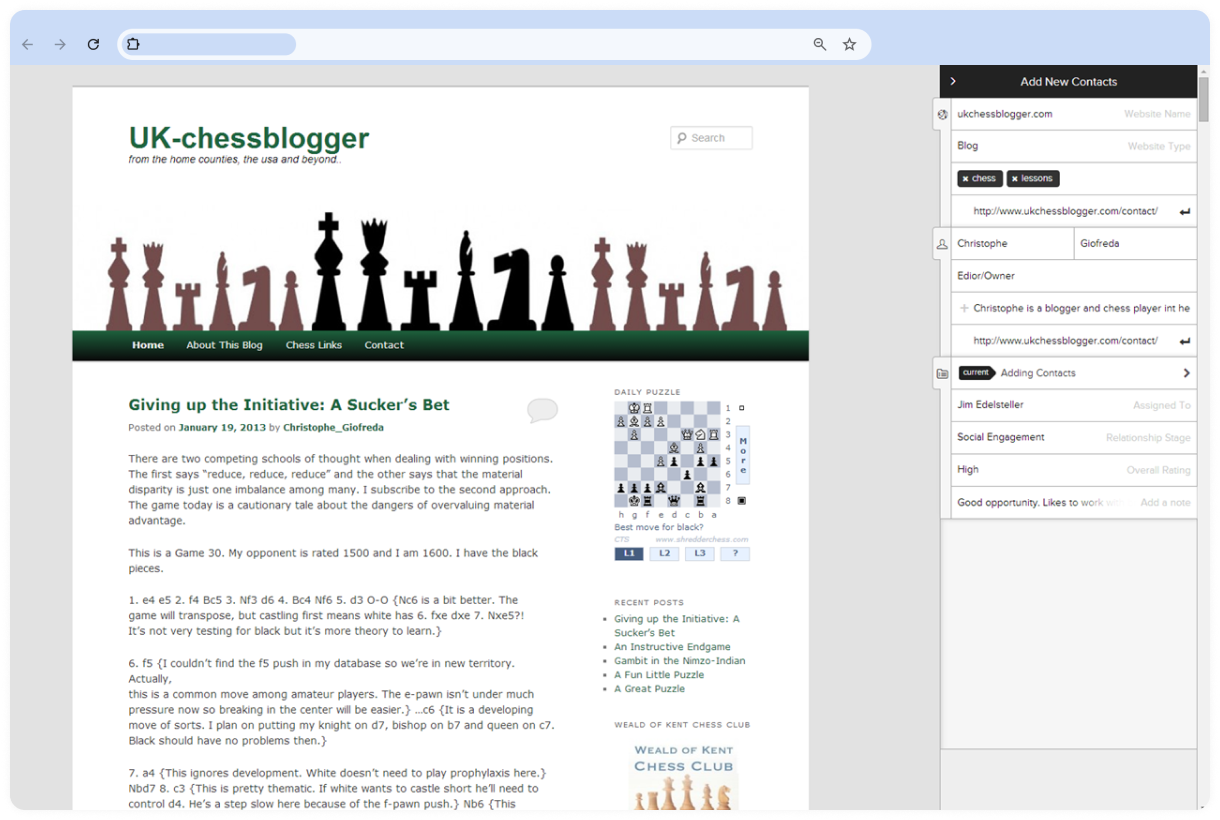
BuzzMarker in action: collecting website contact details for outreach
Best use cases:
- Managing link-building and digital PR prospects
- Researching contacts before outreach
- Avoiding duplicate outreach across teams
Pros:
- Keeps prospecting and outreach in one workflow
- Makes team relationship history easy to access
- Integrates directly with BuzzStream
Cons:
- Requires a BuzzStream account
- Not available as a standalone outreach tool
Hunter Email Finder
⭐ 4.7 👨💻 600,000 users 💰 Freemium extension
Helps you find email addresses from any website. Use Domain Search to discover email addresses associated with a site, and Email Finder to locate specific contacts by name. It also supports list building and integrates with various CRMs.
Key features:
- Finds professional email addresses associated with a domain
- Searches for a specific person's email by name
- Shows public sources and discovery dates for found emails
- Displays confidence scores and verification status for discovered email addresses
- Lets you verify email addresses when needed
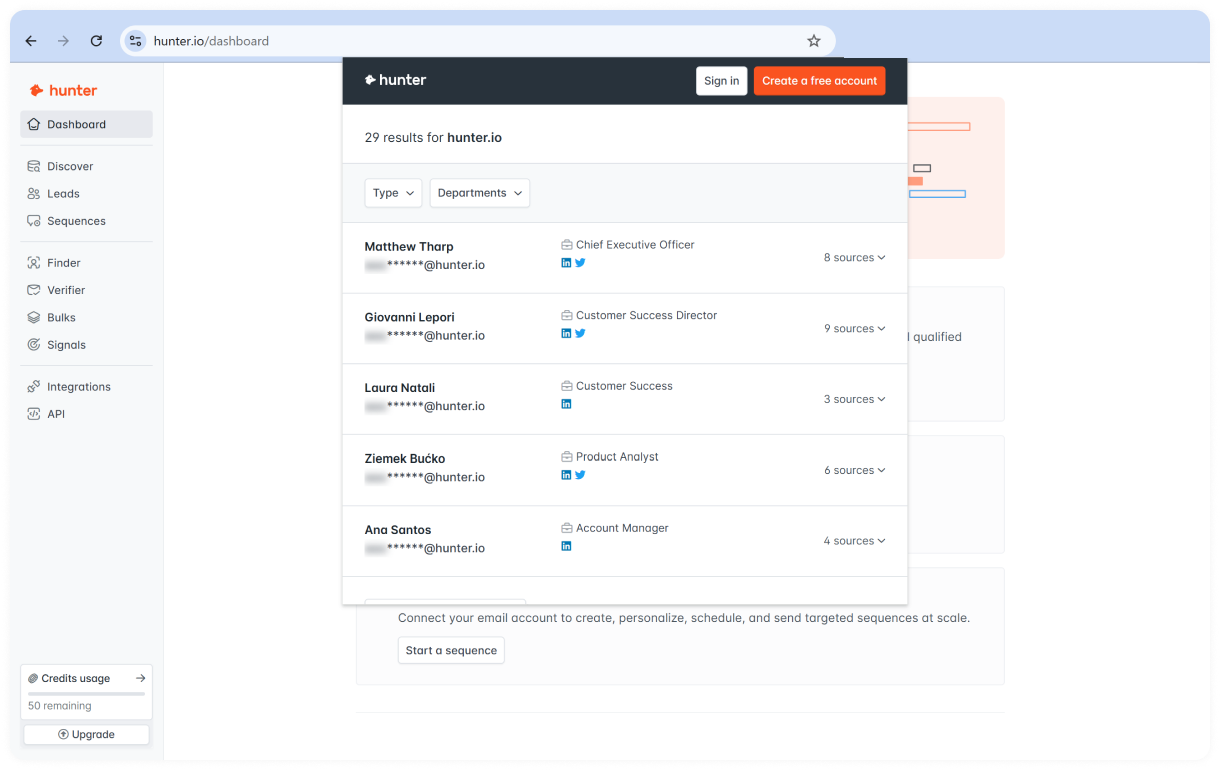
Hunter Email Finder displaying email addresses associated with a domain
Best use cases:
- Finding contacts for link-building outreach
- Researching website owners and company employees
- Building prospect lists for digital PR campaigns
Pros:
- Easy to use directly from the website you're browsing
- Provides sources for discovered email addresses
- Includes email verification features
Cons:
- Requires a Hunter account
- Free accounts have monthly usage limits
Add to Chrome Hunter Email Finder →
Now let's move from link building tools to extensions designed for technical SEO audits.
Technical SEO & Crawling Extensions
Technical SEO often requires checking redirects, crawlability, structured data, and other page-level elements that aren't immediately visible in the browser. These Chrome extensions help you identify technical issues, validate implementations, and troubleshoot pages without running a full website crawl.
Comparison Table: Technical SEO Audit Extensions
| Extension | Best for | Pricing |
|---|---|---|
| SEO Minion ⭐ 4.0 | On-page SEO checks, broken links, redirects, and SERP analysis | Free for customers of Keywords Everywhere's Silver or higher plan |
| Detailed SEO Extension ⭐ 4.9 | Reviewing page metadata, headings, structured data, and links | Free |
| Redirect Path ⭐ 4.3 | Checking redirect chains, HTTP status codes, and response headers | Free |
| Link Redirect Trace ⭐ 4.8 | Analyzing redirect paths, canonical tags, and crawlability signals | Free |
| Robots Exclusion Checker ⭐ 4.9 | Diagnosing crawlability and indexation issues | Free |
| Schema Builder for Structured Data ⭐ 3.6 | Creating and validating JSON-LD structured data | Free |
| Rich Results – Structured Data Test Plugin ⭐ 4.1 | Opening Google's Rich Results Test for the current page | Free |
SEO Minion is the first extension we'll review in this section.
SEO Minion
⭐ 4.0 👨💻 200,000 users 💰 Free extension
SEO Minion brings several on-page, technical SEO, and SERP analysis tools into one browser extension. It helps you quickly review page elements, find broken links, check redirects and hreflang tags, and analyze search results without running a full site audit.
Key features:
- Analyzes on-page SEO elements and highlights potential issues
- Checks broken links and HTTP status codes
- Highlights internal and external links
- Validates hreflang tags and return tags
- Checks redirects and compares source HTML with the rendered DOM
- Provides SERP preview and location-based search tools
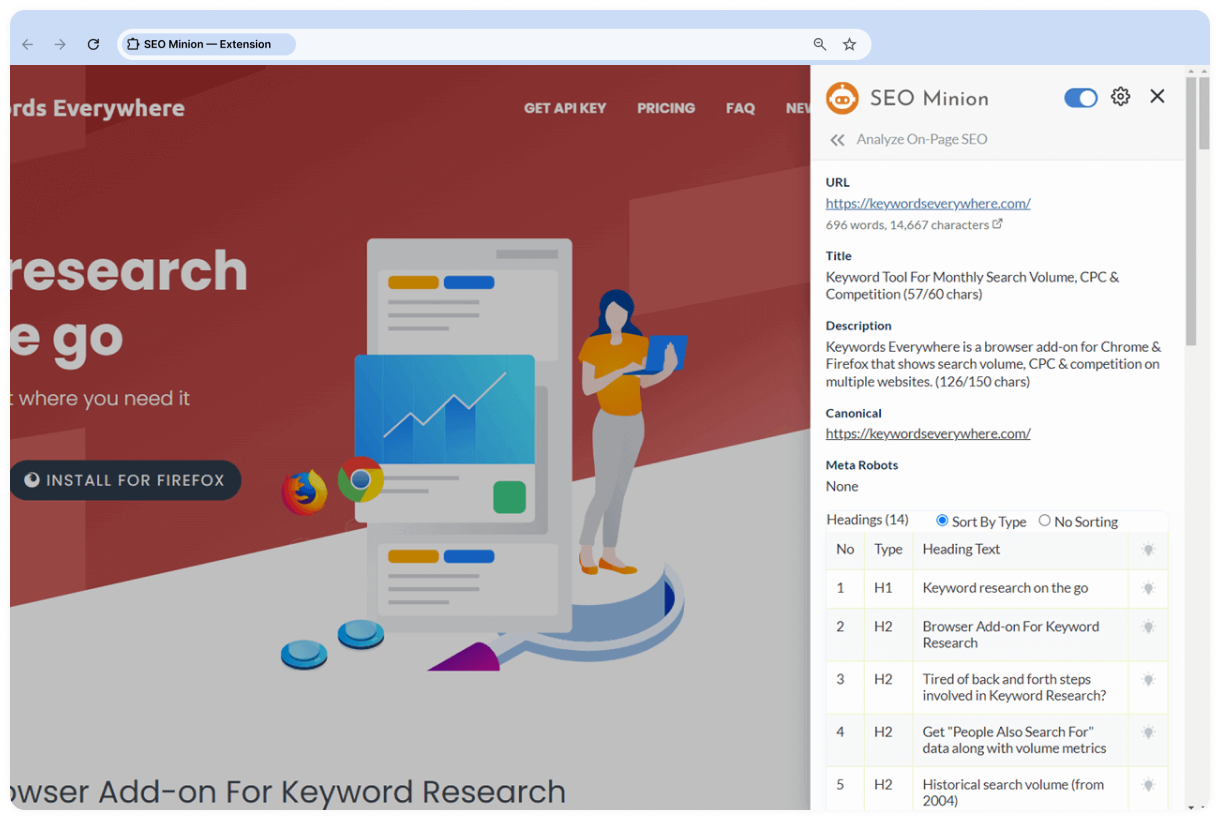
SEO Minion in action: analyzing the on-page SEO elements of the Keywords Everywhere website
Best use cases:
- Running quick on-page and technical SEO checks
- Finding broken links and reviewing redirects
- Validating hreflang implementation
- Analyzing Google search results across locations
Pros:
- Combines multiple SEO checks in one extension
- Covers both on-page and technical SEO tasks
- Offers useful SERP analysis tools
Cons:
- Requires a Keywords Everywhere Silver plan or higher
- May offer more features than needed for simple page checks
Detailed SEO Extension
⭐ 4.9 👨💻 600,000 users 💰 Free extension
Detailed SEO Extension gives you a quick overview of key on-page SEO elements without digging through the source code. It brings metadata, headings, structured data, links, and other page-level details into one easy-to-read interface.
Key features:
- Displays title tags, meta descriptions, canonical URLs, and robots directives
- Shows the complete heading structure of a page
- Reviews structured data and hreflang tags
- Highlights nofollow links
- Exports links and image URLs
- Lets you switch user agents to view pages as Googlebot and other crawlers
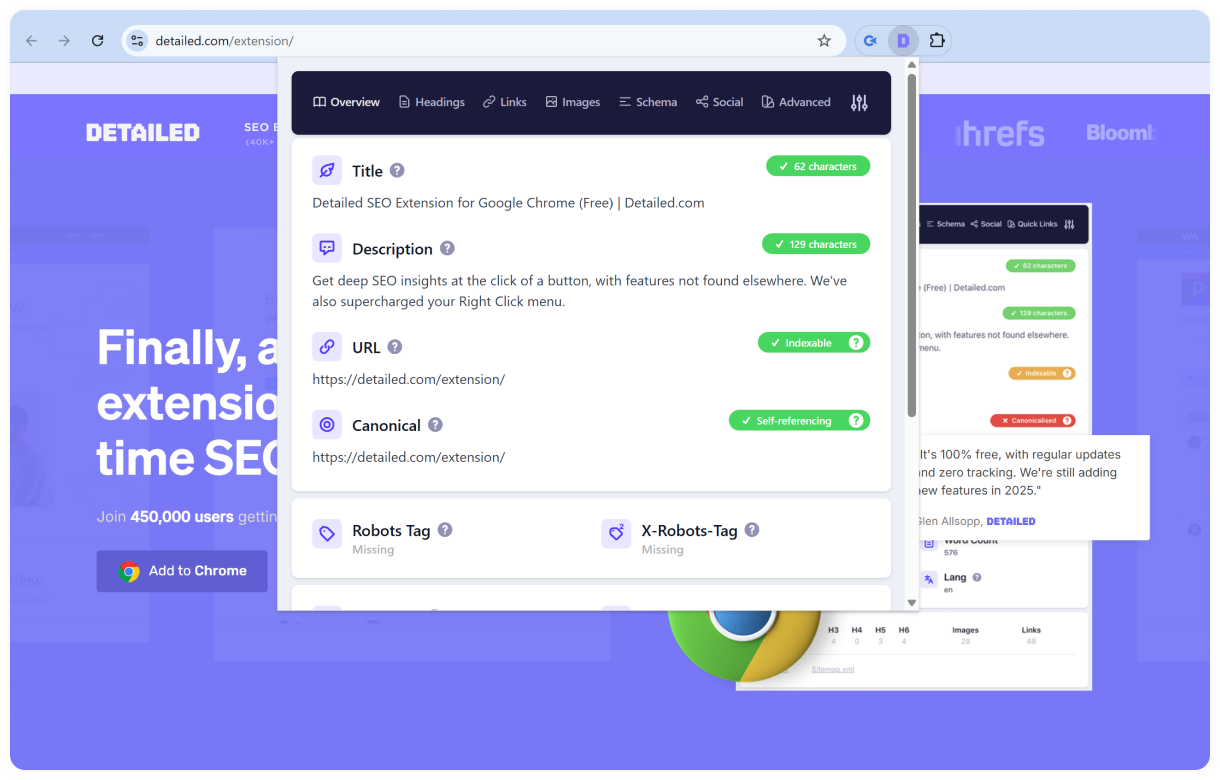
Detailed SEO Extension in action: analyzing the on-page SEO elements of its landing page
Best use cases:
- Running quick on-page SEO checks
- Reviewing page metadata and heading structure
- Checking structured data and hreflang implementation
- Inspecting links and crawl directives
Pros:
- Presents SEO data in a clear interface
- Available for Chrome and Firefox
Cons:
- Focuses on individual pages rather than sitewide audits
- Doesn't replace a full SEO crawler
Add to Chrome Detailed SEO Extension →
Redirect Path
⭐ 4.3 👨💻 300,000 users 💰 Free extension
Redirect Path helps you spot redirects and HTTP status codes as you browse. It flags 301, 302, 404, and 500 responses, as well as meta and JavaScript redirects, making technical issues easier to catch without digging through developer tools.
Key features:
- Detects 301, 302, 404, and 500 HTTP status codes
- Shows redirect chains in real time
- Identifies meta and JavaScript redirects
- Displays HTTP response headers
- Shows server and IP address information
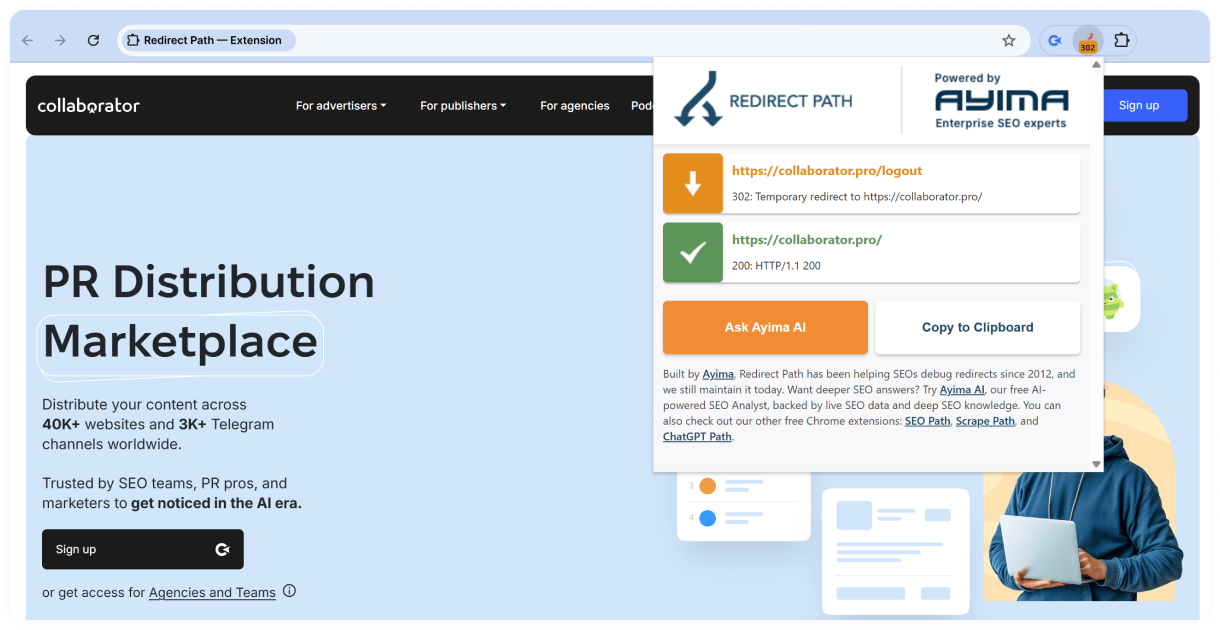
Redirect Path in action: checking a redirect on the Collaborator website
Best use cases:
- Checking redirect chains
- Auditing redirects during website migrations
- Spotting HTTP errors while browsing
- Reviewing HTTP headers
Pros:
- Flags redirect issues directly in the browser
- Provides useful HTTP header data
Cons:
- Doesn't provide broader on-page SEO analysis
- Designed for page-by-page checks rather than sitewide crawling
Link Redirect Trace
⭐ 4.8 👨💻 100,000 users 💰 Free extension
Link Redirect Trace gives you a detailed view of every step in a redirect chain. Beyond tracing HTTP and client-side redirects, it checks canonical, robots, and crawlability signals that may affect how search engines follow and interpret URLs.
Key features:
- Traces HTTP, JavaScript, and Meta Refresh redirects
- Analyzes rel-canonical signals
- Checks robots.txt and X-Robots-Tag directives
- Identifies noindex and nofollow signals
- Shows redirect timings and, when available, LRT Power and Trust metrics
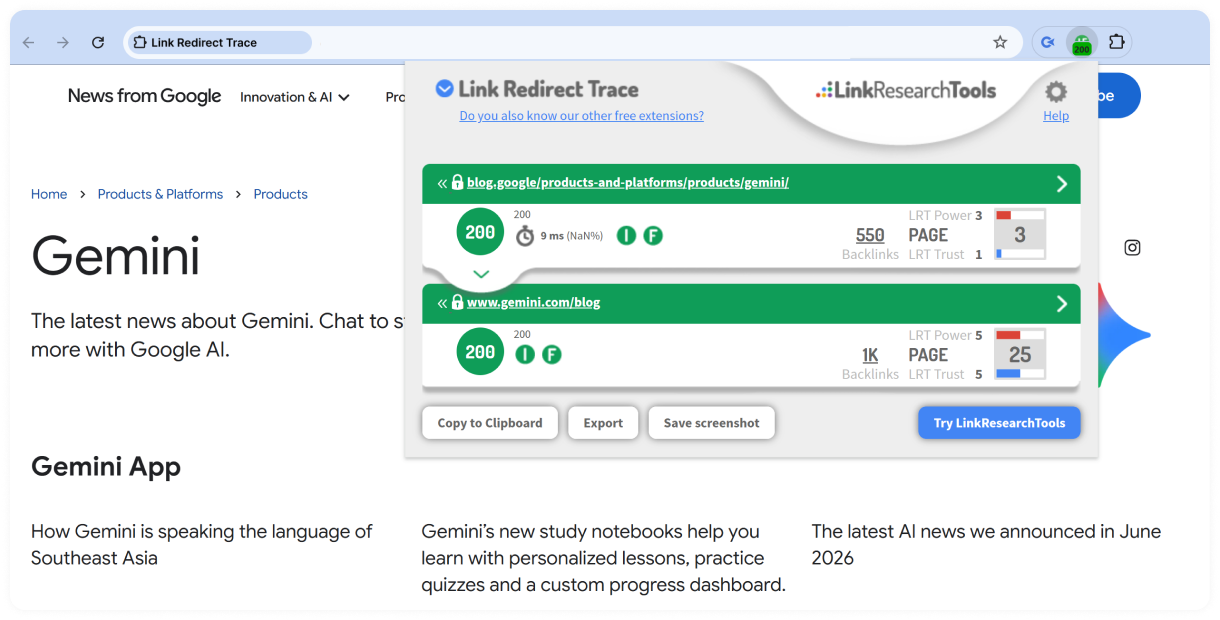
Link Redirect Trace in action: checking redirects for a Google Gemini URL
Best use cases:
- Auditing complex redirect chains
- Checking canonical and crawlability issues
- Reviewing redirects during website migrations
- Finding SEO problems across redirect paths
Pros:
- Provides in-depth redirect analysis
- Checks SEO signals at each step of the redirect chain
Cons:
- May provide more technical detail than beginners need
- Focused on redirect and URL-level analysis
Add to Chrome Link Redirect Trace →
Robots Exclusion Checker
⭐ 4.9 👨💻 50,000 users 💰 Free extension
Robots Exclusion Checker helps you quickly identify crawlability and indexation issues that could prevent search engines from accessing your pages. It checks robots.txt, meta robots, and X-Robots-Tag directives, then clearly shows whether a page is allowed, blocked, or requires attention.
Key features:
- Checks robots.txt, meta robots, and X-Robots-Tag directives
- Explains why a page is blocked from crawling or indexing
- Checks canonical tags alongside crawl directives
- Highlights nofollow, UGC, and sponsored links
- Supports multiple user-agent checks, including Googlebot and Bingbot
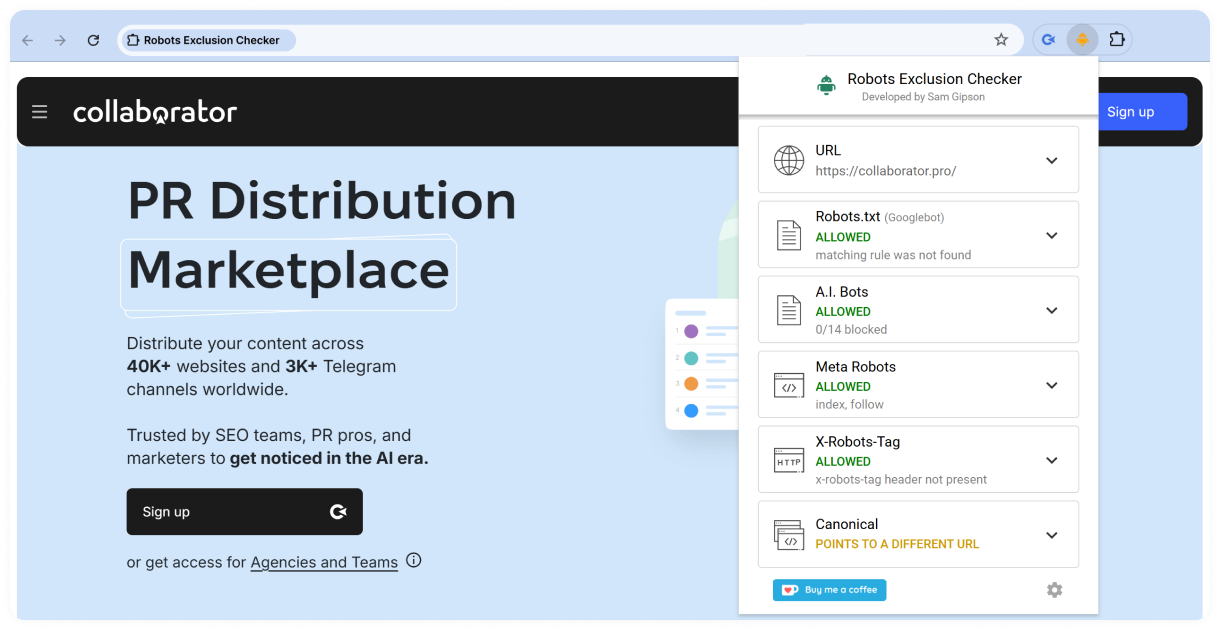
Robots Exclusion Checker in action: analyzing crawl directives for the Collaborator homepage
Best use cases:
- Diagnosing crawlability and indexation issues
- Checking robots.txt and robots directives
- Troubleshooting pages that aren't appearing in search results
- Auditing indexability signals on live or accessible staging pages
Pros:
- Makes robots-related issues easy to spot
- Clearly explains why a page is blocked
Cons:
- Focuses on crawlability and indexation rather than broader SEO analysis
Add to Chrome Robots Exclusion Checker →
Schema Builder for Structured Data
⭐ 3.6 👨💻 40,000 users 💰 Free extension
Schema Builder for Structured Data makes it easier to create and validate JSON-LD markup without writing code from scratch. It supports a wide range of Schema.org types and guides you through the required fields, helping you implement structured data correctly.
Key features:
- Generates JSON-LD structured data for multiple Schema.org types
- Supports 20+ Schema.org types, including Google-supported schema types
- Validates markup and highlights errors or warnings
- Detects existing structured data on a page
- Lets you edit and copy generated schema markup
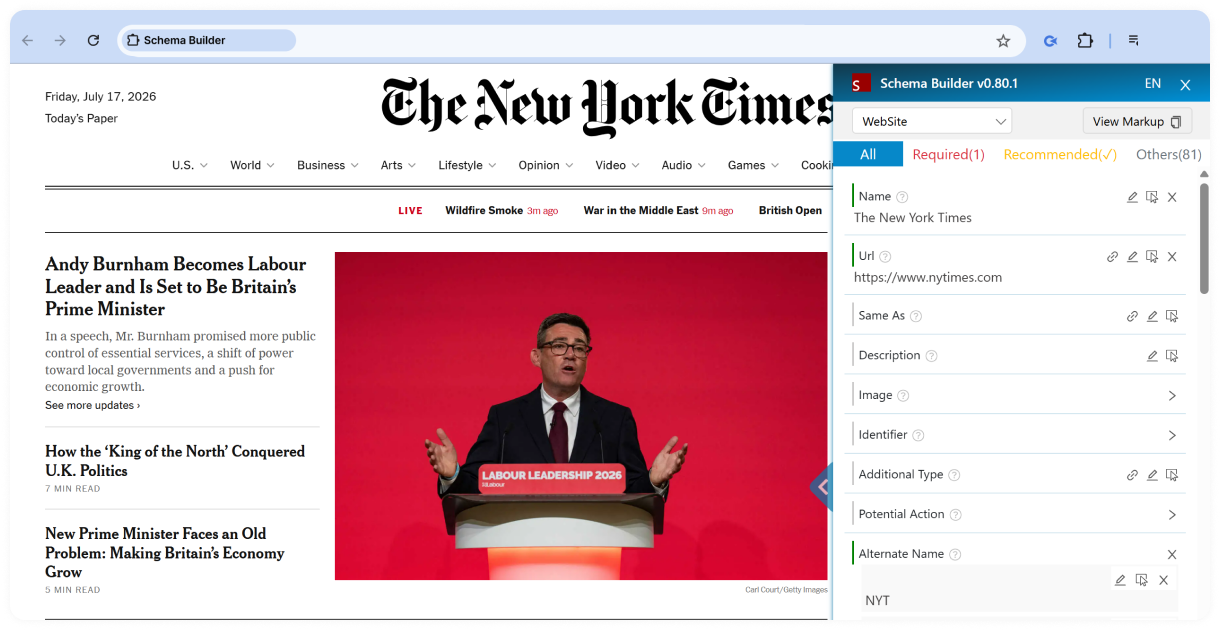
Schema Builder in action: analyzing structured data on The New York Times homepage
Best use cases:
- Creating structured data for new webpages
- Validating existing schema markup
- Troubleshooting structured data errors
- Preparing pages for rich results
Pros:
- Easy to use, even without coding experience
- Supports a wide variety of schema types
- Includes built-in validation tools
Cons:
- Focused exclusively on structured data
- Doesn't perform broader technical SEO audits
Add to Chrome Schema Builder for Structured Data →
Rich Results - Structured Data Test Plugin
⭐ 4.1 👨💻 5,000 users 💰 Free extension
Rich Results – Structured Data Test Plugin makes it easier to validate structured data without leaving the page you're analyzing. With a single click, it opens the current URL in Google's Rich Results Test, helping you identify issues that could prevent your content from appearing as rich results in search.
Key features:
- Opens the current page in Google's Rich Results Test
- Validates structured data and rich results eligibility
- Checks schema markup with a single click
- Provides quick access to Google's testing tools
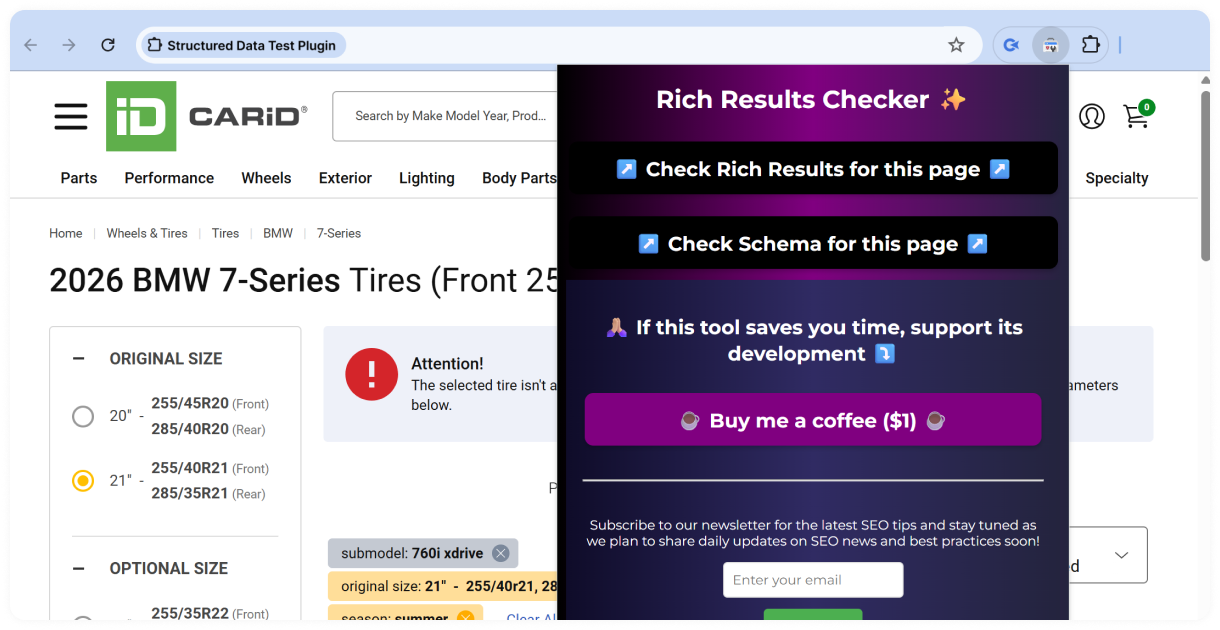
Rich Results Checker in action: validating structured data for the current page
Best use cases:
- Validating structured data on live or accessible staging pages
- Troubleshooting rich results issues
- Checking structured data during on-page SEO audits
Pros:
- Simple one-click workflow
- Saves time when testing structured data
Cons:
- Doesn't generate or edit schema markup
- Focused solely on structured data validation
Add to Chrome Rich Results - Structured Data Test Plugin→
Next, we'll look at extensions that simplify on-page SEO analysis.
On-Page SEO Analysis Extensions
On-page SEO analysis extensions make it easier to review page elements, compare websites, and identify optimization opportunities without leaving your browser. Whether you're auditing metadata, evaluating page authority, checking internal links, or analyzing competitors in search results, these tools provide quick access to the SEO data you need.
Comparison Table: On-Page SEO Extensions
| Extension | Best for | Pricing |
|---|---|---|
| Internal Link Builder ⭐ 5.0 | Finding internal linking opportunities | Free |
| SEOquake ⭐ 4.5 | On-page audits, SEO metrics, and competitor analysis | Freemium |
| Ahrefs SEO Toolbar ⭐ 4.4 | On-page and technical SEO analysis | Free |
| MozBar ⭐ 3.3 | Evaluating authority metrics and competitor research | Freemium |
| SEO Pro Extension ⭐ 4.8 | Reviewing metadata, page structure, and technical SEO elements | Free |
| META SEO Inspector ⭐ 4.4 | Auditing metadata and structured data | Free |
| SEO META in 1 CLICK ⭐ 4.9 | Reviewing on-page SEO elements | Free |
| NoFollow ⭐ 4.3 | Checking link attributes and robots directives | Free |
| Open SEO Stats ⭐ 4.3 | Website SEO overviews and indexation checks | Freemium |
Internal Link Builder is the first extension we'll cover before moving on to broader on-page SEO analysis tools.
Internal Link Builder
⭐ 5.0 👨💻 420 users 💰 Free extension
Internal Link Builder by LinkStorm is a free Chrome extension that instantly finds internal linking opportunities on your website. Instead of manually reviewing pages and searching for relevant content to link, the extension analyzes your site and highlights contextual link opportunities in seconds.
The extension is particularly useful for content audits, small to medium-sized websites, and quickly uncovering internal linking opportunities that might otherwise be missed.
Key features:
- Finds internal linking opportunities across your website
- Suggests relevant anchor text based on page content
- Highlights suggested anchors in context
- Opens referring pages in a preview window
- Works with WordPress, Shopify, static websites, and other CMSs
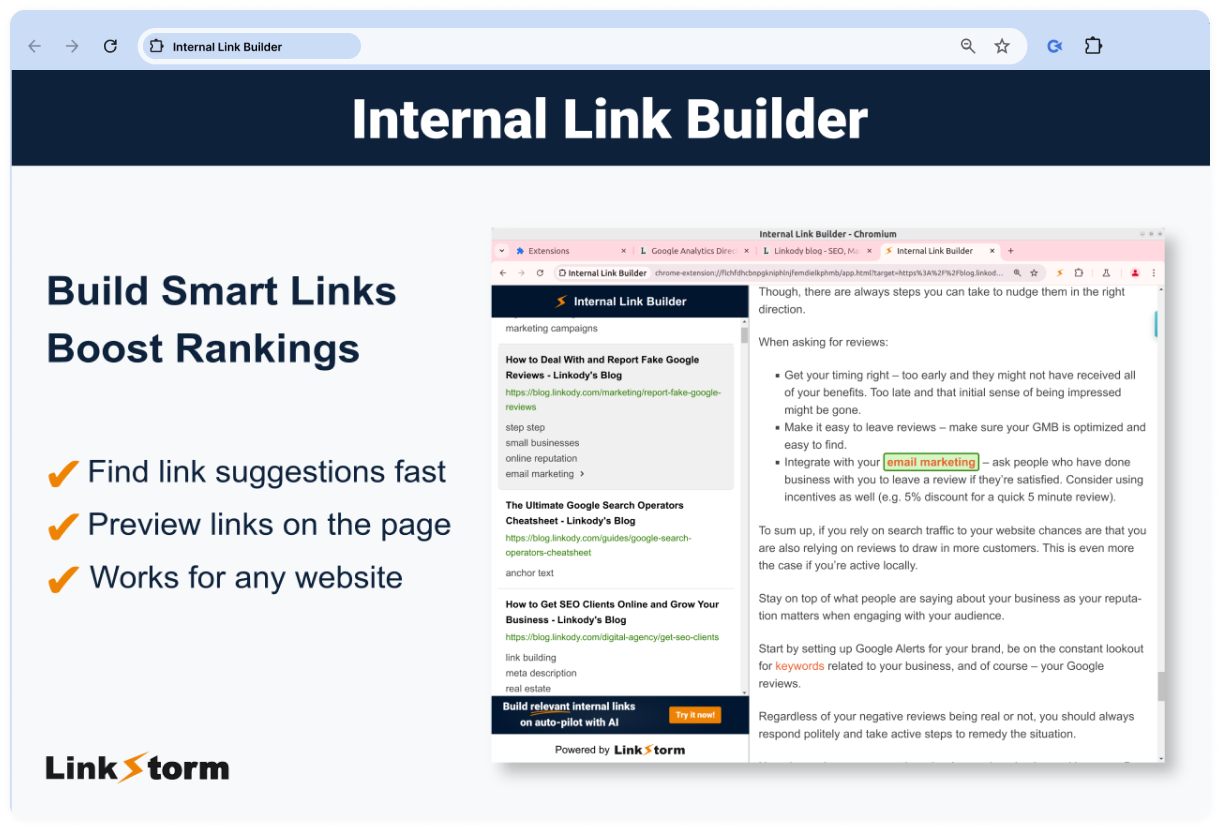
Internal Link Builder in action: suggesting relevant internal links for a webpage
Best use cases:
- Improving internal link structure
- Finding new linking opportunities for existing content
- Strengthening topical authority
- Optimizing content hubs
Pros:
- Works with most website platforms
- Processes data locally in your browser
Cons:
- Requires a publicly accessible XML sitemap
- Suggested links must be added manually
Add to Chrome Internal Link Builder →
SEOquake
⭐ 4.5 👨💻 1,000,000 users 💰 Freemium extension
SEOquake is an all-in-one SEO extension that gives you instant access to key SEO data for any webpage or search result. Whether you're analyzing your own site or researching competitors, it provides a quick overview without requiring you to switch between multiple tools.
Key features:
- Performs on-page SEO audits
- Displays SEO metrics for webpages and SERPs
- Analyzes internal and external links
- Checks keyword density and page metadata
- Compares URLs and exports SERP data
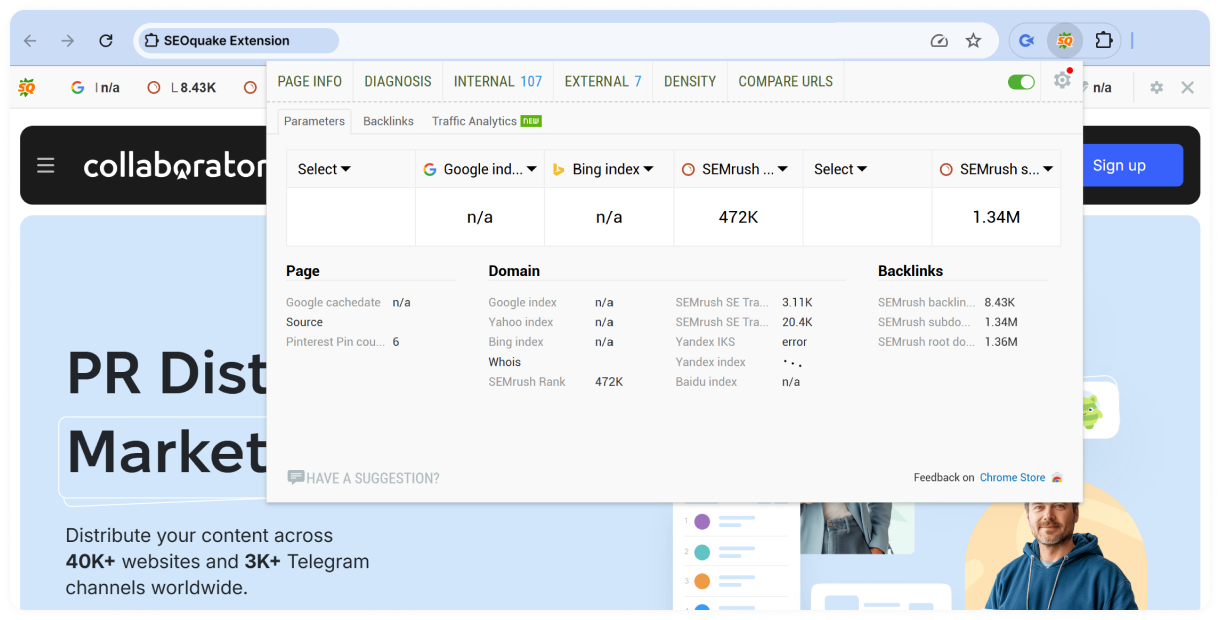
SEOquake in action: analyzing page and backlink metrics for the Collaborator homepage
Best use cases:
- Running quick on-page SEO audits
- Analyzing competitors in search results
- Reviewing page-level SEO metrics
- Comparing multiple webpages
Pros:
- Free to use with optional Semrush integration
- Combines several SEO tools in one extension
- Works directly in Google search results
Cons:
- Some features are enhanced with a Semrush account
- The interface may feel overwhelming for new users
Ahrefs SEO Toolbar
⭐ 4.4 👨💻 400,000 users 💰 Freemium extension
Ahrefs SEO extension facilitates basic SEO analysis and provides on-page SEO reports without needing access to Ahrefs metrics (especially helpful if you don't have a subscription). It offers insights into indexation indicators, analyzes titles and descriptions, identifies canonical URLs, displays headings, and shows social tags.
Key features:
- Analyzes titles, meta descriptions, headings, and social tags
- Checks canonical URLs, robots directives, and indexability
- Highlights broken, redirected, and outgoing links
- Reviews redirect chains and HTTP headers
- Displays Core Web Vitals data when available and compares raw HTML with rendered HTML
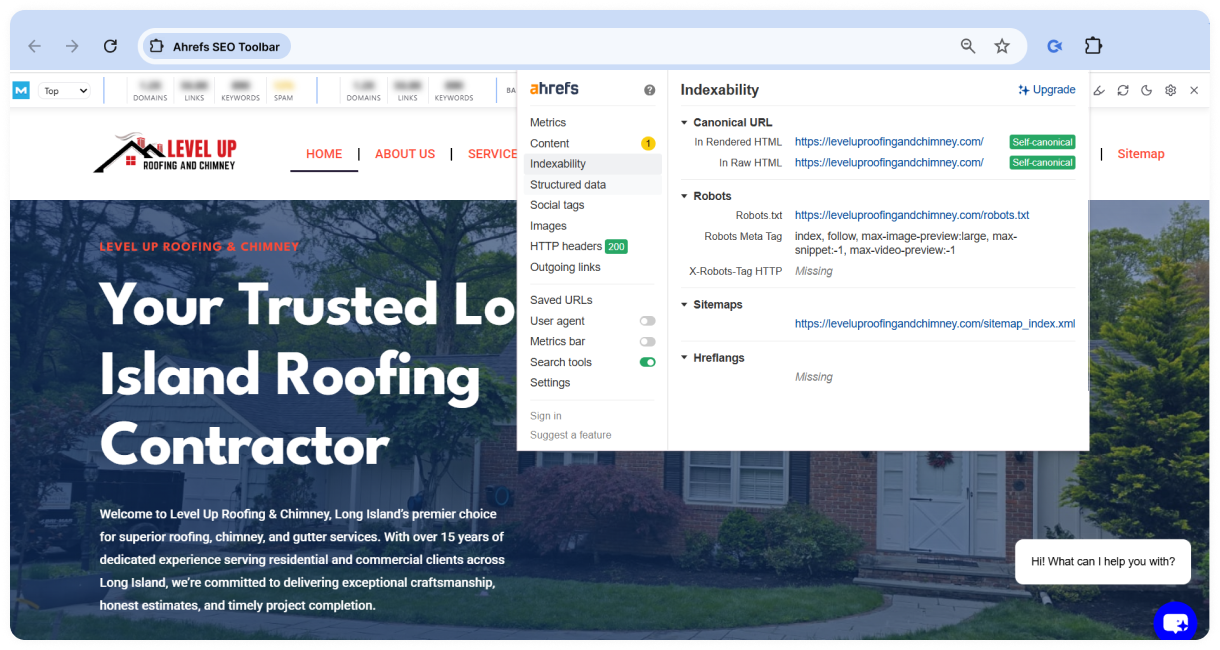
Ahrefs SEO Toolbar in action: analyzing the indexability of a webpage
Best use cases:
- Running on-page and technical SEO audits
- Reviewing page metadata and indexability
- Analyzing redirects and outgoing links
- Researching SERPs across different countries and languages
Pros:
- Combines on-page, technical SEO, and SERP analysis in one extension
- Available for Chrome, Firefox, and Safari
Cons:
- Some SEO metrics require an Ahrefs account or subscription
- The wide range of features may take time to explore
Add to Chrome Ahrefs SEO Toolbar →
MozBar
⭐ 3.3 👨💻 900,000 users 💰 Freemium extension
You can set up search by region and access data on page and domain authority, link profiles, and comparative link metrics. The basic version provides these insights for free, while the professional version requires authorization for additional features.
Key features:
- Displays Domain Authority (DA), Page Authority (PA), and Spam Score
- Analyzes page titles, meta descriptions, headings, and other on-page elements
- Highlights internal, external, followed, and nofollow links
- Compares link metrics across search results
- Supports custom searches by country, region, or city
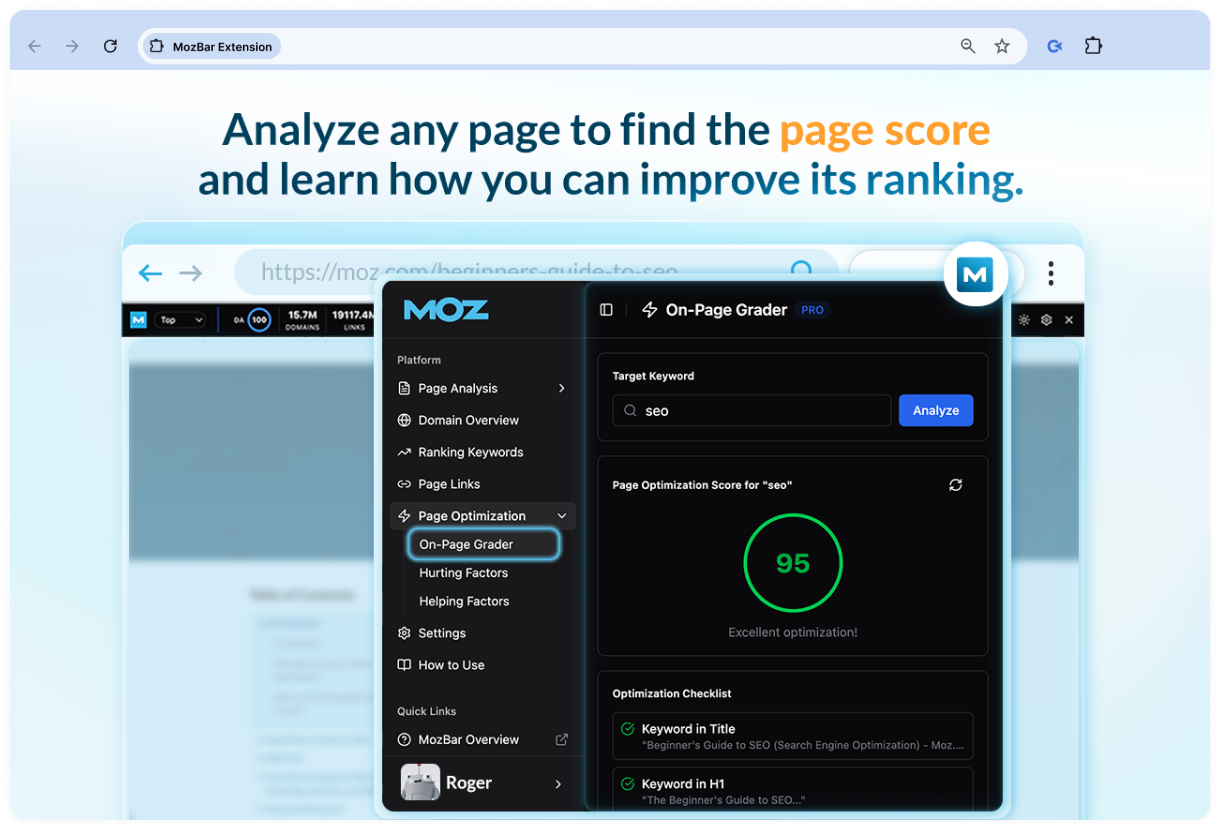
MozBar in action: analyzing on-page optimization with the On-Page Grader
Best use cases:
- Evaluating website authority before link building
- Comparing competitors in search results
- Reviewing on-page SEO elements
- Analyzing link profiles
Pros:
- Industry-standard authority metrics
- Works directly in Google search results
Cons:
- Some features require a Moz Pro subscription
- Uses Moz metrics, which may differ from those provided by other SEO platforms
SEO Pro Extension
⭐ 4.8 👨💻 100,000 users 💰 Free extension
The SEO Pro extension is helpful for both technical and content audits. It provides essential SEO data for any page you visit, including basic metrics, headings, schema, links, images, and structured data.
Key features:
- Displays page titles, meta descriptions, canonical URLs, and robots directives
- Reviews heading structure and structured data
- Highlights internal, external, and nofollow links
- Shows Core Web Vitals and HTTP status codes
- Previews Open Graph tags and exports page content
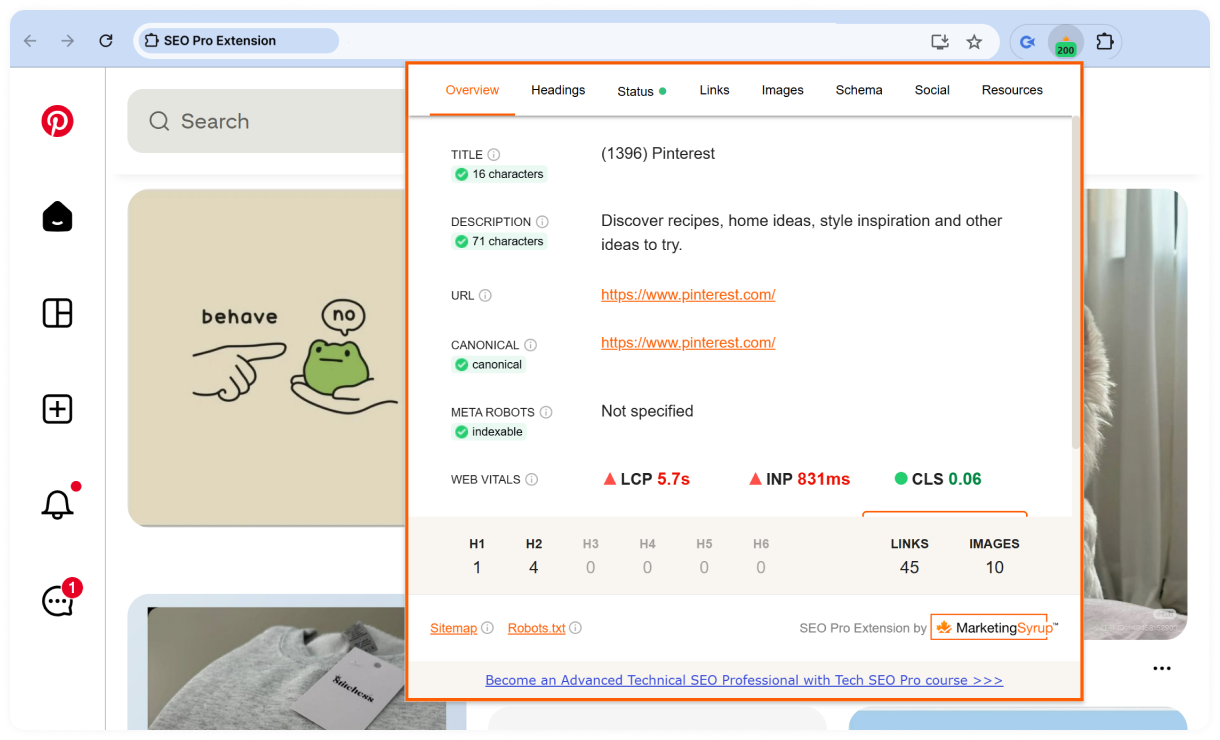
SEO Pro Extension in action: analyzing the on-page SEO elements of Pinterest
Best use cases:
- Running quick on-page SEO audits
- Reviewing page structure and metadata
- Checking Core Web Vitals and redirects
- Inspecting schema markup and links
Pros:
- Combines technical and on-page SEO checks in one extension
- Presents SEO data in a clean, easy-to-read interface
Cons:
- Available only for Chrome
- Designed for page-level analysis rather than full-site audits
Add to Chrome SEO Pro Extension →
META SEO Inspector
⭐ 4.4 👨💻 200,000 users 💰 Free extension
This extension is designed for web developers to check metadata on web pages, identify issues, and receive advice on how to resolve them. It helps identify metadata and HTML issues that may affect SEO and provides recommendations for improvement.
Key features:
- Reviews page titles, meta descriptions, canonical URLs, and robots directives
- Inspects structured data, including JSON-LD markup
- Detects missing or improperly configured SEO tags
- Provides recommendations for resolving metadata issues
- Exports metadata and generates reports
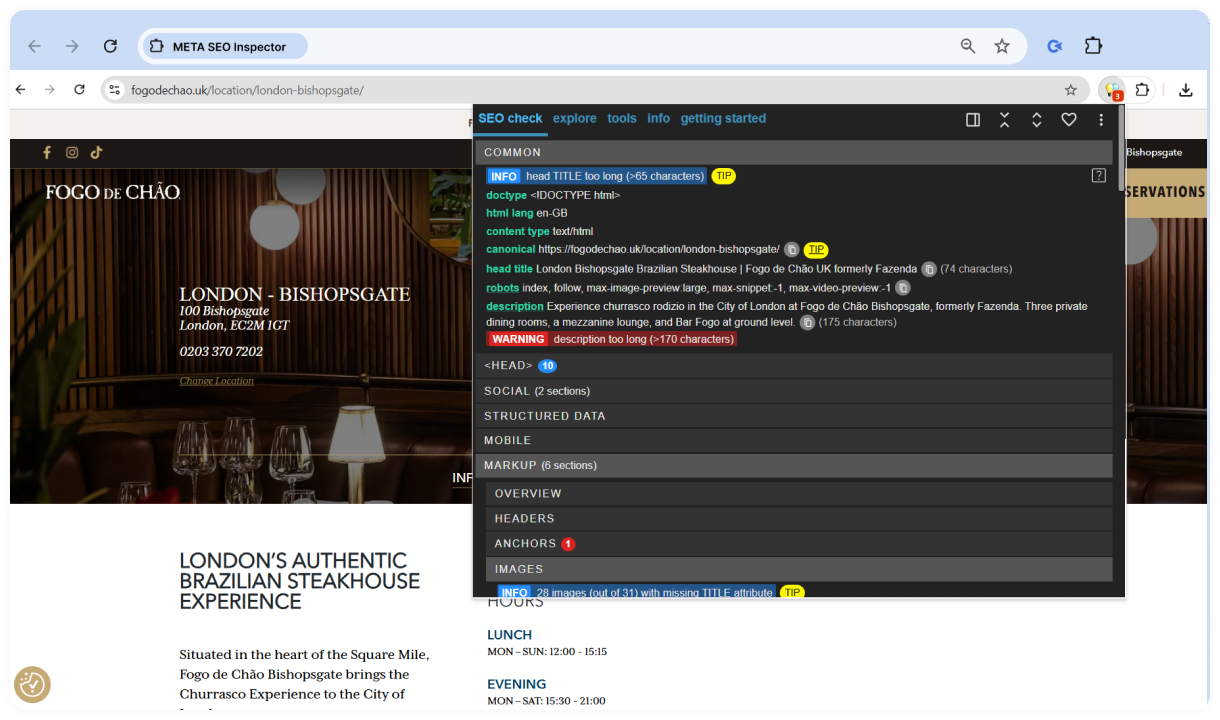
META SEO Inspector in action: analyzing the SEO metadata of a webpage
Best use cases:
- Auditing page metadata
- Validating structured data implementation
- Identifying on-page SEO issues
- Reviewing live or accessible staging pages
Pros:
- Makes metadata issues easy to identify
- Includes actionable recommendations
- Supports exporting reports
Cons:
- Focused on page-level analysis rather than sitewide audits
- Doesn't include backlink or keyword research tools
Add to Chrome META SEO inspector →
SEO META in 1 CLICK
⭐ 4.9 👨💻 900,000 users 💰 Free extension
This plugin provides a general overview of your site's SEO performance, including titles, headings, images, metadata, structured data, and social tags. Super helpful for analyzing and optimizing meta tags, metadata, and other elements on your page.
Key features:
- Displays page titles, meta descriptions, and canonical URLs
- Reviews heading structure and robots directives
- Inspects Open Graph and Twitter Card tags
- Checks image alt attributes and structured data
- Shows internal and external links and HTTP status information
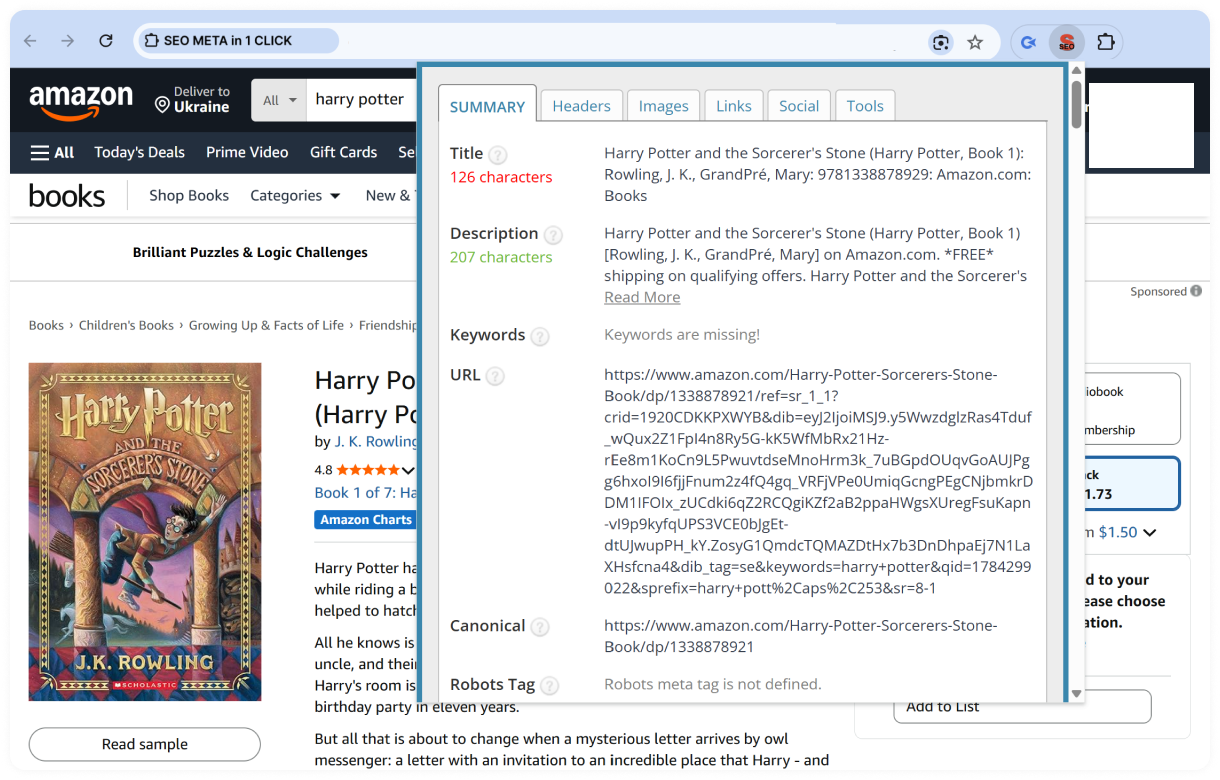
SEO META in 1 CLICK in action: analyzing the on-page SEO elements of an Amazon product page
Best use cases:
- Auditing on-page SEO elements
- Reviewing page metadata
- Checking heading structure and image optimization
- Inspecting structured data
Pros:
- Presents key SEO data in a clear, organized layout
- Covers most essential on-page SEO elements
Cons:
- Focused on individual pages rather than sitewide audits
- Doesn't include keyword or backlink metrics
Add to Chrome SEO META in 1 CLICK →
NoFollow
⭐ 4.3 👨💻 100,000 users 💰 Free extension
The Nofollow extension helps you identify nofollow links, nofollow meta tags, and noindex directives on web pages. It supports detecting nofollow, UGC, and sponsored attribute values, as well as custom meta tags for search engine robots. You can also enable or disable the extension for specific websites, tailoring its functionality to your needs.
Key features:
- Highlights nofollow, UGC, and sponsored links
- Detects noindex meta tags and robots directives
- Supports search engine-specific robots meta tags
- Lets you enable or disable the extension for specific websites
- Allows customization of link highlighting styles
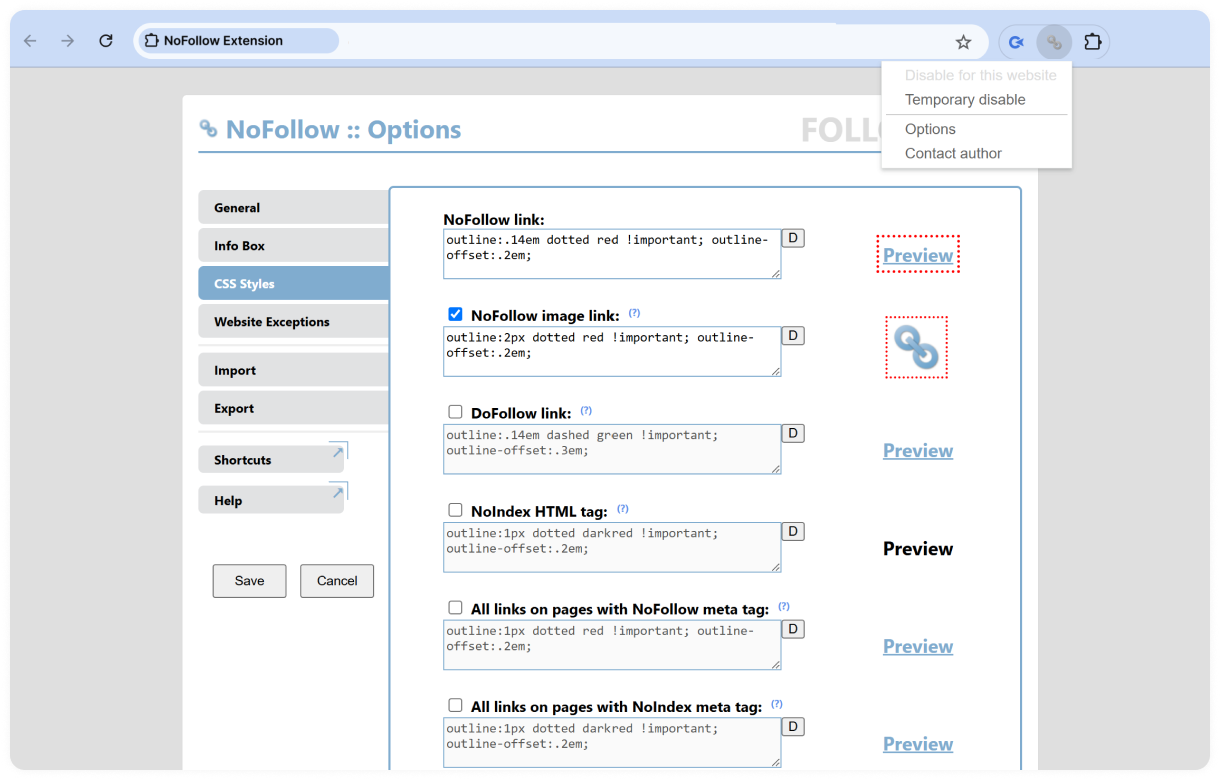
NoFollow extension settings for highlighting nofollow and dofollow links
Best use cases:
- Auditing outbound links
- Verifying link attributes on guest posts and sponsored content
- Checking robots directives during on-page SEO reviews
Pros:
- Makes link attributes easy to identify
- Supports modern rel attributes, including UGC and sponsored
Cons:
- Focused on link attributes and robots directives
- Doesn't provide broader on-page SEO metrics
Open SEO Stats
⭐ 4.3 👨💻 100,000 users 💰 Freemium extension
Open SEO Stats gives you a quick snapshot of a website's SEO and technical information without leaving the page. It combines indexation data, page elements, link statistics, and site information into a single report, making it a useful tool for everyday SEO checks.
Key features:
- Shows indexed pages across multiple search engines
- Displays page metadata, headings, and image alt text
- Reviews internal, external, and nofollow links
- Provides access to XML sitemaps, robots.txt, DNS lookup, and Geo IP information
- Displays cached versions from Google and the Internet Archive
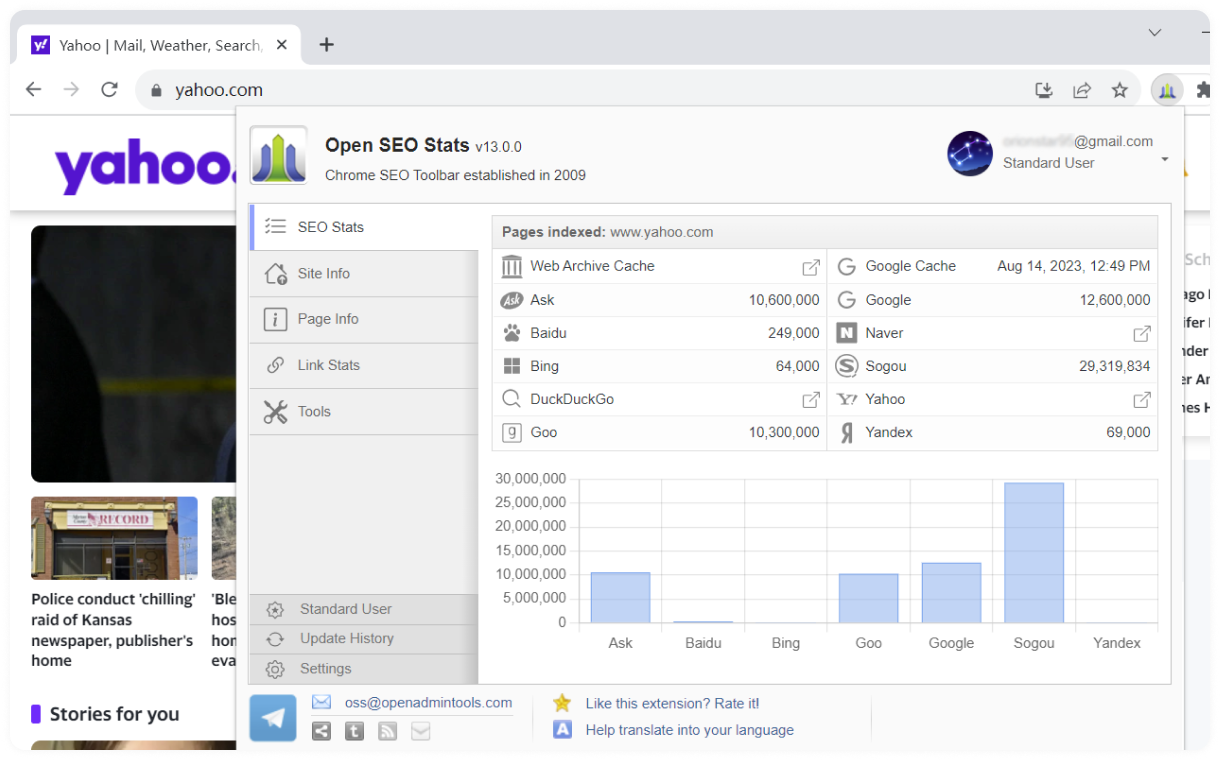
Open SEO Stats in action: displaying page indexation and SEO statistics for Yahoo
Best use cases:
- Running quick website SEO reviews
- Checking indexation and cache status
- Reviewing on-page SEO elements
- Inspecting technical website information
Pros:
- Covers a wide range of SEO and technical metrics
- Supports more than 30 languages
- Combines multiple website checks in one extension
Cons:
- Some features require in-app purchases
- Focused on page-level analysis rather than full-site audits
Add to Chrome Open SEO Stats →
The next group of Google extensions worth your attention helps with keyword research and SERP analysis.
Keyword Research & SERP Analysis Extensions
Keyword research extensions help you discover search opportunities, analyze competitors, and evaluate search results without leaving your browser. Whether you're looking for keyword ideas, search volume data, trend insights, or location-specific SERPs, these tools make it easier to research and validate topics directly in Google Search and other platforms.
Comparison Table: Keyword Research Extensions
| Extension | Best for | Pricing |
|---|---|---|
| Keyword Surfer ⭐ 4.2 | Keyword research directly in Google Search | Free (AI features require a Surfer subscription) |
| Keywords Everywhere ⭐ 4.5 | Multi-platform keyword research and content planning | Freemium |
| Ubersuggest ⭐ 4.5 | Keyword research and competitor analysis | Freemium |
| Glimpse ⭐ 4.8 | Trend research and seasonal keyword analysis | Freemium |
| SEO Extension by Mangools ⭐ 4.3 | Keyword research, backlinks, and website analysis | Freemium |
| Similarweb ⭐ 4.6 | Traffic analysis and competitor research | Freemium |
| Nightwatch Search Simulator ⭐ 4.8 | Location-based SERP analysis | Free |
Keyword Surfer opens our list of keyword research extensions.
Keyword Surfer
⭐ 4.2 👨💻 600,000 users 💰 Free extension
Keyword Surfer brings keyword research directly into Google Search, so you can evaluate opportunities without switching to a separate SEO tool. The extension is free to use for keyword research, while some AI-powered features are available through Surfer's paid platform.
Key features:
- Displays monthly search volume and CPC in Google Search
- Suggests related keywords and content ideas
- Shows keyword insights and related metrics
- Lets you save keywords into collections and export them as CSV
- Supports ChatGPT Humanizer for Surfer subscribers
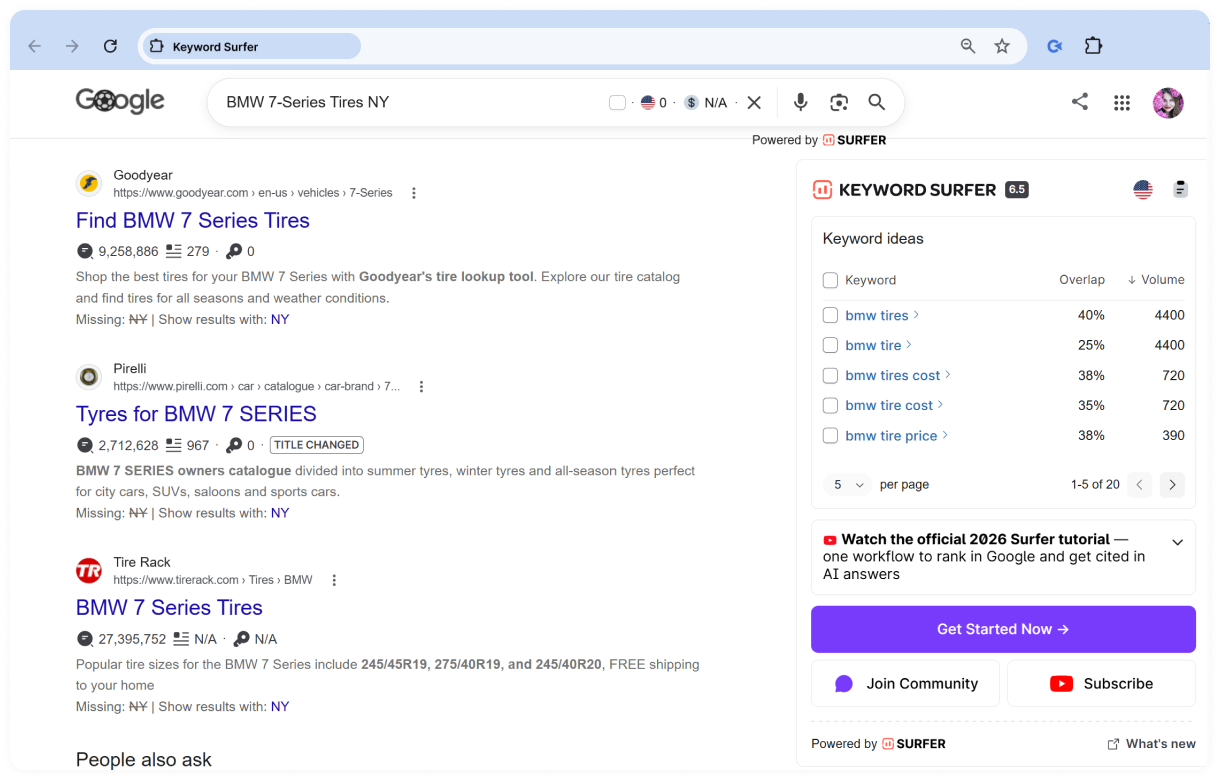
Keyword Surfer in action: displaying keyword ideas alongside Google search results
Best use cases:
- Researching keywords directly in Google Search
- Discovering related search terms
- Building keyword lists for content planning
- Exporting keyword research for further analysis
Pros:
- Displays keyword data directly in Google Search
- Makes keyword research faster and more convenient
Cons:
- Advanced AI features require a Surfer subscription
- Available only for Chromium-based browsers
Add to Chrome Keyword Surfer →
Keywords Everywhere
⭐ 4.5 👨💻 1,000,000 users 💰 Freemium extension
Keywords Everywhere is a freemium keyword research extension that displays SEO data directly in your browser. It helps you discover related keywords, analyze search intent, and access valuable insights across Google Search and many other websites, while advanced keyword metrics are available with a paid subscription.
Key features:
- Displays related keywords and "People Also Search For" suggestions
- Shows estimated organic traffic for pages and SEO metrics
- Provides keyword difficulty and on-page analysis
- Supports keyword research across Google, YouTube, Amazon, Google Search Console, and other platforms
- Includes AI-powered SEO reports and keyword tools
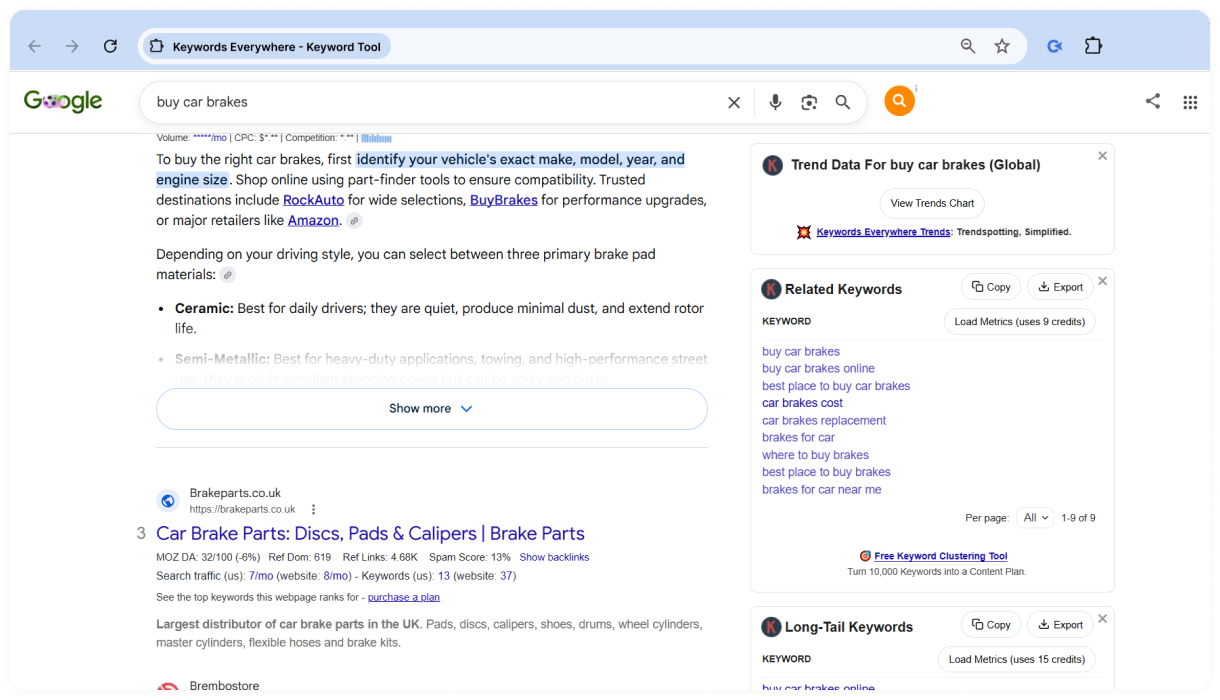
Keywords Everywhere in action: displaying related keywords alongside Google search results
Best use cases:
- Discovering new keyword opportunities
- Expanding content and topic ideas
- Analyzing keywords across multiple platforms
- Supporting SEO content planning
Pros:
- Works across multiple search engines and websites
- Combines keyword research and SEO insights in one extension
Cons:
- Search volume, CPC, trends, and other advanced metrics require a paid subscription
- The wide range of features may take time to explore
Add to Chrome Keywords Everywhere - Keyword Tool →
Ubersuggest
⭐ 4.5 👨💻 600,000 users 💰 Freemium extension
Ubersuggest provides keyword suggestions, search volume data, and cost-per-click (CPC) metrics directly within your search results. This extension helps you uncover valuable SEO insights without leaving the search page, making keyword research faster and more convenient.
Key features:
- Displays search volume, CPC, and SEO competition
- Suggests keyword and content ideas
- Shows website metrics, including domain score and backlink data
- Analyzes top-ranking pages and keyword opportunities
- Works with Google, YouTube, and Amazon
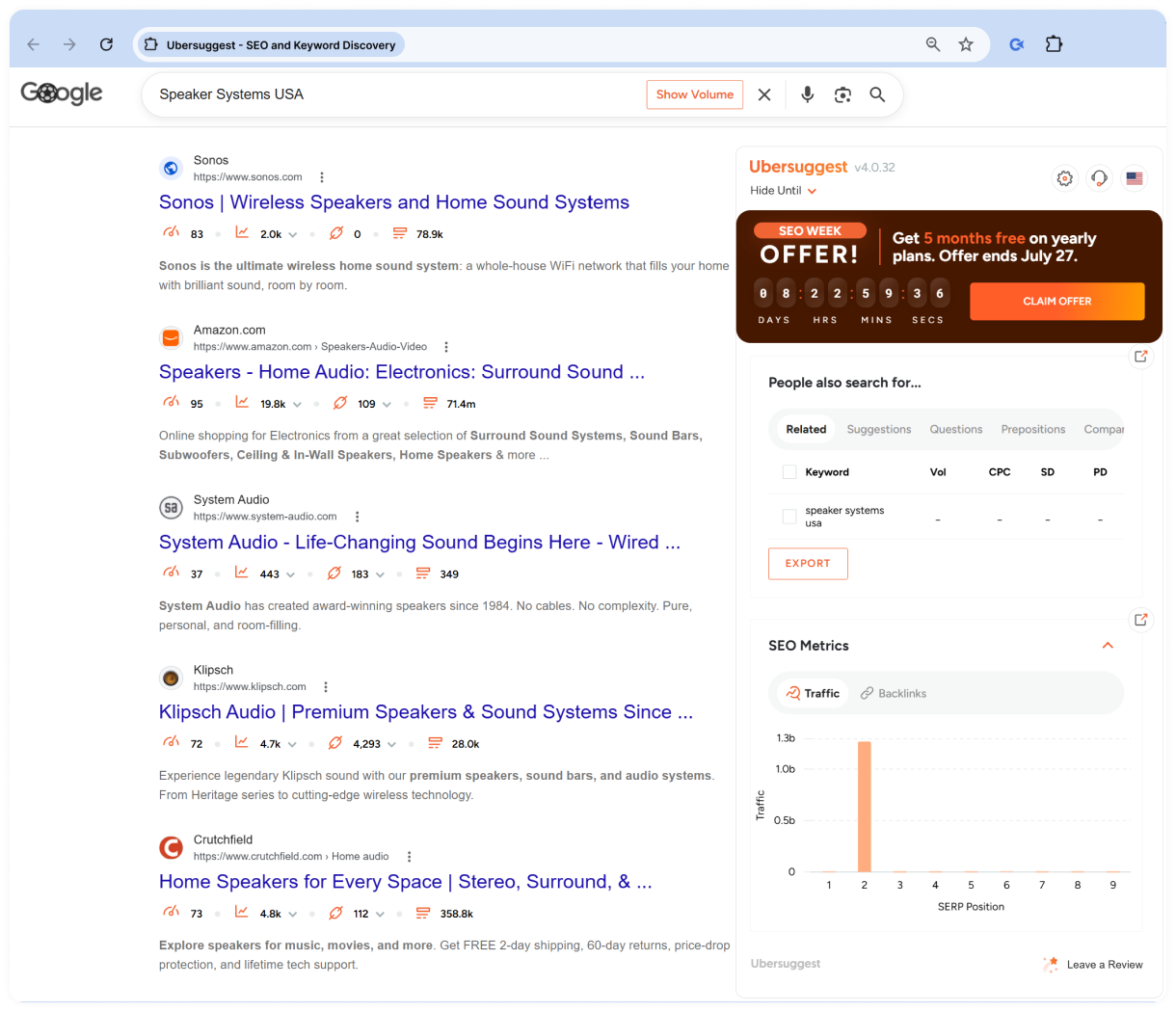
Ubersuggest in action: displaying keyword ideas and SEO metrics alongside Google search results
Best use cases:
- Researching keywords while browsing search results
- Analyzing competitors and top-ranking pages
- Finding content ideas and keyword opportunities
- Evaluating website SEO metrics
Pros:
- Combines keyword research and website analysis
- Supports multiple search platforms
Cons:
- Access to additional data requires an upgrade
- Available only for Google Chrome
Add to Chrome Ubersuggest - Keyword & SEO Tool →
Glimpse
⭐ 4.8 👨💻 100,000 users 💰 Freemium extension
Glimpse enhances Google Trends with search volume data, long-tail keyword suggestions, trending topic alerts, and easy export options. It’s ideal for discovering trending topics, product niches, and business ideas with real-time insights, trusted by professionals worldwide.
Key features:
- Displays estimated search volume and growth metrics
- Shows seasonality and trend forecasts
- Suggests long-tail keywords and related searches
- Tracks keywords and sends trend alerts
- Exports Google Trends data to Google Sheets
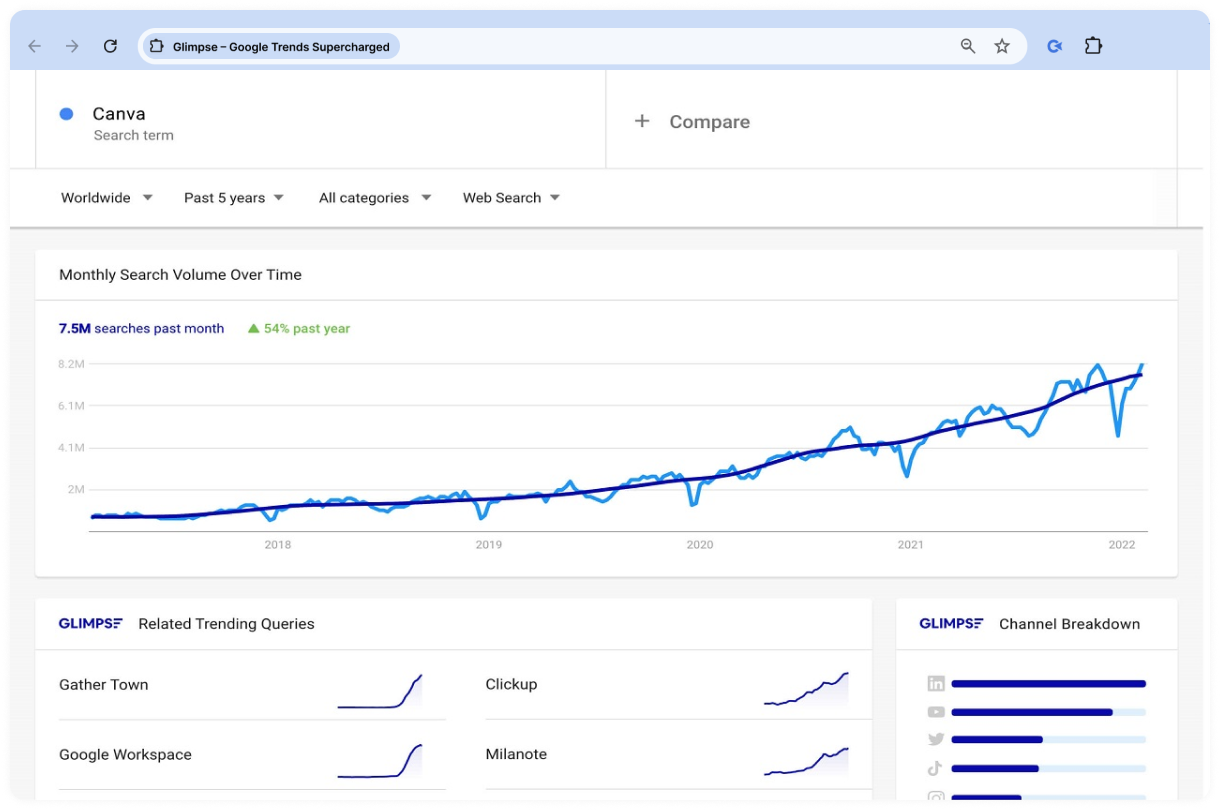
Glimpse in action: displaying enhanced search trend data in Google Trends
Best use cases:
- Discovering emerging keyword trends
- Planning SEO and content strategies
- Researching seasonal search demand
- Monitoring keyword popularity over time
Pros:
- Enhances Google Trends with richer SEO insights
- Makes trend research faster and more actionable
Cons:
- Many advanced insights require a paid subscription
- Works specifically with Google Trends
Add to Chrome Glimpse - Google Trends & Insights Tool →
SEO Extension by Mangools
⭐ 4.3 👨💻 60,000 users 💰 Freemium extension
SEO Extension by Mangools combines keyword research, backlink analysis, website metrics, and on-page SEO tools in one extension. It helps you evaluate websites, analyze competitors, and identify optimization opportunities without switching between multiple SEO platforms.
Key features:
- Displays website authority metrics, including DA, PA, Citation Flow, and Trust Flow
- Shows top-ranking keywords, search volume, and estimated traffic
- Analyzes backlinks and link attributes
- Reviews metadata, headings, structured data, and keyword usage
- Checks broken links and previews Google SERP snippets
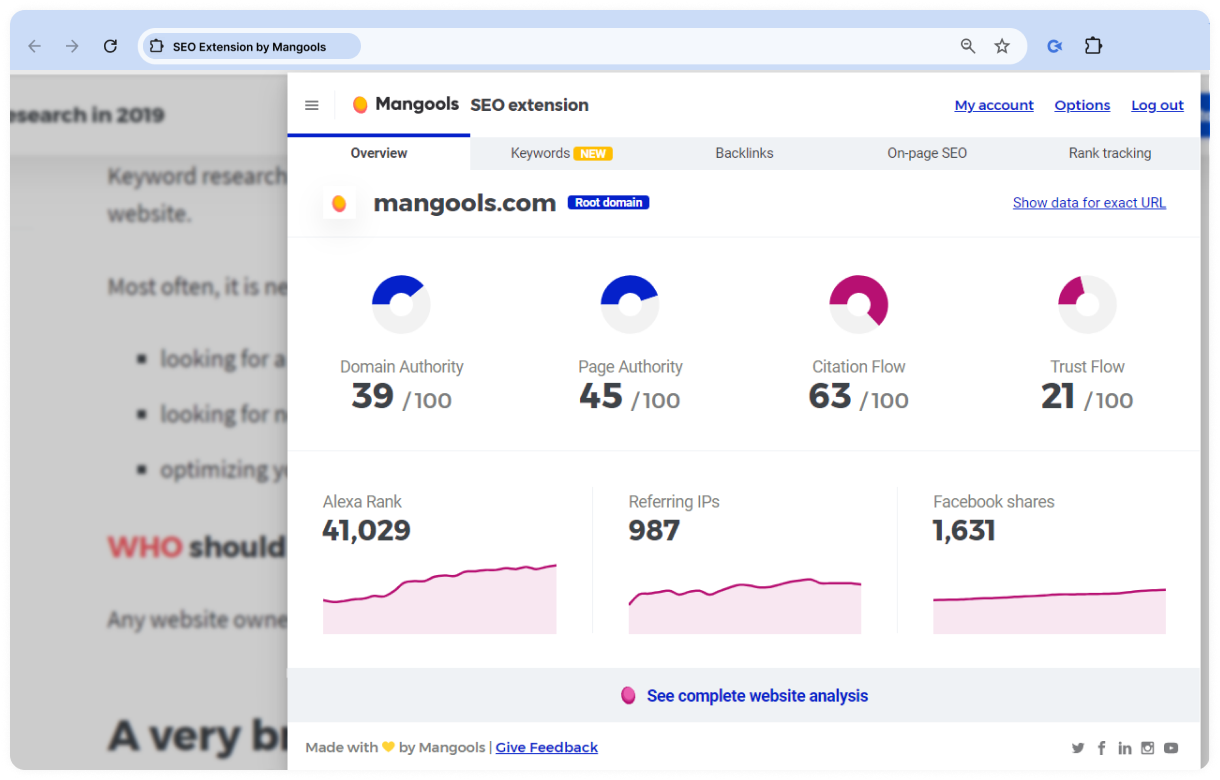
SEO Extension by Mangools in action: displaying domain authority and backlink metrics for a website
Best use cases:
- Researching competitors
- Running quick on-page SEO audits
- Analyzing backlinks and website authority
- Discovering keyword opportunities
Pros:
- Combines multiple SEO tools in one extension
- Includes backlink, keyword, and on-page analysis
- Integrates with the Mangools SEO toolkit
Cons:
- Requires a Mangools subscription after the free trial
- Available only for Chrome
Add to Chrome Mangools - SEO Extension →
SimilarWeb
⭐ 4.6 👨💻 1,000,000 users 💰 Freemium extension
The SimilarWeb plugin provides traffic estimates, engagement metrics, traffic sources, and keyword insights for any website. It’s a powerful tool for competitor analysis, offering a glimpse into your peers' traffic.
With this extension, you can view the website’s rating, track the number of visits and bounce rates, analyze traffic sources (such as paid, organic, and social), and explore the geographic distribution of the visitor base.
Key features:
- Estimates website traffic and engagement metrics
- Shows traffic sources and audience distribution
- Displays top keywords and marketing channels
- Provides website ranking and category information
- Offers insights directly while browsing websites
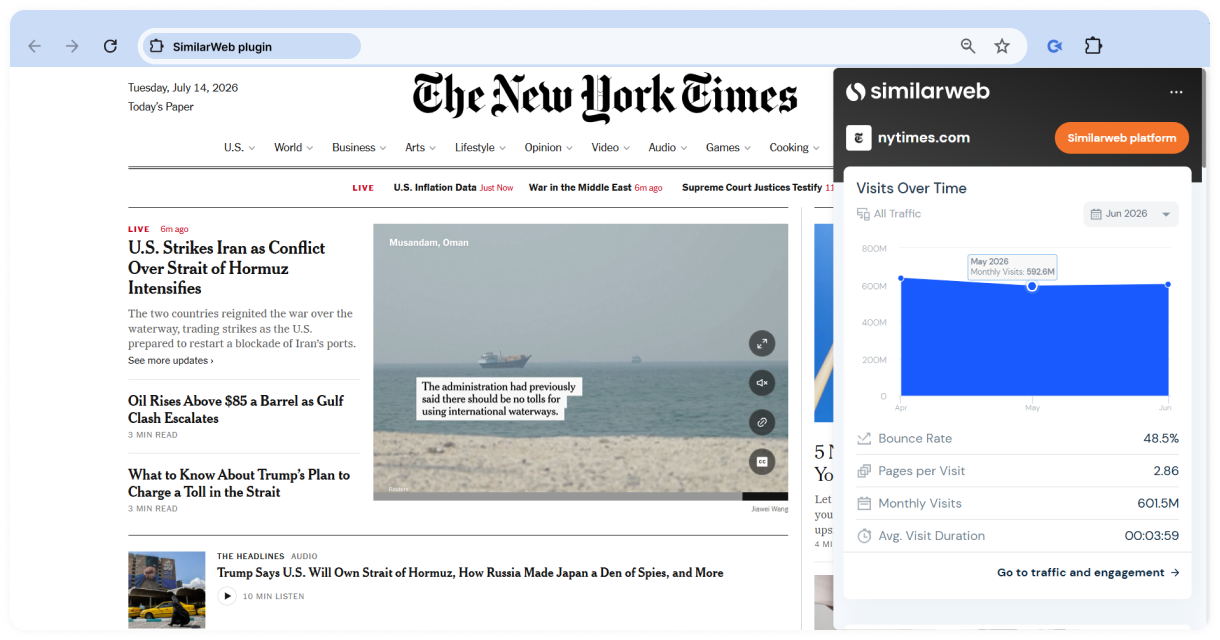
Similarweb in action: displaying traffic and engagement metrics for The New York Times website
Best use cases:
- Analyzing competitor websites
- Researching traffic sources and audience behavior
- Comparing website performance
- Identifying keyword and marketing opportunities
Pros:
- Makes competitor research quick and convenient
- Covers traffic, audience, and keyword data in one extension
Cons:
- Some advanced insights require a Similarweb account
- Traffic and engagement metrics are estimates rather than exact analytics
Nightwatch Search Simulator
⭐ 4.8 👨💻 100,000 users 💰 Free extension
SEO Search Simulator by Nightwatch lets you view Google search results as if you were searching from a different country, city, or language. It removes personalization from search results, making it easier to check your own rankings or see how competitors appear in local SERPs without using a VPN or Incognito mode.
Key features:
- Simulates Google searches from different countries, cities, and languages
- Displays unbiased search results without personalization
- Highlights your website or a competitor's domain in the SERPs
- Lets you save searches for future use
- Doesn't require a VPN or Incognito mode for basic searches
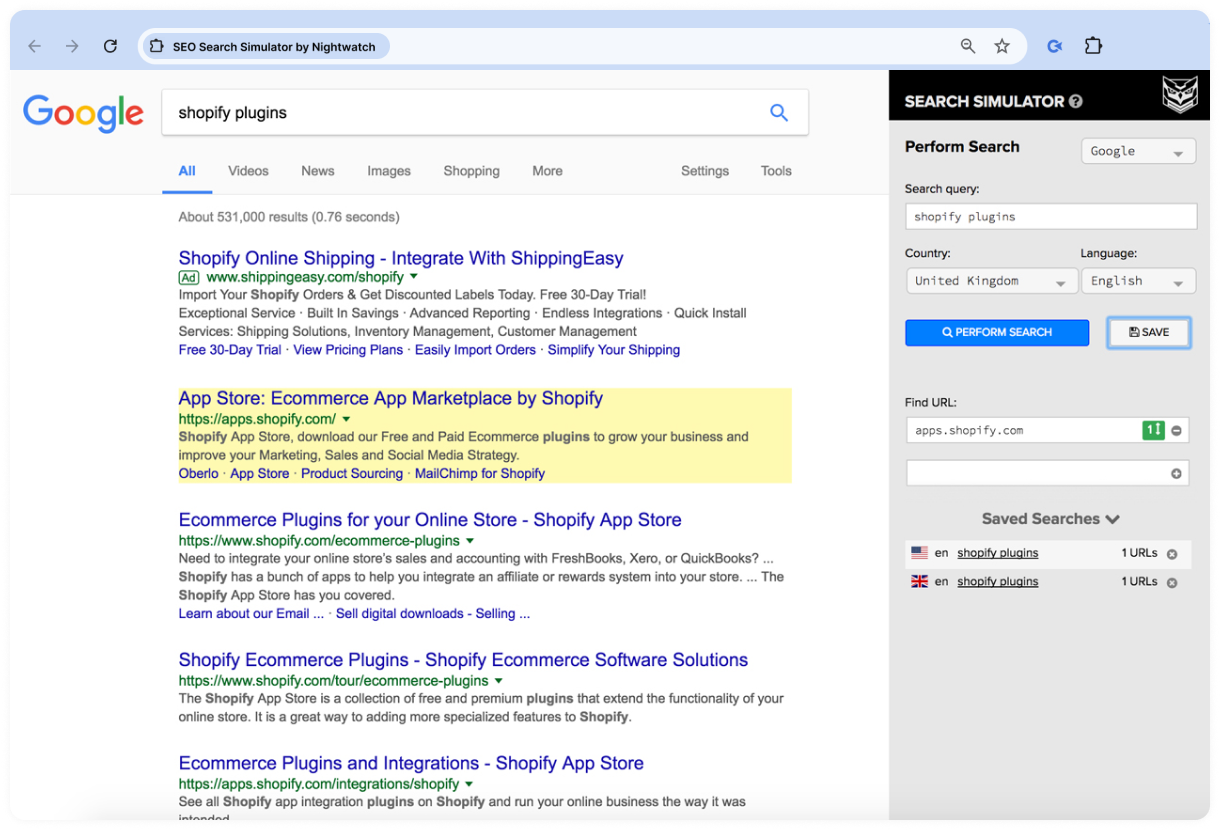
SEO Search Simulator in action: simulating Google search results for a specific country and language
Best use cases:
- Checking local keyword rankings
- Previewing search results in different locations
- Analyzing competitors in international markets
- Verifying location-specific SEO efforts
Pros:
- Supports location and language-based searches
- Quick and easy way to view unbiased Google SERPs
Cons:
- Focuses exclusively on Google Search
- Doesn't provide historical rank tracking or reporting like the Nightwatch platform
Add to Chrome Nightwatch Search Simulator →
Keyword research helps you find opportunities, but analytics tools show how those efforts perform in practice. The next extensions focus on traffic, user behavior, and website performance.
Analytics & Performance Extensions
Analytics & Performance Extensions help you understand how your website performs beyond keyword rankings. They provide insights into traffic, user behavior, page speed, and tracking data, making it easier to monitor performance and identify issues that could affect your SEO efforts.
Comparison Table: Analytics & Performance Extensions
| Extension | Best for | Pricing |
|---|---|---|
| Lighthouse ⭐ 4.4 | Website performance, accessibility, and SEO audits | Free |
| Google Analytics Debugger ⭐ 4.2 | Debugging Google Analytics implementations | Free |
| Tag Assistant ⭐ 3.9 | Verifying Google tags and events | Free |
| Page Load Time ⭐ 4.5 | Quick page load time checks | Free |
Let's start with Lighthouse, Google's free auditing tool for website performance and SEO.
Lighthouse
⭐ 4.4 👨💻 1,000,000 users 💰 Free extension
Lighthouse is Google's free auditing tool for evaluating website quality and performance. With a single click, it generates a detailed report covering performance, accessibility, SEO, and best practices, along with recommendations to help you improve your pages.
Key features:
- Audits website performance and Core Web Vitals
- Evaluates accessibility and SEO
- Checks compliance with web best practices
- Generates detailed reports with improvement recommendations
- Produces reports for Progressive Web Apps (PWAs)
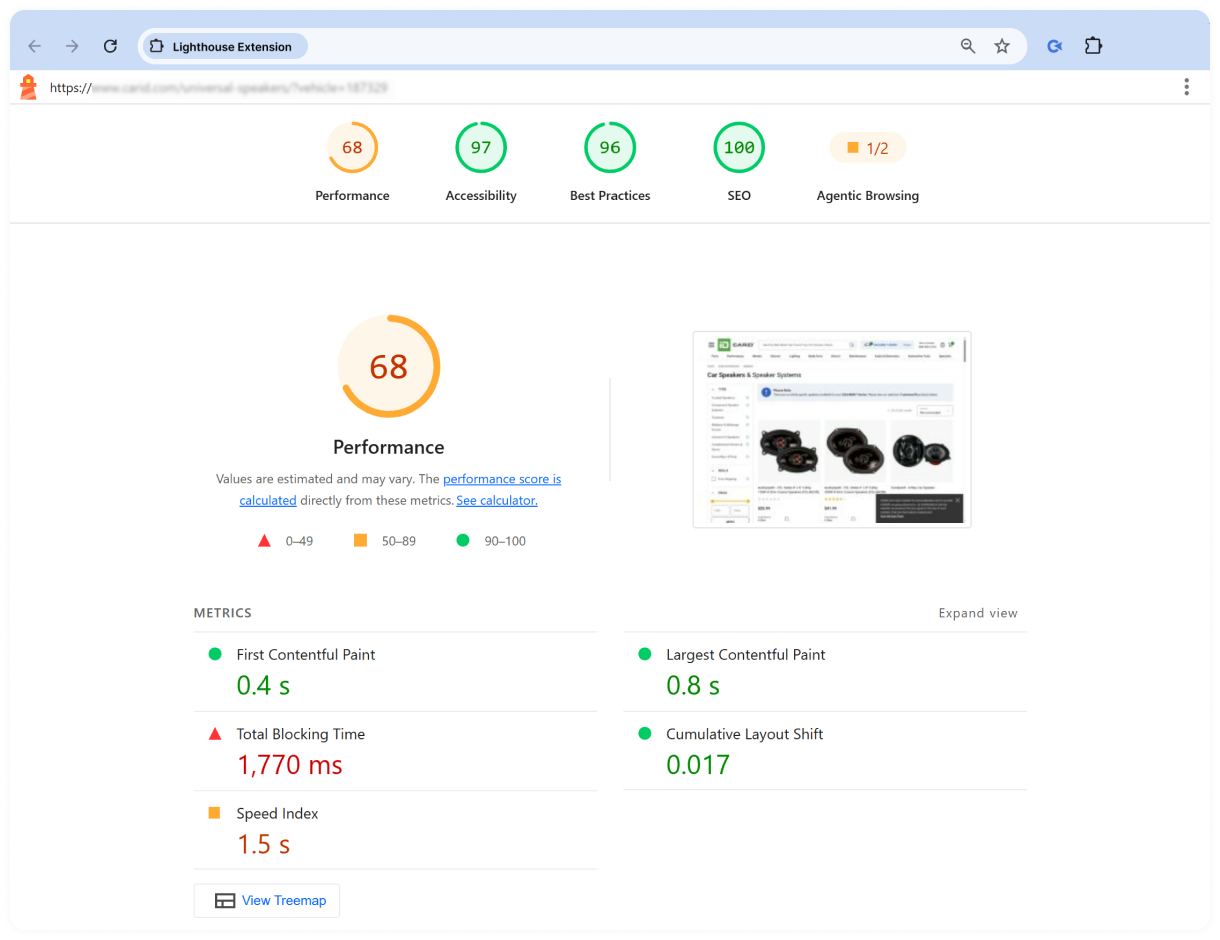
Lighthouse in action: auditing a webpage's performance, accessibility, best practices, and SEO
Best use cases:
- Running technical SEO and performance audits
- Identifying page speed bottlenecks
- Improving accessibility and user experience
- Validating websites before launch
Pros:
- Developed and maintained by Google
- Provides actionable recommendations
- Covers multiple aspects of website quality in one report
Cons:
- Audits one page at a time
- Performance scores can vary depending on test conditions
Google Analytics Debugger
⭐ 4.2 👨💻 600,000 users 💰 Free extension
Google Analytics Debugger helps you verify that your Google Analytics implementation is working as expected. When enabled, it displays detailed debugging information in your browser's developer console, making it easier to troubleshoot tracking issues and validate events.
Key features:
- Displays detailed Google Analytics debugging information
- Logs tracking requests and events to the JavaScript console
- Helps troubleshoot Google Analytics implementations
- Supports troubleshooting measurement issues
- Works directly in Google Chrome
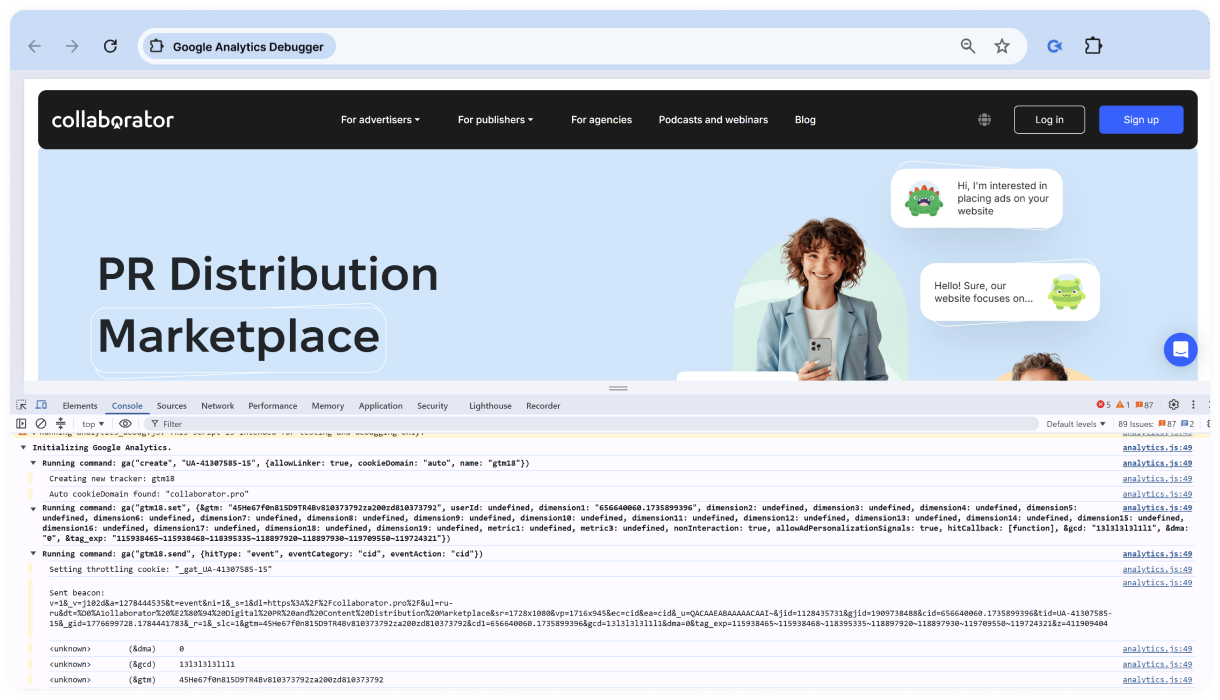
Google Analytics Debugger in action: displaying Google Analytics events for the Collaborator homepage
Best use cases:
- Debugging Google Analytics tracking
- Verifying event implementation
- Troubleshooting measurement issues
- Testing analytics before deployment
Pros:
- Developed by Google
- Provides detailed debugging information
- Simple to enable and disable
Cons:
- Requires familiarity with browser developer tools
- Designed specifically for Google Analytics debugging rather than general SEO or website analysis
Add to Chrome Google Analytics Debugger →
Tag Assistant
⭐ 3.9 👨💻 3,000,000 users 💰 Free extension
Tag Assistant helps you verify whether Google tags are installed and working correctly on your website. Instead of inspecting the page source or relying on trial and error, you can quickly see which Google tags are detected and start a debugging session directly from the extension.
Key features:
- Detects Google Analytics, Google Tag Manager, Google Ads, and other supported Google tags on a webpage
- Launches a debugging session in Tag Assistant for real-time tag validation
- Helps identify missing or incorrectly configured Google tags
- Displays detected tags in a browser side panel for quick review
- Supports debugging across multiple pages during a browsing session
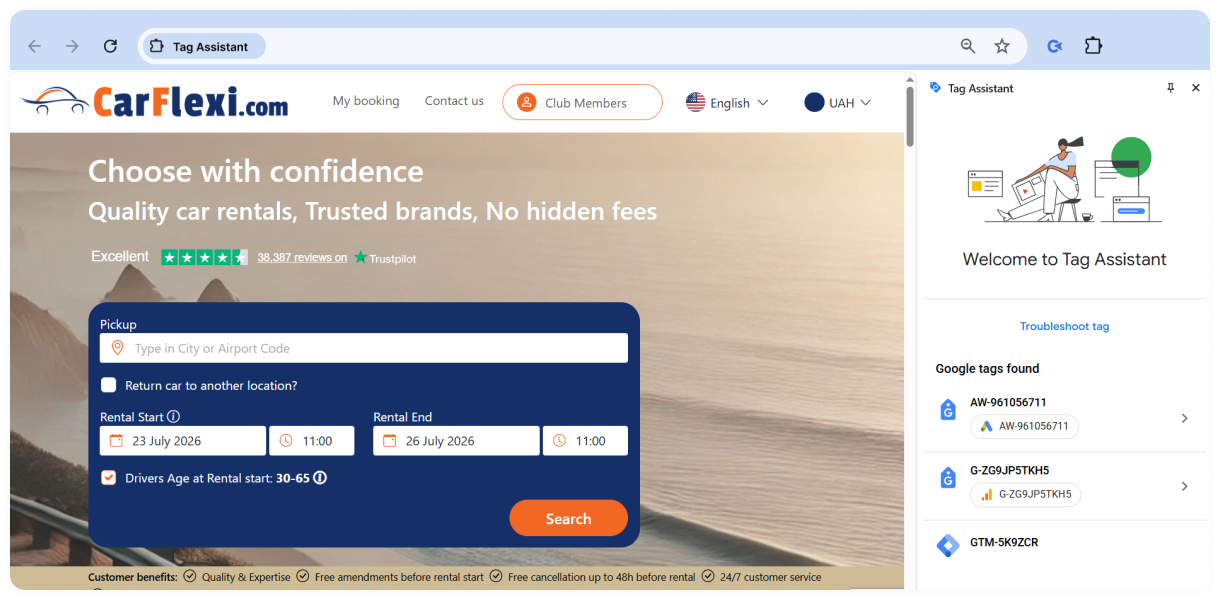
Tag Assistant in action: detecting Google tags on a webpage
Best use cases:
- Verifying GA4 and Google Tag Manager installations
- Testing Google Ads conversion tracking before launching campaigns
- Troubleshooting analytics implementation issues
- Confirming that Google tags fire correctly after website updates
- Validating tracking during website migrations or redesigns
Pros:
- Official Google extension for tag validation
- Easy to use, even for users with limited technical experience
- Integrates directly with the Tag Assistant debugging tool
- Makes it easier to diagnose tracking and implementation issues
- Supports multiple Google tagging products, including GA4, GTM, and Google Ads
Cons:
- Focused exclusively on Google tags and tracking
- Doesn't provide SEO metrics, backlink data, or keyword insights
- Requires opening a debugging session for more detailed analysis
- Not suitable for general website or technical SEO audits
Page Load Time
⭐ 4.5 👨💻 100,000 users 💰 Free extension
Page Load Time is a lightweight extension that shows how long a webpage takes to load. Instead of running a full performance audit, it provides a quick measurement in your browser toolbar, making it easy to compare loading times as you browse different websites.
Key features:
- Measures browser page load time for the current webpage
- Displays loading time in the browser toolbar
- Supports quick performance checks while browsing
- Provides a simple, lightweight interface
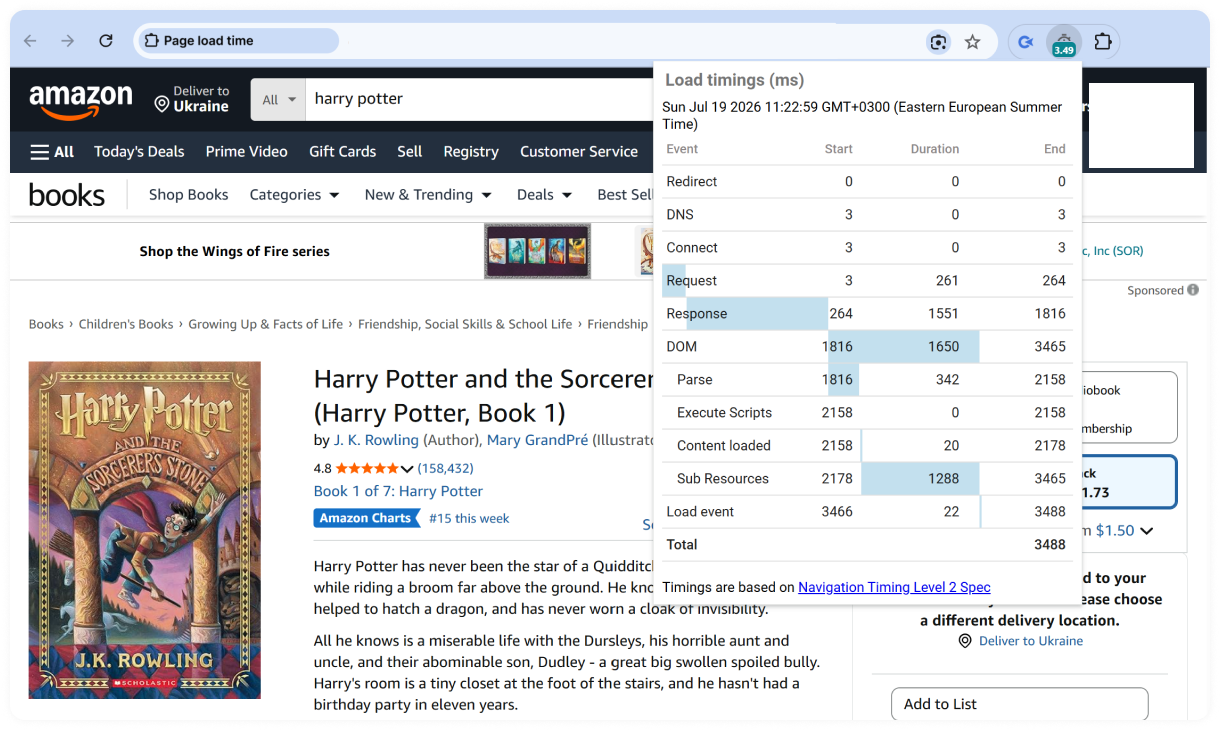
Page Load Time in action: displaying detailed page load timings for an Amazon product page
Best use cases:
- Comparing page load times across websites
- Spotting slow-loading pages
- Performing quick performance checks during SEO audits
Pros:
- Lightweight and easy to use
- Provides instant page load measurements
Cons:
- Measures only page load time rather than full performance metrics
- Doesn't provide optimization recommendations or Core Web Vitals
Add to Chrome Page Load Time →
Local SEO Extensions
Local SEO extensions help you analyze Google Business Profiles, research competitors, and uncover insights that aren't immediately visible in Google Search or Maps. If you're optimizing local rankings or managing multiple business listings, these tools can make competitor research and profile audits much faster.
Comparison Table: Local SEO Extensions
| Extension | Best for | Pricing |
|---|---|---|
| GMB Everywhere ⭐ 4.7 | Auditing Google Business Profiles and competitor analysis | Freemium |
| PlePer Local SEO Tools ⭐ 2.8 | Analyzing Google Maps listings and local SEO insights | Free |
GMB Everywhere
⭐ 4.7 👨💻 200,000 users 💰 Freemium extension
The GMB Everywhere tool is designed for local SEO, allowing you to perform a comprehensive audit of Google Business Profile (GBP) categories, including competitors’. Once installed, the plugin adds check buttons to business pages and Google search results, enabling easy review and analysis of GMB categories.
Key features:
- Audits Google Business Profiles
- Displays business categories and profile details
- Analyzes reviews and local SEO signals
- Compares competitor Google Business Profiles
- Generates audit reports for local SEO analysis
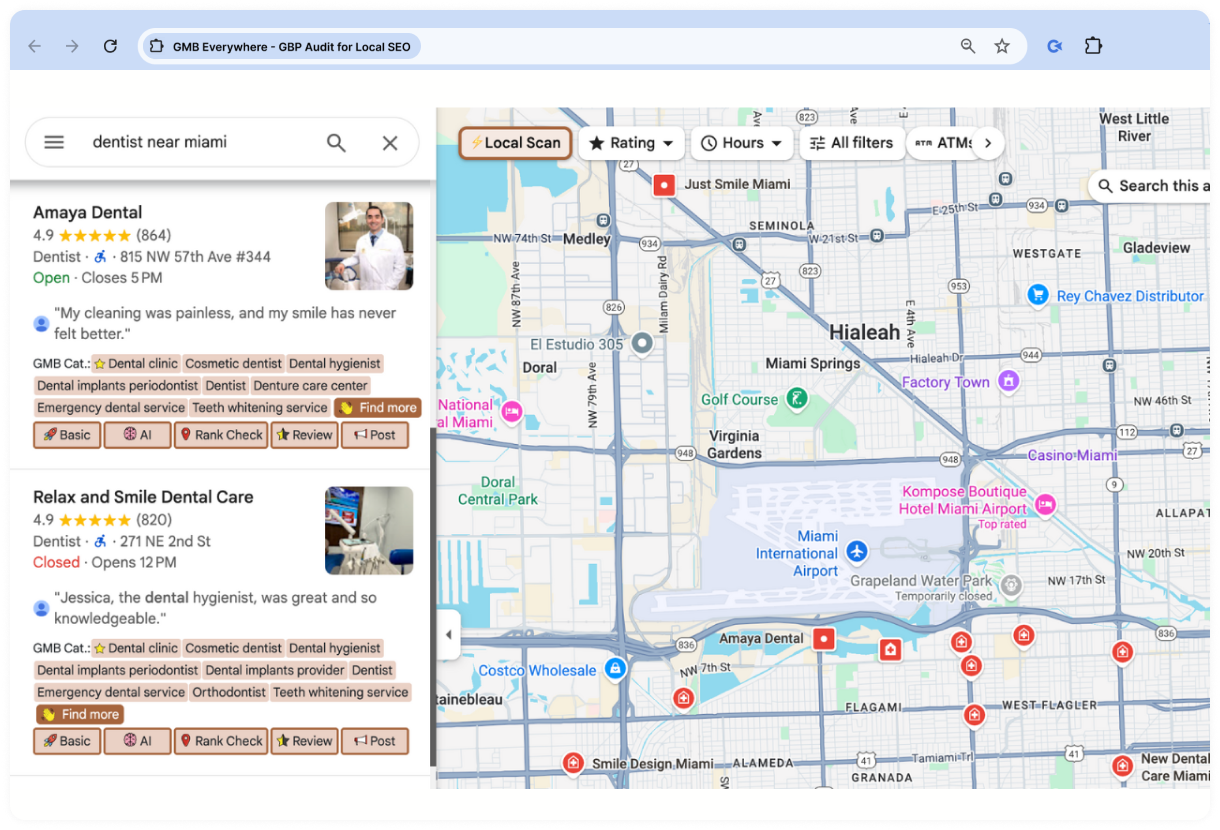
GMB Everywhere in action: displaying Google Business Profile insights in Google Maps
Best use cases:
- Auditing Google Business Profiles
- Researching local SEO competitors
- Optimizing business listings
- Analyzing reviews and profile categories
Pros:
- Simplifies Google Business Profile audits
- Makes competitor research faster
Cons:
- Advanced audit features require a paid subscription
- Focused exclusively on Google Business Profiles
Add to Chrome GMB Everywhere →
PlePer Local SEO Tools
⭐ 2.8 👨💻 70,000 users 💰 Free extension
PlePer Local SEO Tools enhances Google Maps with additional data for local SEO analysis. It helps you review Google Business Profiles, analyze business categories, inspect reviews, and gather valuable insights when researching local competitors.
Key features:
- Displays additional Google Business Profile data
- Analyzes business categories and attributes
- Reviews ratings and customer reviews
- Provides quick access to location and listing information
- Adds useful local SEO insights directly to Google Maps
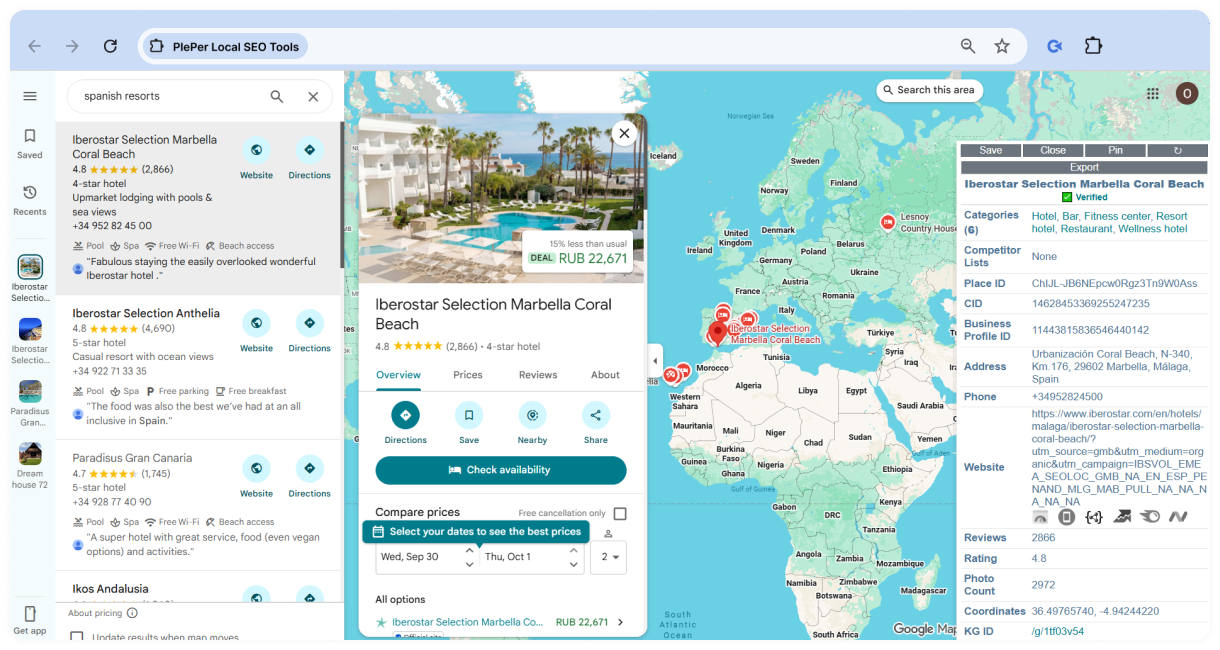
PlePer Local SEO Tools in action: displaying Google Business Profile insights in Google Maps
Best use cases:
- Researching local competitors
- Auditing Google Business Profiles
- Analyzing business categories and reviews
- Optimizing local SEO strategies
Pros:
- Integrates seamlessly with Google Maps
- Makes local SEO research faster and more efficient
Cons:
- Focused specifically on Google Business Profiles and Google Maps
- Doesn't provide broader SEO analysis outside of local search
Add to Chrome PlePer Local SEO Tools →
Best SEO Extensions for Firefox
While Chrome dominates the SEO world, Firefox continues to be a favorite among many SEO professionals, developers, and privacy-conscious users. Its independent browser engine, flexible customization options, and strong privacy features make it a reliable alternative for everyday SEO work.
The good news is that switching to Firefox doesn't mean giving up your favorite SEO tools. Many of the industry's most popular browser extensions are available for Firefox, allowing you to audit websites, analyze competitors, research keywords, inspect backlinks, and troubleshoot technical SEO issues without changing browsers.
The table below highlights the best Firefox SEO extensions and the tasks they're best suited for.
Comparison Table: Best Firefox SEO Extensions
| Extension | Best for | Pricing |
|---|---|---|
| SEOquake ⭐4.5 | On-page SEO audits, SEO metrics, and competitor analysis | Freemium |
| Ahrefs SEO Toolbar ⭐ 3.3 | On-page and technical SEO analysis | Free |
| MozBar ⭐ 5.0 | Evaluating authority metrics and competitor research | Freemium |
| SEO Minion ⭐ 4.1 | On-page SEO checks, broken links, redirects, and SERP analysis | Free (some features require a Keywords Everywhere subscription) |
| Similarweb ⭐ 4.1 | Traffic analysis and competitor research | Freemium |
| Keywords Everywhere ⭐ 4.4 | Multi-platform keyword research and content planning | Freemium |
| NoFollow ⭐ 4.0 | Checking link attributes and robots directives | Free |
| Link Redirect Trace ⭐ 4.2 | Analyzing redirect paths, canonical tags, and crawlability signals | Free |
Best SEO Extensions for Safari
Safari users have a smaller selection compared to Chrome and Firefox. Even so, it supports several well-known extensions that cover the essentials, including technical SEO audits, on-page analysis, keyword research, website performance, and competitor analysis.
If Safari is your browser of choice, you can still build a capable SEO toolkit without switching to another browser. The table below highlights the best SEO extensions currently available for Safari and what each one does best.
Comparison Table: Best Safari SEO Extensions
| Extension | Best for | Pricing |
|---|---|---|
| Ahrefs SEO Toolbar | On-page and technical SEO analysis | Free |
| SEO Website Scanner for Safari | Quick basic on-page checks — meta title/description with character counts, canonical, robots, word count, headings | Free |
| Wappalyzer | Identifying website technologies and CMS platforms | Free |
Best SEO Extensions for ChatGPT & AI Workflows
AI tools like ChatGPT have become part of many SEO workflows, helping with keyword research, content planning, technical SEO, and competitor analysis. Browser extensions make these workflows even more efficient by bringing SEO data, prompts, research tools, and website insights directly into your AI conversations.
Instead of switching between ChatGPT, SEO platforms, and dozens of browser tabs, these extensions let you access relevant information faster and automate repetitive tasks. Whether you're generating content briefs, reviewing SERPs, analyzing webpages, or refining prompts, the right extension can save time and keep your workflow organized.
The table below highlights the best browser extensions for ChatGPT-powered SEO workflows and the tasks they're best suited for.
Best Browser Extensions for ChatGPT & AI SEO Workflows
| Extension | Best for | Pricing |
|---|---|---|
| AIPRM for ChatGPT ⭐ 3.9 | SEO prompts, content templates, and AI-assisted marketing workflows | Freemium |
| Merlin AI ⭐ 4.8 | AI assistance across websites, search engines, and productivity tools | Freemium |
| WebChatGPT ⭐ 4.2 | Enhancing ChatGPT with real-time web search results | Free |
| ChatGPT Writer ⭐ 5.0 | Writing, rewriting, and replying to emails and other content | Freemium |
| HARPA AI ⭐ 4.7 | AI-powered web automation, content generation, and page analysis | Freemium |
| Perplexity AI ⭐ 3.8 | AI-powered research with cited web sources and fact-based answers | Freemium |
| Sider ⭐ 4.9 | Reading, writing, translating, summarizing, and analyzing webpages with AI | Freemium |
Best SEO Extensions for YouTube SEO
Growing on YouTube takes more than great content. Dedicated YouTube SEO extensions help you discover keyword opportunities, analyze competitors, optimize video metadata, and evaluate performance directly on YouTube. The table below highlights the best YouTube SEO extensions and the tasks they're best suited for.
Comparison Table: Best YouTube SEO Extensions
| Extension | Best for | Pricing |
|---|---|---|
| vidIQ Vision for YouTube ⭐ 4.5 | Keyword research, competitor analysis, video optimization, and channel growth | Freemium |
| TubeBuddy ⭐ 4.5 | Video SEO, bulk optimization, A/B testing, and channel management | Freemium |
| Keywords Everywhere ⭐ 4.5 | YouTube keyword research and search volume insights | Freemium |
| VidIQ Keyword Inspector ⭐ 4.6 | Discovering keyword opportunities and analyzing search demand | Freemium |
| YouTube Tag Generator ⭐ 5.0 | Creating relevant tags for YouTube videos | Free |
| Thumbnail Rating Bar for YouTube ⭐ 4.6 | Analyzing audience engagement through like/dislike ratios | Free |
| Return YouTube Dislike ⭐ 4.5 | Viewing estimated dislike counts to evaluate competitor content | Free |
SEO Extensions for Magento Audits
Magento stores often have large product catalogs and complex site structures that can create unique SEO challenges. Browser extensions make it easier to review metadata, redirects, structured data, crawlability, page performance, and other technical elements while browsing a store.
These are browser extensions used to audit Magento websites, not plugins available in the Magento Marketplace. They work in your browser and help identify SEO issues without installing anything on the website.
Comparison Table: Best Browser Extensions for Magento SEO Audits
| Extension | Best for | Pricing |
|---|---|---|
| Ahrefs SEO Toolbar ⭐ 4.4 | Reviewing on-page SEO, redirects, metadata, and indexability | Free |
| Detailed SEO Extension ⭐ 4.9 | Auditing metadata, headings, structured data, and links | Free |
| SEO META in 1 CLICK ⭐ 4.9 | Reviewing page metadata and on-page SEO elements | Free |
| SEO Pro Extension ⭐ 4.8 | Analyzing technical SEO, schema markup, and Core Web Vitals | Free |
| SEO Minion ⭐ 4.0 | Checking broken links, redirects, hreflang, and on-page SEO | Free (some features require a Keywords Everywhere subscription) |
| Redirect Path ⭐ 4.3 | Detecting redirects, HTTP status codes, and server responses | Free |
| Schema Builder for Structured Data ⭐ 3.6 | Creating and validating structured data | Free |
| Lighthouse ⭐ 4.4 | Auditing performance, accessibility, and SEO | Free |
What Are SEO Extensions?
SEO extensions are browser add-ons that bring essential SEO data directly into your browser, eliminating the need to switch between multiple tools or dashboards. Instead of opening thousands of tabs, you can access virtually any data you need while browsing any webpage or search results.
What Can SEO Extensions Do?
SEO browser extensions support many day-to-day search engine optimization tasks, from technical audits to content optimization and competitor research.
SEO tasks you can complete with browser extensions:
- Technical SEO audits: Find broken links, redirect chains, duplicate tags, indexing issues, and structured data errors.
Check redirects, robots directives, schema markup, and canonical tags. - Competitor analysis: Analyze competing websites without leaving your browser.
View domain metrics, estimated traffic, backlinks, and top-performing pages. - Keyword research: Discover keyword opportunities directly in search results.
Analyze search volume, keyword difficulty, related keywords, and search intent. - Backlink analysis: Audit backlinks and identify new potential link-building opportunities.
Check dofollow/nofollow attributes, referring domains, and backlink profiles. - On-page SEO: Review key page elements to uncover optimization opportunities.
Inspect title tags, meta descriptions, headings, schema markup, and image alt text. - Internal linking: Evaluate your site's internal link structure and find new linking opportunities.
Review internal links, orphan pages, and anchor text. - Website performance: Measure speed and user experience metrics that impact SEO.
Monitor Core Web Vitals, page speed, and performance scores.
With so many capabilities packed into a single browser, it's easy to see why SEO specialists rely on these extensions every day.
Top Reasons SEO Experts Use Browser Extensions
Browser extensions don't replace comprehensive SEO services like Ahrefs or Semrush, but complement them by making everyday tasks significantly faster. Here are the biggest reasons SEO professionals rely on them:
- Save time on repetitive SEO tasks by accessing essential information in seconds instead of manually checking multiple tools.
- View SEO data without switching between platforms, making competitor analysis, technical audits, and keyword research much more efficient.
- Streamline daily SEO workflows by keeping all the insights you need just a click away while browsing websites or search results.
With so many extensions available, choosing the right ones is only part of the equation. To get the most value from your SEO toolkit, it's just as important to avoid a few common mistakes.
Common Mistakes When Using SEO Extensions
SEO extensions make keyword research, technical audits, backlink analysis, and competitor research much faster. However, using them incorrectly can lead to inaccurate conclusions and poor SEO decisions. Below are some of the most common mistakes and practical ways to avoid them.
-
Don’t Rely on a Single Extension
The sad truth is that no SEO extension provides a complete picture of a website's performance. Every platform relies on its own crawler, database, and methodology. That’s the reason why backlink counts, traffic estimates, and authority metrics often vary from one tool to another.
Don't take SEO extension data at face value. Even Google's own SEO tools don't always align.
Want proof? Explore our traffic analysis of 7,500+ websites comparing Ahrefs, Google Analytics, and Google Search Console.
DO: Compare data from several extensions instead of relying on a single one when evaluating a website.
-
Don’t Ignore Data Accuracy
SEO metrics you get using even the best extensions should always be treated as estimates rather than exact values. Organic traffic, keyword rankings, and backlink data change constantly, while extensions update their databases on different schedules. As a result, the metrics displayed in your browser may not always reflect a website's current performance.
DO: Consider this data as insights and check when it was last updated, if possible.
-
Don’t Use Too Many Extensions at Once
Installing every popular SEO extension rarely improves productivity. Instead, it often slows down your browser. Many extensions display similar information in search results or on web pages, making it harder to identify the metrics that actually matter.
DO: Use a small collection of extensions (up to 7) for your daily workflow and disable extensions you don’t currently need at chrome://extensions usually results in a cleaner browser and a more efficient research process.
Frequently Asked Questions
1. Are SEO browser extensions accurate?
Yes, SEO browser extensions are typically accurate. However, don't treat them as the ultimate source of truth. Most SEO extensions rely on third-party databases that update at different times, so it's normal to see different traffic, backlink, or authority metrics across tools. For important decisions, it's always worth double-checking the data using multiple sources.
2. Are SEO extensions safe to use?
Generally yes, but it's still worth being selective. It’s always a good idea to stick to extensions from reputable developers and check user reviews and permissions before installing. If an extension requests access that seems unrelated to its purpose, it's best to avoid it.
Final Thoughts
SEO browser extensions have become an essential part of modern SEO. They make it easier to audit websites, research keywords, analyze competitors, monitor backlinks, and uncover technical issues without constantly switching between tools.
There's no universal extension that does everything equally well. Most SEO professionals build a toolkit that combines several specialized extensions, choosing the ones that best fit their workflow and the tasks they perform most often.
If you're just getting started, focus on a few reliable tools for your day-to-day work and expand your collection as your needs evolve. The right combination of extensions can save time, simplify routine SEO tasks, and help you make more informed decisions every time you open your browser.
Related reading
- • 9 Best Free Backlink Checkers and Monitoring Tools in 2026
- • 30 + Free Web 2.0 Submission Sites List for High-Quality Backlinks in 2026
- • 5+ Best Backlink Price Comparison Tools in 2025 (Free & Paid)
- • Free Backlinks: 55 High-Authority Sites List to Build Links for Free in 2026
- • 12 Best Link Building Tools for SEO in 2026
- • Best SEO Affiliate Programs: Top 35+ Programs Compared