Collaborator Introduces a Free Backlink Checker: What It Shows & How to Use

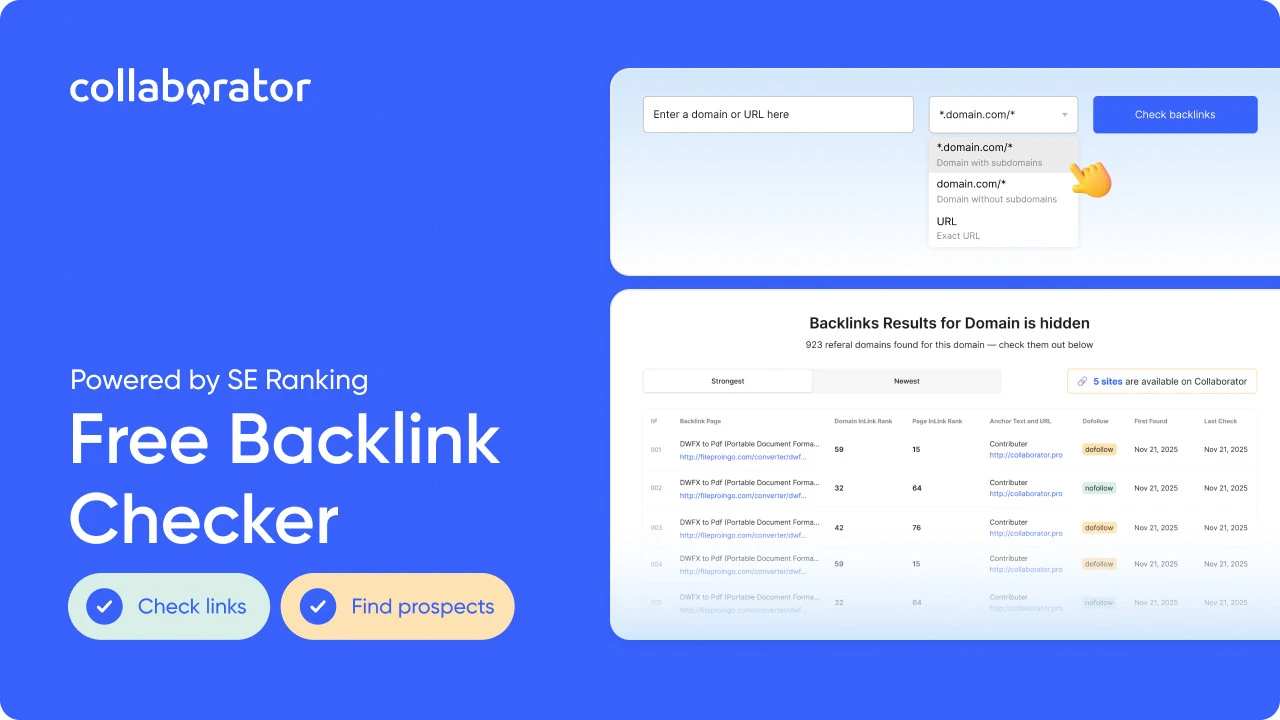
Collaborator, in partnership with SE Ranking, has launched a Free Backlink Checker that allows users to analyze the backlink profile of any website. The tool provides detailed insights into referring domains, dofollow and nofollow link attributes, anchor texts, and link freshness — all in a single, easy-to-use interface.
Unlike most free backlink analysis tools, Collaborator Backlink Checker goes beyond basic metrics by highlighting websites available in the Collaborator marketplace, along with their placement prices. Users can also explore the strongest and newest backlinks, review up-to-date domain authority metrics, and access other key SEO indicators.
Collaborator Free Backlink Checker enables SEO professionals, link builders, and digital PR teams to quickly identify valuable link-building opportunities, streamline prospecting efforts, and discover relevant websites without time-consuming outreach or manual research.
Let’s take a closer look at the metrics it provides, how accurate the data is, and how to use the tool step by step.
Try Collaborator Free Backlink Checker
What Is the Collaborator Free Backlink Checker?
The Collaborator Backlink Checker is a free tool powered by SE Ranking backlink data that streamlines backlink analysis and link prospecting. It enables SEO professionals to quickly evaluate backlink profiles, monitor referring domains, and uncover high-quality guest posting and link-building opportunities — all from a single platform.
With Collaborator Backlink Checker, you can:
- Analyze backlinks for free. Whether you need insights for an entire domain, a specific subdomain, or an individual URL, you'll get them.
- Research competitors’ backlink profiles to better understand their SEO and digital PR strategies and uncover new growth opportunities.
- Discover link-building prospects, including websites that are already available in the Collaborator marketplace for fast and efficient outreach.
- Evaluate backlink quality by reviewing anchor texts, link attributes (dofollow/nofollow), and the activity and relevance of referring domains.
The Collaborator Backlink Checker shows the total number of referring domains for any website at the domain, subdomain, or URL level. Users can also analyze detailed data for the 50 strongest and 50 newest backlinks.
Link check limits:
- Guests can run up to 5 backlink checks per day
- Logged-in users can run up to 20 checks per day
Let’s take a closer look at metrics available in Collaborator’s Backlink Checker.
What Metrics Does the Collaborator Free Backlink Checker Show?
The Collaborator Free Backlink Checker provides backlink data that helps users better understand competitor SEO strategies and evaluate backlink quality faster.
Metrics Available With Backlink Checker from Collaborator
|
Metric |
What It Shows |
Why It Matters |
|---|---|---|
|
Anchor text |
Clickable backlink text |
Reveals keyword strategy |
|
Dofollow/Nofolow |
Link attribute type |
Helps estimate SEO impact |
|
First seen |
When the backlink appeared |
Detects new campaigns |
|
Last seen |
Latest backlink detection |
Confirms link activity |
|
Referring domain |
Unique linking website |
Measures authority diversity |
Together, these metrics help SEO specialists identify valuable competitor backlinks, evaluate link quality, and discover actionable link-building opportunities faster.
When it comes to SEO metrics, it’s important to understand how accurate and reliable they are. The thing is, data from even the most authoritative tools, such as Ahrefs, Google Search Console, and Google Analytics, doesn’t always align. Collaborator’s analysis of traffic across 7,500+ websites proves this.
So let’s find out how accurate backlink data provided by the Collaborator Backlink Checker is.
How Reliable Is the Collaborator Free Backlink Checker Data?
The Free Backlink Checker uses backlink data powered by SE Ranking, one of the well-known SEO platforms for backlink monitoring and competitor analysis.
The database is continuously updated to ensure users have access to the most accurate and up-to-date SEO metrics. Currently, data for 58% of all tracked backlinks is updated every 90 days.
Using the Collaborator Free Backlink Checker is simple: let’s go through the process step by step.
Try Collaborator Free Backlink Checker
How to Use the Collaborator Free Backlink Checker
To start using the Collaborator Free Backlink Checker, simply enter a domain, subdomain, or specific URL to analyze backlinks, referring domains, and competitor SEO strategies.
Step 1: Enter a Domain or URL
Start by entering a website URL into the search field and choose in a drop-down window whether you want to see backlinks in a domain-, subdomain-, or specific URL-level.
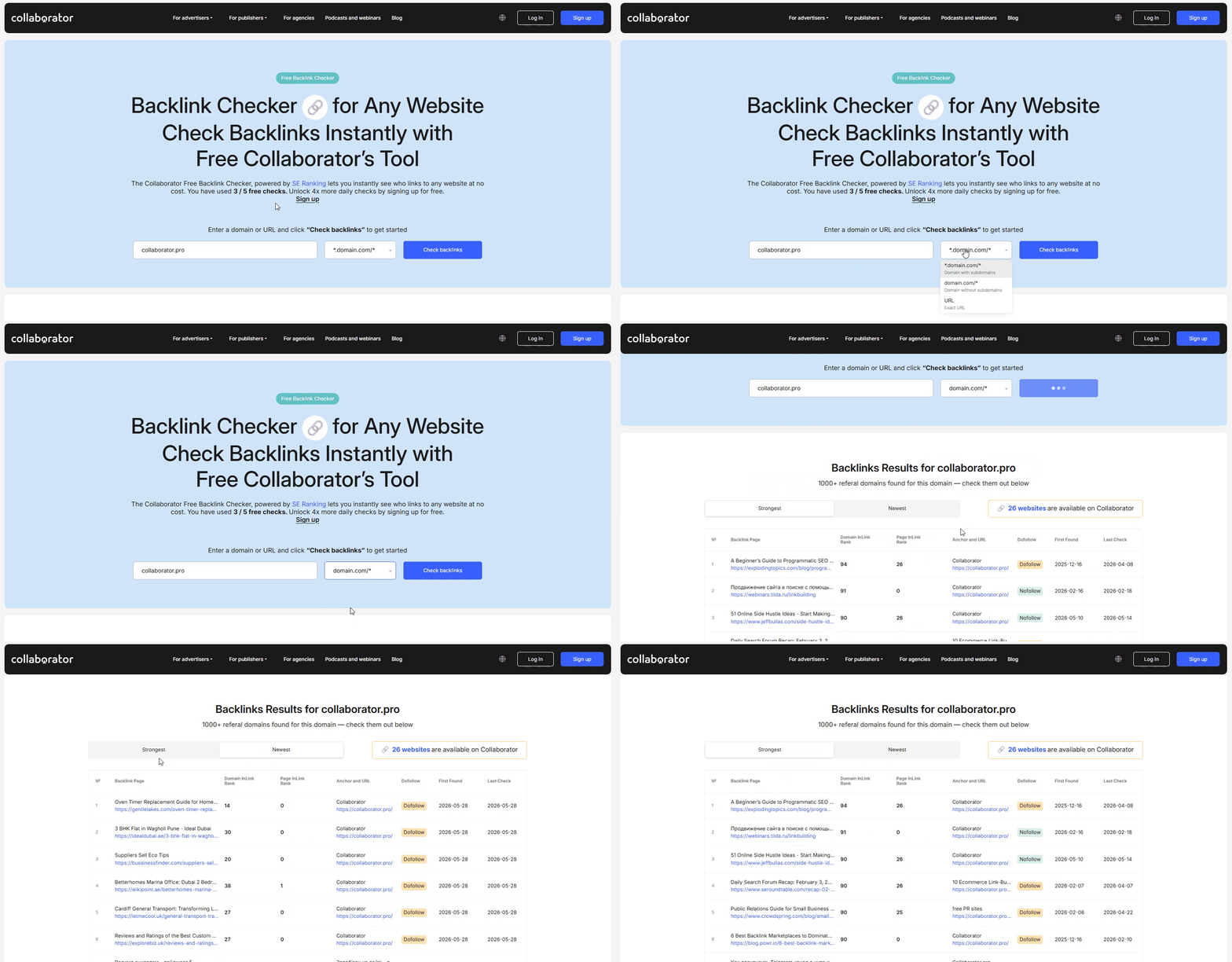
Collaborator Free Backlink Checker supports domain-,subdomain-, and URL-level analysis
The tool supports three analysis modes:
- Subdomain-level analysis helps analyze backlinks for separate sections of a website, such as a blog, regional version, or knowledge base.
Choose: *domain.com/* - Domain-level analysis shows backlinks pointing to the entire website. It’s the best choice for analyzing an overall backlink profile and researching competitor SEO strategies.
Choose: domain.com/* - URL-level analysis focuses on backlinks pointing to a specific page. It helps identify which pages attract the most backlinks and what type of content performs best.
Choose: URL
Using different analysis modes makes it easier to understand how competitors build backlinks across entire websites, individual pages, and separate content sections.
After clicking the “Check Backlinks” button, you will see a list of the top 50 backlinks and the total number of referring domains for further analysis.
Step 2: Review Backlinks & Analyze Their Quality
Review the list of 50 top backlinks, referring domains’ rank, anchors, and link attributes. It helps to better understand competitor backlink strategies and which links may positively impact SEO and which ones could look suspicious or low-value.
With the Collaborator Backlink Checker, users can view lists of the strongest and newest backlinks.
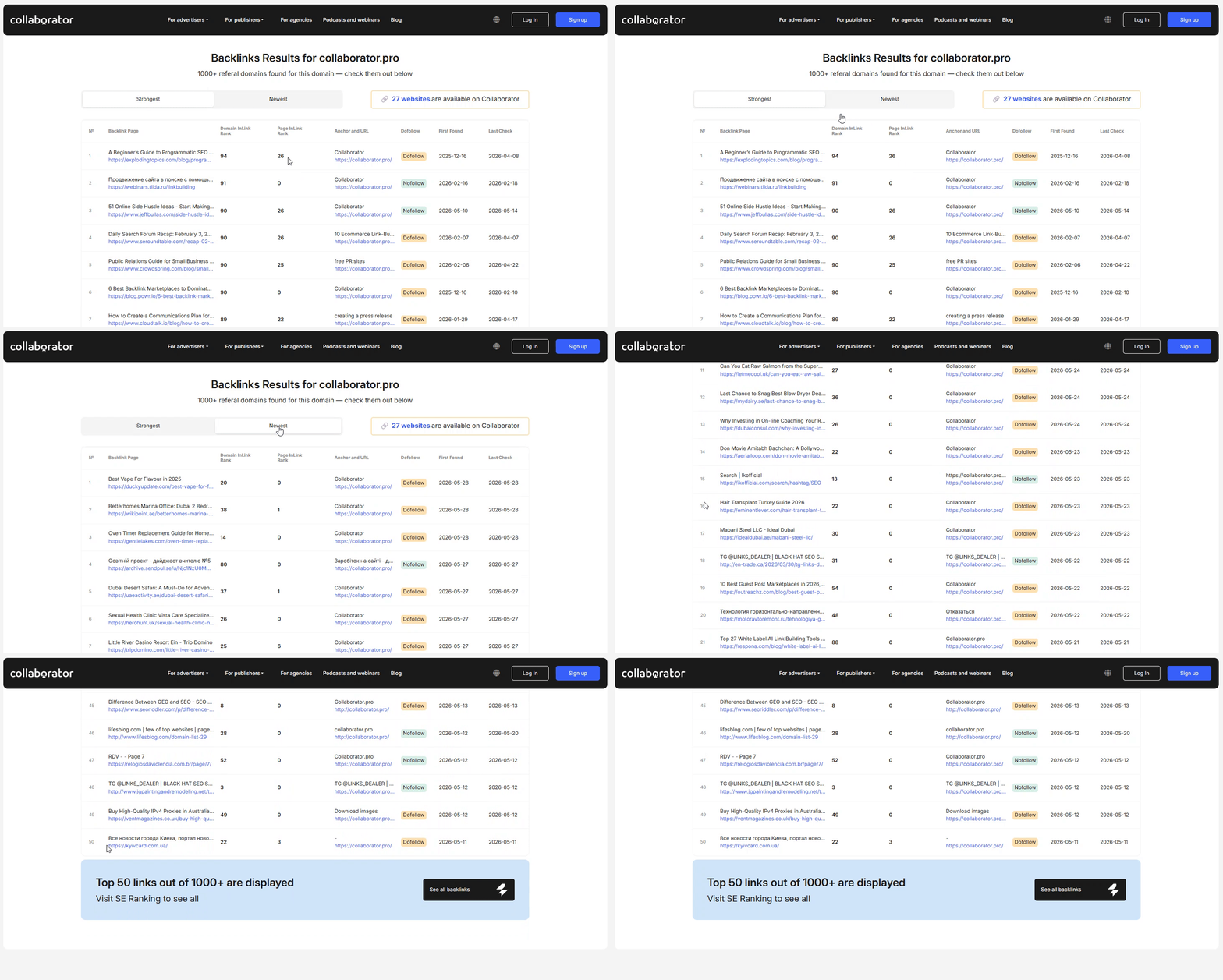
Collaborator Free Backlink Checker shows top backlinks, referring domains, and key backlink metrics
What to consider when analyzing backlinks:
- Look for authoritative websites with high page rank
- Prioritize niche-relevant and topically related domains
- Identify recurring domains linking to multiple competitors
- Compare dofollow and nofollow backlinks
- Check backlink freshness and recent link activity
This analysis helps uncover realistic backlink opportunities and reveals which websites actively link to businesses in your niche.
|
For quick backlink verification, try Collaborator Link Assistant, a free Chrome extension designed for link building and backlink monitoring. It helps you easily check placed backlinks, track their status, and streamline your link management workflow. |
The data you get helps to identify link building prospects quicker. Below we’ll discuss it in detail.
Step 3: Discover Placement Opportunities
One of the key advantages of the Collaborator Backlink Checker over most free backlink analysis tools is its direct integration with the marketplace.
Referring domains available for guest post placements, link building, and digital PR campaigns are highlighted directly in the backlink analysis results, making it easy to turn insights into actionable SEO opportunities.
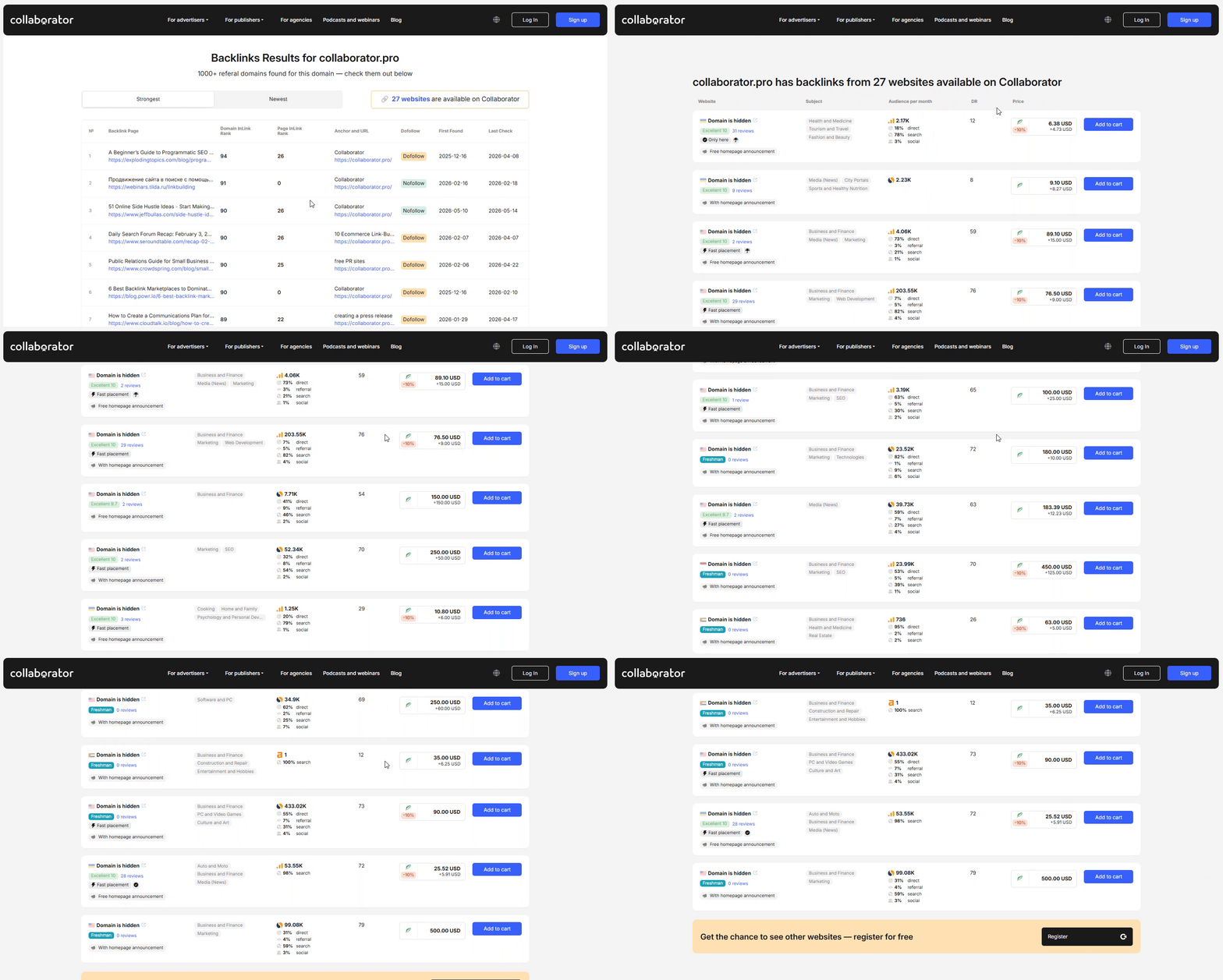
Free Backlink Checker highlights referring domains available for guest post placement in Collaborator’s catalog
That allows you to:
- See which competitors' donor sites are already listed in Collaborator
- Reduce time spent on manual prospecting and outreach research
- Quickly validate whether a website is relevant to your niche
- Open a marketplace listing directly from the backlink report
- Order a placement without switching between multiple tools
Instead of spending hours searching for contact details and checking whether a website accepts guest posts or PR articles, you can immediately turn competitor backlink research into actionable placement opportunities.
|
If you're working at scale and want to automate website monitoring and selection, check out how to integrate the Collaborator API. |
Use the Collaborator Backlink Checker for free, recommend it to your colleagues, and share your feedback in the comments or on social media.
Related reading
- • How to Integrate Collaborator API to Automate SEO and Link Building Workflows
- • Collaborator Link Assistant: Free Chrome Extension for Link Building and Backlink Monitoring
- • Traffic Analysis of 7,500+ Websites: Ahrefs vs Google Analytics vs Google Search Console. Unexpected Results
- • AI Filtering by Keywords in the Collaborator Catalog: Find Truly Relevant Websites Faster